


rorobull
Members
-
Joined
-
Last visited
Everything posted by rorobull
-
I'm including a sample of my LSSD just for an example; I hope this helps.I'm also a pretty new to this, but I got ambient spawns to work by messing with my Agency.xml file. I'll put a sample of part of mine below. Also changing my DefaultRegions.xml causes all my addon to come when I call for backup.
 I installed BlueGhost's Unmarked Pack today and had something odd happen(see attached). When spawning through trainer or rage all models spawn fine. The only problem when calling for a tow the models show as a hex instead of model name. I have tried to uninstall and reinstall the pack too. It seems my JMsahp pack is conflicting with blueghost pack. just wondering if anyone has seen this.
- 485 comments
- 78 reviews
I installed BlueGhost's Unmarked Pack today and had something odd happen(see attached). When spawning through trainer or rage all models spawn fine. The only problem when calling for a tow the models show as a hex instead of model name. I have tried to uninstall and reinstall the pack too. It seems my JMsahp pack is conflicting with blueghost pack. just wondering if anyone has seen this.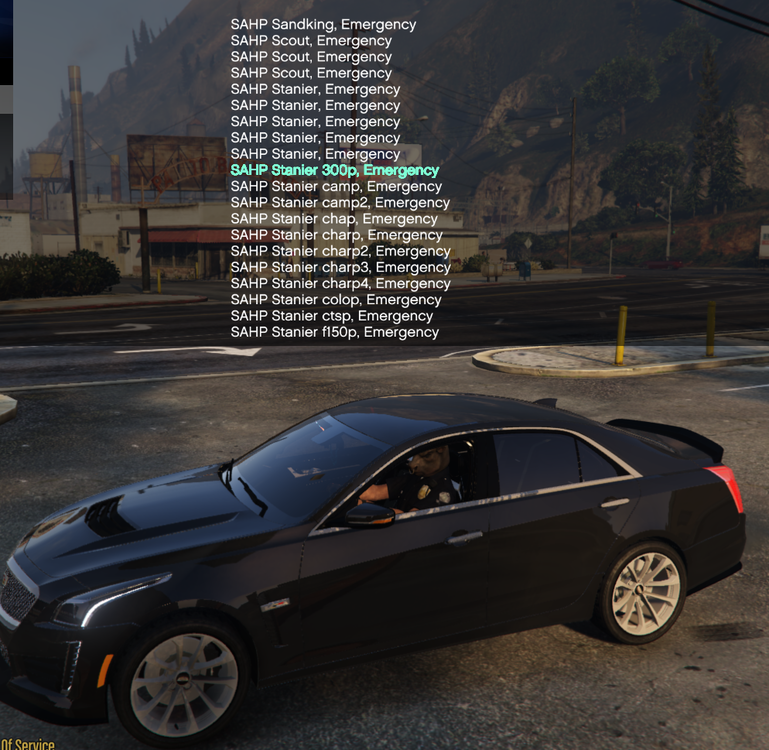 I had a similar problem with my Sheriff backup, I put a post on here for help with zero response, a bit frustrating. After a couple of weeks of messing around I solved my own problem in "DefaultRegions.xml" I'm including a sample of my LSSD just for an example; I hope this helps you.Thanks for all the help, I figured it out.Its a very minor problem but I've been working on it for days. I really would like SAHP to show as code 2 or code 3 backup.My SAHP only respond to shots fired, they don't respond to code 2 or code 3 backup. They are showing up in the garage and they spawn ambiently in the world. When I call for state backup, say during a pursuit, through Ultimate Backup only the default unmarked CVPI, police4, and bike, policeb, show up and they are in the correct uniforms. Things I've tried to this point is adding sahp vehicles to agency.xml, sahp to the backup.xml. I even added the vehicles to the agency_eup.xml. My most recent change was adding the vehicles to the SpecialUnits.xml. My current plugins; CompuLite, EUP, GrammarPolice, PoliceSmartRadio, StopThePed, UltimateBackup, VocalDispatch, ALPRLite, SimpleCallouts, SpeedRadarLite, UnitedCalloutsYes I agree, I'm looking for a callout pack of the same. Any pack that we are secondary units instead of always primary units.
Thank you BlueGhost for all your hard work, great pack. I'm still new to this but I've found a solution to my crashing on startup. I removed BCSO Pack [ELS] [DLC INCLUDED] 1.4.0 from my dlclist.xml, this line exactly, "<Item>dlcpacks:/infidelbcso/</Item>". After removing that line the game runs fine as well as this pack. p.s. Sorry BG that people don't read ????oh where are the ELS files????
I had a similar problem with my Sheriff backup, I put a post on here for help with zero response, a bit frustrating. After a couple of weeks of messing around I solved my own problem in "DefaultRegions.xml" I'm including a sample of my LSSD just for an example; I hope this helps you.Thanks for all the help, I figured it out.Its a very minor problem but I've been working on it for days. I really would like SAHP to show as code 2 or code 3 backup.My SAHP only respond to shots fired, they don't respond to code 2 or code 3 backup. They are showing up in the garage and they spawn ambiently in the world. When I call for state backup, say during a pursuit, through Ultimate Backup only the default unmarked CVPI, police4, and bike, policeb, show up and they are in the correct uniforms. Things I've tried to this point is adding sahp vehicles to agency.xml, sahp to the backup.xml. I even added the vehicles to the agency_eup.xml. My most recent change was adding the vehicles to the SpecialUnits.xml. My current plugins; CompuLite, EUP, GrammarPolice, PoliceSmartRadio, StopThePed, UltimateBackup, VocalDispatch, ALPRLite, SimpleCallouts, SpeedRadarLite, UnitedCalloutsYes I agree, I'm looking for a callout pack of the same. Any pack that we are secondary units instead of always primary units.
Thank you BlueGhost for all your hard work, great pack. I'm still new to this but I've found a solution to my crashing on startup. I removed BCSO Pack [ELS] [DLC INCLUDED] 1.4.0 from my dlclist.xml, this line exactly, "<Item>dlcpacks:/infidelbcso/</Item>". After removing that line the game runs fine as well as this pack. p.s. Sorry BG that people don't read ????oh where are the ELS files????- 485 comments
- 78 reviews

