


JJRambo
Members
-
Joined
-
Last visited
Everything posted by JJRambo
-
 Is there any way to tone it down just a TAD? it's WAYYYYY to flashy and bright but the tweak you made is still needed for better lighting. But a night it's blinding
- 110 comments
- 20 reviews
-
I looked everywhere i could and through the configs. Is there any way i can lengthen the time i have to respond or accept a callout? I use radio realism, grammar police and BlueLineVibes dispatch 2.0 and by the time the dispatcher stops blabbing all the info on the callout i can't respond in time or i have to just scream over her and it breaks the immersion.
-
 So i died and i was saved then it said to RELOAD plugins after death - necessary if you have the compatibility pach. Not sure what that is, but everytime i do that the game crashes.
- 295 comments
- 33 reviews
-
-

- 1
-
-
Can anyone help with a few questions, ANY discord link i click on to join says invalid so i'm asking here......... 1. I see no indication where my patrol zone is on the map. How do i know where it is? 2. When i go back and end my shift at the station, how do i summon/find or where is my personal Car? I have to cheaply use the pause menu and warp to apartment?
- 295 comments
- 33 reviews
-
Interesting, I watched the scripthook site for a few days after the GTA update and noticed it changed to release date December 12th. How's it updated but not updated? Weird. Ok
-
Hey everyone, well the new rockstar update had me start from SCRATCH and reinstall GTAV, lspdfr, all the plugins, mods, configs. Everything works fine until i try to install the new scripthookv they released yesterday on their site it just hangs at the rockstar game launcher window with the rockstar logo. If i remove the scripthookv again everything is fine. any ideas? they just updated scripthookv but the lspdfr front page RED notice says an update isn't available yet for SHV
-
That worked, plugins loaded albeit grammar police is complaining about the voice recognition again but the plugins loaded. I guess i'll add mods back one at a time in a fresh mods folder. THANKS!!! EDIT: The game loads, but as soon as i add a mods folder with the new gameconfig it freaks out and lspdfr plugin crashes and sometimes still errors
-
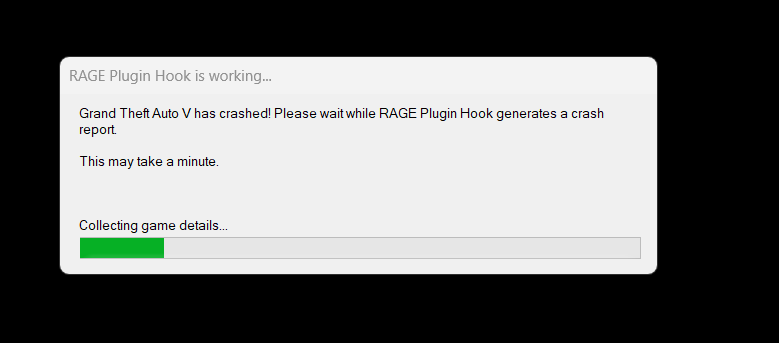
I get a ERR_MEM_EMBEDDEDALLOC_ALLOC error after hitting "single player with rageplugin" in the title screen. Crashes immediately with that error or just straight to desktop - Updated to New LSPDFR - Updated the RPH from the official discord - Updated to the new ScripthookV (was released hours ago and that error is now gone) - Have Heap adjuster, packlimit installed - Updated to the new Gameconfig file. - Verified file integrity in Steam It then says RPH is creating a crash log but never does after running for 20 minutes

-
I downloaded the new LSPDFR and supposed RPH bundled update and it didn't work saying wrong game version still. I had to go to the Discord of of RPH and download the updated file there. Everything is working now accept ScripthookV
-
It says right in their update notice on lspdfr main page that script hook mods won't work until updated (like ELS)
-
Appreciate the feedback also, i have tried 10-4 according to documentation but it always just says Dispatch: Say again
-
I will try that the second i get home. Is there a grammar police command by chance? just curious. But either way this is AWESOME
-
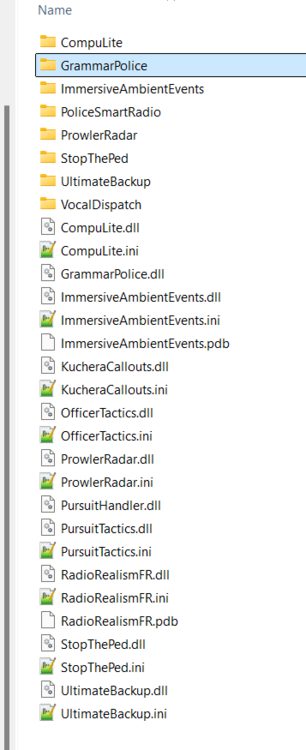
Greetings, While i'm playing a callout i sometimes hit wrong buttons, end the callout, die or whatever you and bank up is all over the place. How do i cancel any backup that has show up all of the area. Is there a grammar police command, a menu or anything? I try Y to end the callout and other things. Do i have to walk up face to face to every officer and cancel their backup? here is the mods i have installed.
-
Hello, I have a few mods working and everything is fine. But when i press down on my Dpad when in a pursuit it brings up a pursuit menu (same on as hitting "n" does). So with my ELS its conflicting with my siren toggle and pursuit menu. where do i change this? I don't see that bind in the keys.ini. Anyone know what mod or config is pulling that menu up on my controller? Here is my installed mods

-
Greetings, i am new to LSPDFR and followed a complete guide to install LSPDFR Clean Steam install Clean LSPDFR drag and manual drop No configs changed No mods installed The buttons do not work on my gamepad for anything with lspdfr Dpadleft just changes the stations in the car with no lspdfr function A button does not blip a car to pull over Can't enter police station to go on duty with dpadright all controls work fine for the game itself and the dpad woks fine in menu's or pulling up phone nothing works. What can i do?
-
Greetings, When i first played with this Mod, it worked perfectly Fine it seemed But now, i never get the "Press 8" for transport prompt when i have someone detained/arrested. Does it only work during a callout possibly? I am pretty sure the first frew times i used it that wasn't the case. Also, isn't this the mod that had a Red Arrow above the selected ped you are interacting with? That stopped also
-
 There used to be an red arrow on top of the ped you are interacting with right? Also, the Transport option "8" stopped prompting and i never get it to come back anymore I reinstalled and nothing.
- 1,915 comments
- 242 reviews
-
I am brand new to this mod/game Does this post still apply in 2020 versions?


