Skip to content
View in the app

A better way to browse. Learn more.

LCPDFR.com

A full-screen app on your home screen with push notifications, badges and more.

To install this app on iOS and iPadOS
  1. Tap the Share icon in Safari
  2. Scroll the menu and tap Add to Home Screen.
  3. Tap Add in the top-right corner.
To install this app on Android
  1. Tap the 3-dot menu (⋮) in the top-right corner of the browser.
  2. Tap Add to Home screen or Install app.
  3. Confirm by tapping Install.

SuperTriniGamer

Members
  • Joined

  • Last visited

Everything posted by SuperTriniGamer

  1. I changed the name of the police car from "police.ytd" and the other two to "police3.ytd" so they don't replace another car, and now the light is glitched. Instead of rotating, like it's supposed to, the rotator just gets bigger and pops out of the bulb when it's turned on. Pictures below are provided to show the problem. I am sorry if this has been asked before, but I have searched up and down and cannot find a similar problem. I have ELS, but no xlm for police3.
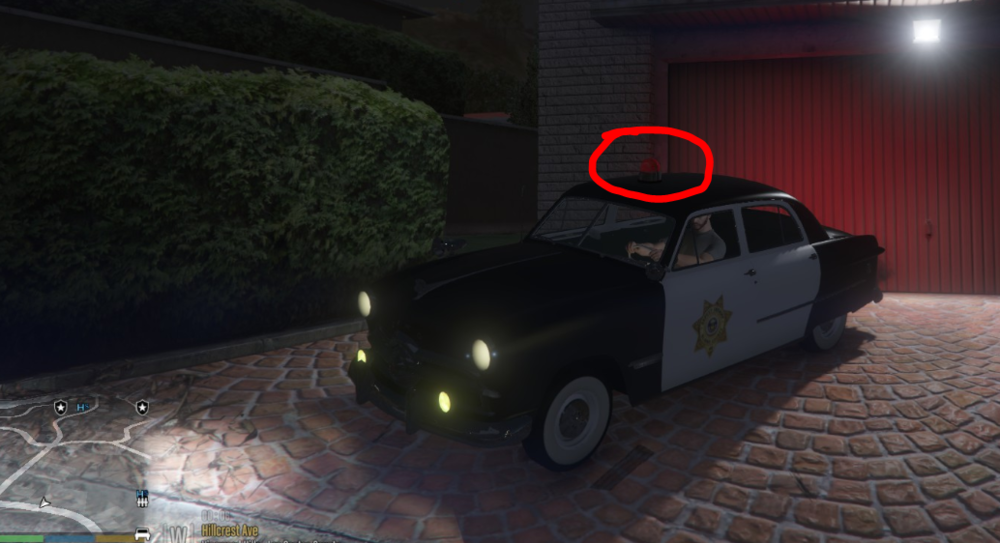
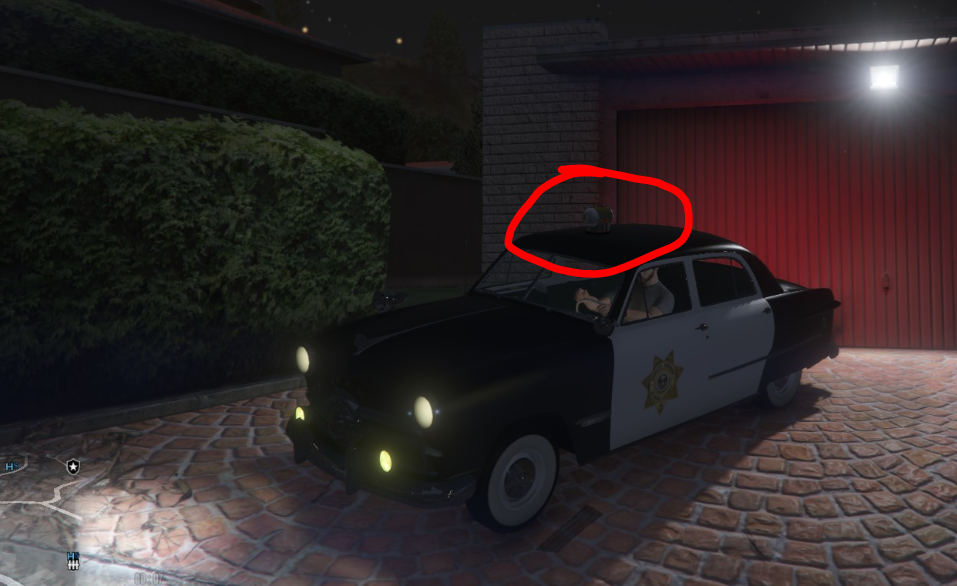
Account

Navigation

Search

Search

Configure browser push notifications

Chrome (Android)
  1. Tap the lock icon next to the address bar.
  2. Tap Permissions → Notifications.
  3. Adjust your preference.
Chrome (Desktop)
  1. Click the padlock icon in the address bar.
  2. Select Site settings.
  3. Find Notifications and adjust your preference.