BadDecisions160
Members
-
Joined
-
Last visited
Everything posted by BadDecisions160
-
Hi guys, My game is stuck on the loading screen where it says "loading story mode with rage plugin hook" in the bottom right. I've stripped it completely back so it's just the LSPDFR mod that's on there. Any help would be amazing.
-
The downloads on that page are pop up spams
-
Hey guys, I'm looking at downloading StopThePed but there are so many in all different languages. Could someone please drop me a link for the go to file?
-
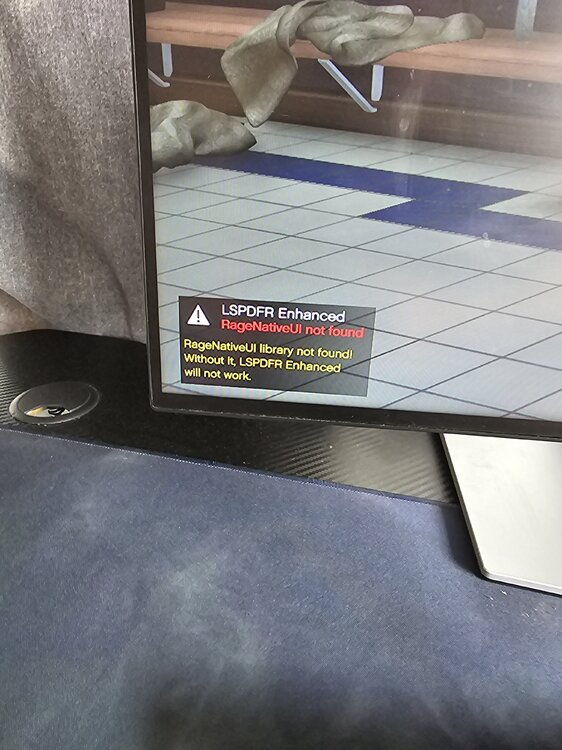
I've followed install instruction but keep getting the message in the picture. Any ideas would be greatly appreciated.
-
Check here for update info
-
I'm new to it also. I've never backed mine up, only waited for new patchesI'm looking for a script that has lifestyle content. Things like thirst, hunger, sleep etc and also things like fuel gages, speedometer, rank, wages, banking............ I know I'm probably asking a lot but does anyone know any good scripts that will cover all of this?1. Don't think anyone has that answer yet. 2. Last time I installed the new one and replaced the filesWe would be the first to complain if the game got outdated and was never updated. Updates will always be part of gaming, whether it be to improve the games performance or to integrate new features. It's something we just need to deal with.LSPDFR Homepage - LCPDFR.com if you go here you can enable updates for new releasesWe're waiting for it to be releasedI get what you're saying but game publishers release games to be played, not to be modded. The guys here will have an update soon enough.Download the new patch and replace the filesI would think the guys here are working on it. Just keep an eye on the LSPDFR download. It will change when they have it updated.Updates are essential to help games grow. The guys here will get a patch update soon.Yea. Game updated so current mod is not compatible.Need to wait for a patch update if you haven't backed up your game files.Hey bro. I posted the same thing. Need to wait on a MOD update if you don't have backed up files for GTAThank very much PS, keep up the good work. You guys are doing amazing things here.Hey troops. Just had an update for GTA V today ( about 300MB or so ). Now when I try to launch LSPDFR it says the game version is not supported. Are we going to wait for another MOD patch and if so, do any of the staff have an ETA? The current game version is not supported. Installed game version: 3274.0 Latest game version: Unknown Supported game versions: 3258.0Its unfortunate. I'm not willing to tamper with the console but the mods look really good on PC. Never know what may happen when the new xbox comes out. Thank you for your reply.Hey guys, I know by looking through the forums that the mod is not available for Xbox even though people are making YouTube videos saying you can. I was just wondering if theres ever going to be a possibility that there will be a MOD made for the Xbox in the future? Is it possible to even do so? Thanks.