volac.
Members
-
Joined
-
Last visited
Everything posted by volac.
-
Try adding GTA V into your exceptions in the anti virus or just disable the anti virus entirely. Make sure to check if your RageNativeUI is up to date aswell and if neither of those work try renaming your mods folder to _mods and see if its not plugin related
-
A simple fix for this is to run PlayGTAV.exe first and wait until it starts showing all the legal agreements on the black screen, after which you simply run RPH and wait until it hooks onto the game instance. I don't know why this happens, I think it has something to do with logging into social club (which again im not sure what the cause of is).
-
Benzo's tutorial is almost 2 years old so I'm not 100% sure if putting the vehicle files into patchday24ng will work. Can you try doing the same steps but inside patchday28ng?
-
No problem 😁
-
Appears your LSPDFR is crashing when it loads RiskierTrafficStops, you could probably try removing it since im not sure if that's related to the issue you're describing or not. Also can you elaborate what you mean by STP not working? Does it crash, not show up when pressing the context key or interact key? Just trying to get as many details as I can since the log says that STP loads in properly
-
Please post the "RagePluginHook.log" which you can find in your GTA V directory, would make this a lot easier
-
It appears that your POLICET model is causing the issue. Could you try removing it and restoring it to the default?
-
By default the taser in GTA V incapacitates (aka kills) suspects. LSPDFR makes it so the taser effect happens but doesnt kill the person. Not sure if that's possible to restore, though I know an alternative. StopThePed is programmed to where after tasing someone they will get tased per usual, get up and put their hands up so you can arrest them, no further running involved.
-
Is there any chance you could link the video or modpack that you used?
-
You could try putting your replace cars inside patchday28ng, this one works for me. Also by dlc cars you mean addon cars, correct?
-
Glad to hear you solved it and no problem for the help
-
You can try removing every modded thing in your directory (including every modded .asi file, scripts or anything similar) and maybe disabling the antivirus. Sometimes problems don't seem related to it but it's still the issue
-
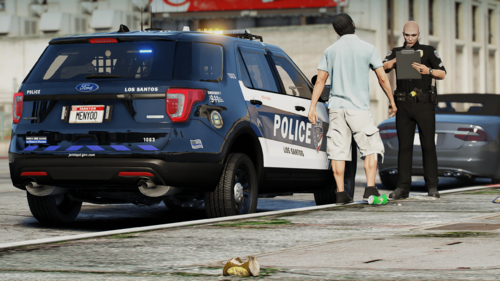 BRIEF DESCRIPTION Simple LSPD livery pack I decided to make. Based off of nothing, simply a design I came up with. This is my first livery-based post on LCPDFR.com, so if you have any constructive feedback I would greatly appreciate if you shared it in the comments and/or reviews so I can improve my future work. REQUIRED DOWNLOADS INSTALLATION INSTRUCTIONS The installation instructions are provided in the README.txt file. I highly advise you extract the zip file before installing. CONTENTS RIPPLE'S LSPD VALOR PACK LIVERIES: - 2014 Charger - 2014 Tahoe - 2016 Explorer - 2016 Taurus - 2018 Charger - 2019 Tahoe - 2020 Explorer RABBIT'S 2021 FORD EXPLORER LIVERIES: - 2021 Explorer (Regular) - 2021 Explorer (White ghost) CREDITS
 -
Install these 3 (1, 2, 3) if you haven't already. You could also try deleting the vehicles.rpf and copying it again from your non-mods directory to make sure that your car files are 100% vanilla
-
Rename your mods folder to _mods and try launching the game that way to make sure it's a mod issue. A thing you could try is installing these 3 if you haven't already (1 2 3).
-
If you have any OpenIV type mods installed you could try renaming your "mods" folder in your gta directory to "_mods" to disable them and try running the game with ragehook that way.
-
You could try launching GTA V first and then opening RPH once it goes into the black screen. Could you please elaborate further?
-
If you installed cars that are ELS make sure that you've placed their respective files (they would be called something along the lines of POLICE, POLICE2, SHERIFF, FBI, etc.) inside the ELS/pack_default folder. If you did, make sure that you have ScriptHookV and ELS 1.05 installed correctly.
-
-
 Have been using this mod for a quite a while, absolutely love the realism it adds. I like the reduction of player health, but the ai health not as much. Is there any way that I could be able to have only myself be affected? Regardless, great work, keep it up.
- 625 comments
- 55 reviews
-
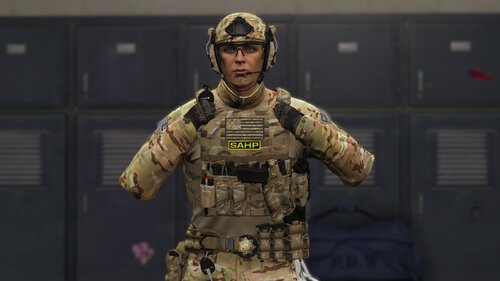 I'm not sure if this is me just being blind or something, but shouldn't the texture for the pants also be in the file? If not, would very much love to have it. Very beautiful pack regardless
- 43 comments
- 1 review
-
I have managed to solve this problem with the help from the RPH discord. The solution is to right click your gta v folder, go into the security tab, and check everything for the SYSTEM, administrators and yourself. Everything should be checked except for special permissions. Better explained:
-
Hello, I've recently had a problem with rph where it does not hook onto the game instance. The error messages are: "Slow system or insufficient permissions" and "Could not hook onto game process. Insufficient permissions or bad anti-virus".The game launches and tries to load in normally when launching without rph, but crashes and turns off when finished loading. I have tried renaming the mods folder, running the game with administrator privileges, turning off any overlay that could be "hooking" onto the gta v instance, adding the gta folder into exclusions, turning off the windows defender real-time protection and changing the gta folder name. Additionally, I don't have any other anti-virus that could be the cause. I am speculating that an external vpn may be the cause of the crashes, but I cannot launch gta without it due to the "offline mode" glitch. Any help is appreciated. Thanks. UPDATE: I have managed to launch into the rockstar games launcher without the vpn, yet the problem still persists. I really can't think of any solution to this.
-
Thanks, it worked.
-
Hello, I had this problem during this week, simply I've gotten a Illegal Radio Broadcasting callout from PeterUCallouts. I responded and the ped gunned me down, after respawning in the hospital the ped spawned and started a pursuit. Since then the same ped and vehicle keep spawning and starting a pursuit. The only problem with this is that the ped goes around the military base where I can not go due to rampage missions that crash my game. I do not know how to disable this any help will be appreciated.