volac.
Members
-
Joined
-
Last visited
Everything posted by volac.
-
-
 Thank you for the kind words, means a lot! 😄 Will be releasing an update in the next 10-20 minutes to fix this. Appreciate you for pointing this out
 -
DESCRIPTION : Welcome to my most ambitious project (so far) ever since I've learned how to make ELS cars. This may not be the usual Sherrif/Police Department stuff you're used to, instead diving into the more niche Park Ranger stuff. There isn't any general inspiration for the liveries or builds - just pure freestyle. I tried my best to make these as realistic as possible regardless. I hope you enjoy using this pack as much as I enjoyed making it 😄 INSTALLATION INSTRUCTIONS : OVERVIEW : The pack features 4 Park Ranger vehicles: 2021 Chevrolet Tahoe PPV - pranger1 2020 Ford Police Interceptor Utility - pranger2 2013 Dodge Charger Pursuit - pranger3 2021 Ford F150 PPV - pranger4 DISCLAIMER :
-
Thanks for the info, how much are they before I bother Cartres?
-
Hey guys, do you know where I can find the base models of Kane104's explorers? Especially the 2020 one Thanks in advance
-
-
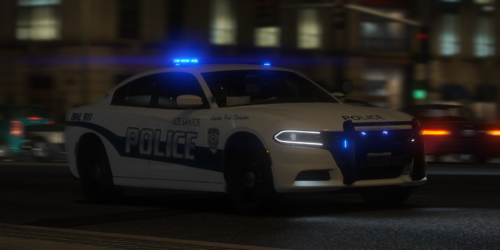 I'll try and address the issue as soon as i can, thank you for reporting Make sure you installed the textures for the R&B lights correctly If you edit the vehicles filename from for example police to sheriff2, make sure to go into vehicles.meta and edit the sheriff2 entry to be the same as police. The vehicles.meta fixes these issues
 -
Sorry for the late reply, make sure you installed the gameconfig.xml, packfile limit adjuster and heap adjuster Screenshots are taken with NVE only with brighter ELS, LSPDFR compatibility and the darker nights addons that come alongside it Does this happen on the addon or replace? Make sure to see if it's not caused by low settings (turn up the view distance and textures to max just to check). The _hi yft file should have the steering wheel and all of the interior models on the highest render, so make sure you look into that too
-
did you make sure to add the dlcpacks' line into your dlclist.xml? I'll try and add his fpiu into my future work if possible, i tried to find it for this pack but no luck
-
-
-
Thank you for the nice words, it means a lot to me. Regarding new cars, I'll try to make some as soon as I can I managed to locate the cause and fix it, I'll release an update within a couple hours. Thank you for the nice words and thank you for reporting the bug It's what you mentioned in your comment above, file descriptions
-
An add-on version should be up soon thanks for pointing this out, this is fixed in the new update
-
-
Log doesn't say much. Can you try and replicate the problem and then send the log? Every game launch resets the log, which is what I assume the cause of this is
-
np
-
Wrote this just for you, untested so make sure it works: Either replace the <Loadout> to </Loadout> section with this if you don't want bike cops or put this text below the </Loadout> line of your motor unit
-
I advise you try and install all of your plugins without LML, the instructions on how to do so should be inside the plugins lcpdfr page or inside their zip file's readme
-
This is pretty simple if you can understand what each value means. For any vanilla lspdfr resource (aka agency.xml) all you have to do is find the department in which you want to put your addon vehicle into and look for the <Vehicles> variable which can be found not far below the name. All you have to do in there is make a new line and paste in the line of a vehicle above, replacing it with the name of your addon, so for example: <Vehicle>POLICE</Vehicle> <Vehicle>POLICE2</Vehicle> <Vehicle>POLICE3</Vehicle> <Vehicle>customcar</Vehicle> customcar being the car you'd like to add into said department. You can repeat this for every addon car that you wish to add. UltimateBackup is a bit different. I'm gonna do a very brief explanation, if you want more info every UB document has an overview and explanation written at the top. - DefaultRegions corresponds to Local, State and other default units like K9, SWAT, NOOSE etc. There are only a couple predetermined locations they can spawn in, aka LS, LS County, BC, Paleto and Cayo perico. - CustomRegions is just what the filename says, custom regions. It determines what units spawn in certain locations whenever you request default units like Local, State and so on. - SpecialUnits is custom backup that doesn't rely on regions. This backup usually appears on the bottom of the backup list. It's mostly used for units like FIB, DOA and anything similar. If you'd like to add something like LSPD cars you'd go to DefaultRegions and look for <LocalPatrol> and find <LosSantosCity> inside of that variable. Just like agency.xml the vehicles should be somewhere inside the aforementioned LS variable. This is how vehicle lines in UB usually look like: <Vehicle chance="100" pax="1" pax_chance="50">POLICE</Vehicle> Every vehicle must have a chance to spawn, which is what the "chance="100"" attribute is for. All car chances inside the region must add up to to 100. The second attribute is "pax", meaning the amount of passengers, and "pax_chance" being how likely the passengers are to spawn. If you'd like to add in an addon vehicle you'd do something like this: <Vehicle chance="50" pax="1" pax_chance="50">POLICE</Vehicle> <Vehicle chance="50" pax="1" pax_chance="50">customcar</Vehicle> There's a 50% chance for either vehicle to spawn in, with a 50% chance to get 1 passenger inside of them.
-
Tricky indeed. Last idea I have on mind is maybe try and change the window's number format/locale to "English US". Very unique issue at hand here
-
You should probably also try removing everything in your directory (into another backup folder preferably) and doing a clean install of LSPDFR with only STP installed
-
Try updating your RageNativeUI, could be the issue
-
Odd. Try removing all of the files associated to STP, UB and compulite and reinstall them 1 by 1 and launch the game after installing one of them, don't change any keybindings or modify .inis, keep them stock
-
That really shouldn't cause the issue. Can you try moving both ultimatebackup, stp and compulite out of your plugins folder just to make sure they're not the cause of the crash?
-
Did you change any keybindings at all? Log says "Exception message: Input string was not in a correct format." most likely meaning something inside a file wasn't formatted correctly