skillzgaming
Members
-
Joined
-
Last visited
Everything posted by skillzgaming
-
The game would start, then freeze, then crash every time I start. I installed using the installer. The file is in .rcr but since I can't upload .rcr, I changed the extension to .zip. DO NOT unzip it, just change the file extension. CrashReport_638175881801847046.zip
-
sorry for lateness, it's in StopThePed.ini in plugin folder, just search for "realistic"
-
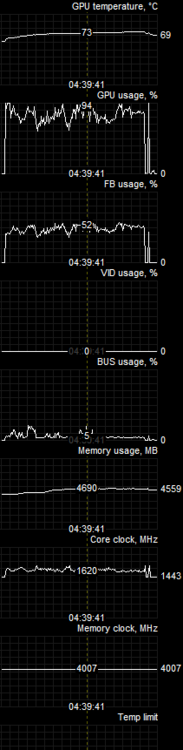
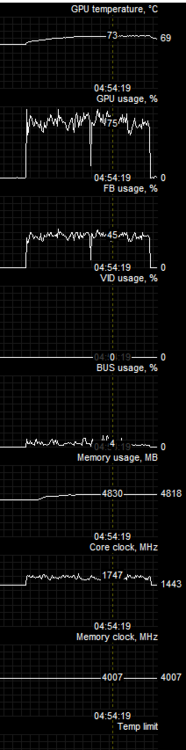
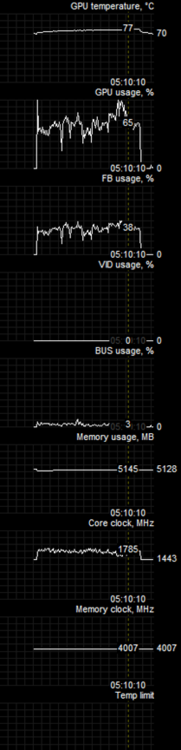
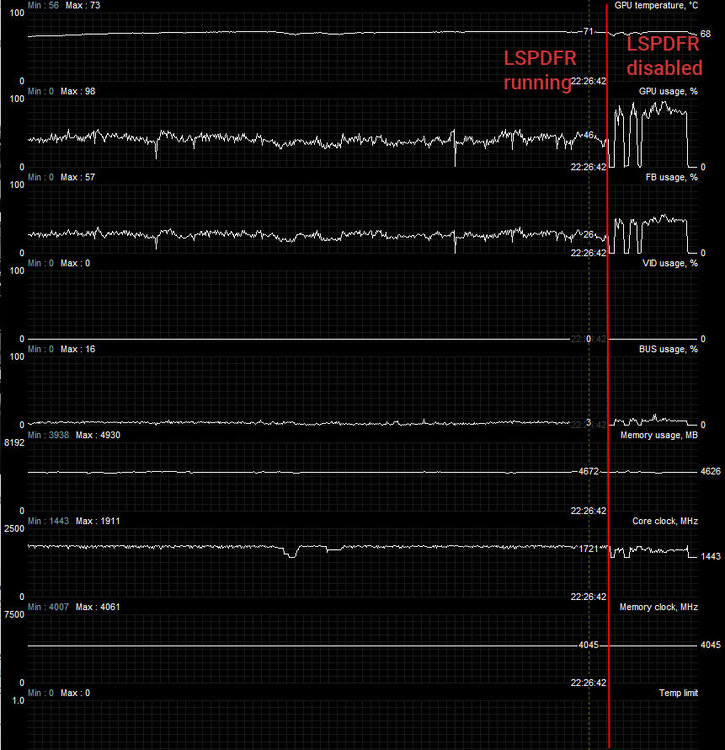
1: WITHOUT RAGE PLUGIN HOOK AND LSPDFR Avg fps: 65, Min: 55, Max 75 2: WITH RAGE PLUGIN HOOK AND LSPDFR NOT ON DUTY Avg fps: 65, Min: 55, Max 75 3: RAGE PLUGIN HOOK AND LSPDFR ON DUTY Avg FPS: 45, Min: 35, Max: 60 *FPS is estimated by my mind, it is still similar to how to perform. As you could see, the GPU usage monitor when LSDPFR while on duty shows that LSDPFR under use the GPU compared to unmodded. This test was done without any other mods or changes to game file. Is this expected or a bug? I've already posted about this but still haven't get any answer from devs. (x-link to reddit: https://www.reddit.com/r/lspdfr/comments/g0da3b/lsdpfr_and_rph_still_have_issues_with_low/)
-
I don't think so. I think it's LSPDFR using lower GPU/CPU usage for some reason.
-
-
 I need to wait for new RAGE/LSPDPD update rip. Do you know how to stop steam from auto updating when launch?
- 37 comments
- 1 review
-
-
No, but for me both CPU and GPU usage drop to around 50% after i go on duty, and increased back up to 90% when the plugin crashed. (see screenshot)
-
Ok. You should do a new tutorial on how to install this pack. I'm really confused that do I need to edit the lspdfr\data cop_presets_outfits.xml file, it seems to have a outfit menu customization option? Thanks.
- 37 comments
- 1 review
-
@Sam @LMS Excuse my bombing the old thread, but I've discovered that while using LSPDFR, the GPU usage drop significantly causing major FPS drop. I don't know that you've known about this or not: Thanks.
-
Hello @Error 404 I Don't know why does the New Zealand EUP does not work EUP L&O, EUP Menu, EUP Config is installed. I've changed the presentconfig in plugins folder. And the locker room menu is still not displaying NZ Police options
- 37 comments
- 1 review
-
Hello, I've discovered today that LSPDFR plugin uses half the amount of GPU and 3/4 of the CPU usage when the plugin is active when compared to unloaded LSPDFR plugin. When the plugin was terminated by RAGEHOOK (crashed), the game now run at the normal GPU/CPU usage. This is bad because any unused performance, is wasted performance. This also contributed to FPS drop while using LSPDFR. As normally I'm running at 70FPS near max settings, but when LSPDFR is active (on duty), the FPS drop to 30FPS. There are some usage monitor; CPU Intel(R) Core(TM) i7-6700HQ CPU @ 2.60GHz (Laptop) GPU: NVIDIA GeForce GTX 1070 (Desktop, not MAX-Q) * some trough in GPU usage is me switching windows. Is this a well known problem? And how to fix this issue if at all? Thanks.