



1XERO1
Members
-
Joined
-
Last visited
Everything posted by 1XERO1
-
 You are aware that Albo has left the modding community and no longer mods, right?
- 3,646 comments
- 306 reviews
-
-

- 1
-
-
Turns out you unfortunately can't edit the SWAT/NOoSE vehicles. Any change to the SWAT/NOoSE section will just break the game 😕
-
 I've been trying to join the Discord server, however when I try to accept the invite, i get a message telling me I have been banned. I had someone look into it, and all they got is that I was banned quite a time ago for an unspecified reason. I don't recall ever being in the EUP Server, and I was hoping someone could look into it and unban me. My name and tag are Retr0#0262.
- 2,341 comments
- 236 reviews
-
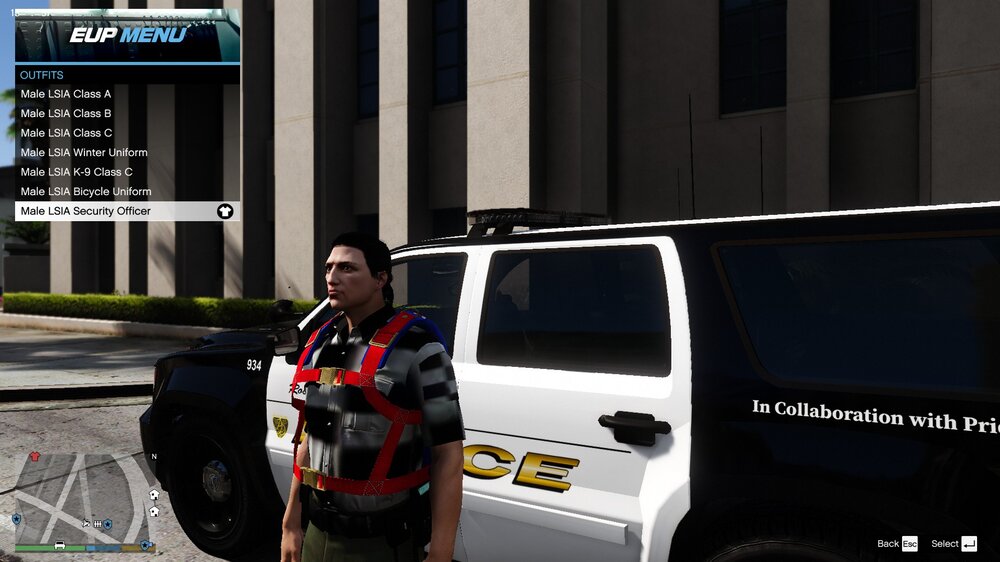
For some reason, certain presets that EUP has are broken for me. The picture shows the problem I'm having. I've attempted re-installing EUP with no results. I don't have any addon/replacement clothes that would affect EUP. How can I fix this?
-
I'll just remove the callout pack for the time being in that case. Thanks for the help.
-
YobbinCallouts.txt
-
No, I haven't.
-
RagePluginHook.log
-
Yes. I've reset all changes. Still crashes though.
-
Deleting did help the problem with LSPDFR not loading. But now I can't go on duty. Any idea what could be causing that? RagePluginHook.log
-
Nope.
-
I recently did a clean install of my game to remove a bunch of mods. After re-installing the main mods, as well as LSPDFR and everything I used with it, I have not been able to load into LSPDFR. It crashes while loading. So far, I have attempted removing all plugins except for LSPDFR and loading LSPDFR through the in-game RPH Menu. Neither have helped. All the mods I have installed are the same as what I had before re-installing (minus, obviously, the mods I decided to remove). I've attached my RPH log. RagePluginHook.log
-
Recently I edited my Dispatch.meta by adding a couple of addon vehicles I installed. I finished editing, saved, went into the game, and all the cars were working perfectly fine until I reached 4 stars. At this point I was expecting armoured cars like the Insurgent or vans such as the police Speedo to spawn - and they did, but with absolutely no-one inside. The cars would spawn in big lines, ranging from 1 single car to a big congo-line of 10+ self driving cars. I've searched multiple forums, and in all of then the result is that the OP just gave up or was told to install the Driver "Ghost" Fix (Which I tried, but it didn't work). Is there any way of fixing this issue?
-
 A really good mod, minus a bug I've encointered. The bug I encountered was, when responding to shots fired, everyone just stands still until you get really close to them, and only then the action starts. I also have a problem with the ambiently responding units, and how they act on the road. One time I had a felony stop, but an ambiently responding unit spawned, and rammed through all the units, killing everyone except me. This has also happened on traffic stops, crime scenes, etc. It also seems they spawn near the player regardless of the callouts location. Like, I've had units from Los Santos respond to callouts out in Grapeseed.
- 346 comments
- 42 reviews
-
So, I want to add more agencies to the LSPDFR garage. I want to do this as I have some vehicles in my game that arent an actual agency in LSPDFR (E.g. Go-Loco Police, LSPP, etc.) How can I do this?
-
So, I've never update LSPDFR before, and I want to know how to do it without breaking any of my plugins/mods, as well as removing my character, etc.
-
Too bad that all the "lore friendly" vehicles here on LSPDFR are, in fact, not lore friendly, but are rather real cars with fictional liveries. I find it annoying that every time I find what would seem to be a cool, lore friendly pack/vehicle, it ends up being a real vehicle with a fictional livery.
-
I think Bejoljo's Stop The Ped plugin fixes that. Here is a link to download it: https://www.bejoijo.com/
-
That's just because of the way physics work in GTA. You need to be very aggressive with your pits and smash into their end or attempt to ram them off the road. Another strategy is you spike them or shoot out two tires and them pit them.
-
What do you mean glitched and wierd? Are the peds wearing normal clothes like a civilian or are the textures missing?
-
Does it break anything in your game? If not, it's normal and you don't need to worry about it.
-
It's probably an ambient spawn. GTA likes to randomly make cops turn on their lights and sirens and make them drive around aimlessly at high rates of speed.
-
Do you have the latest UB installed? It could be a bug due to a GTA V update or something like that.
-
What mission are you on in GTA V? If this is after after the mission where you take out Madrazo's cousin, then its Madrazo's people that are spawning. This is because the game is detecting that you are playing as Michael, who is at that point exiled from the city. You'll either need to 1. Progress further into the story in GTA V or 2. Play as a sheriff in Blaine County.
-
RagePluginHook.log


