



1XERO1
Members
-
Joined
-
Last visited
Everything posted by 1XERO1
-
Provide your RPH.log file.
-
Texture loss is usually caused by the game preloading models/textures. Going into the lspdfr.ini file and changing Main.PreloadAllModels to false should fix that. If it doen't, you'll need to change your texture quality in the game settings. As for the crashing, you'll need to attach a new RHP.log since the one you provided isn't available to me.
-
What cars are you trying to install, are they addon or replace, and do you have Edit mode enabled in OpenIV?
-
New Text Document.txt Here is a file explaining what is what. <Ped chance="17" comp_shirt="5" comp_pants="36" comp_hands="53" tex_hands="2" comp_shoes="52" comp_eyes="9" comp_accessories="57" comp_decals="13" tex_decals="3" comp_shirtoverlay="201">mp_m_freemode_01</Ped> The lines should look something like this. Obviously, the numbers will be different, and you might add or remove the things based on the in-game names and numbers.
-
You want to go into the UB config files using Edit mode in OpenIV (CustomRegions.xml). From here, you want to go to whichever department spawns with these masks (in this case LSPD), go down to peds, and look for comp_beard="1" (the number determines what they wear). Delete that, and if there is a tex_beards="1" (determines texture), you can delete that too.
-
Issue 1: I'd say they want you to put the props into the latest props folder. It can be found in patchday23ng. Issue 2: I'm assuming your attempting to install these as replacement. From what I can tell, you installed the LSPD pack first, then the LCSO (LSSD) pack. The reason for all the cars being LSSD is because the LCSO (LSSD) pack uses the same car models as the LSPD pack (such as police2, police3 and police4). To fix this, you'll want to either install one or both of the packs as addon.
-
Are you using UB, and if so, do you have any custom configs installed for it?
-
There are 2 ways you can go about doing this. Way 1 (More difficult, but removed just the one mod): Go to GTA V/update/update.rpf/common/data and open the original visualsettings.dat file, and locate the original lighting values. Copy those. Then go to GTA V/mods/update/update.rpf/common/data, open the modified visualsettings.dat file in edit mode, and replace the custom values created by Better radiance with the ones you copied from the original game files. Way 2 (Easier, but removes all other visual mods that change something in the file): Go to GTA V/update/update.rpf/common/data and copy the visualsettings.dat file you find there. Next, go to GTA V/mods/update/update.rpf/common/data and paste the copied visualsettings.dat file into there.
-
Do you have a custom UB config installed? Because if you do, that's probably at fault.
-
I'm getting callouts way too much. I was wondering if the LSPDFR handles all callouts (including custom ones), so all I have to do is head into the lspdfr.ini file and change the callouts value there, or if every callouts is handled by the callouts pack. If each callout is handles by it's callout pack, where could I possibly find the frequency values for the pack if they aren't in the .ini?
-
-
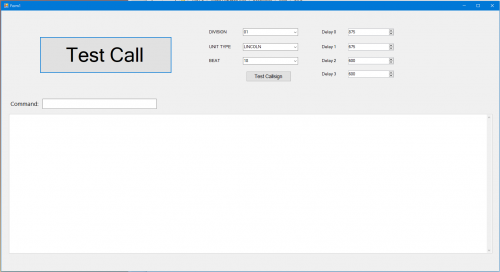 I'm not sure how exactly to install this. I'm trying to see if it detects my mic correctly before I install GrammarPolice, however when I extract the file and attempt to run the .exe, I get an error that says "The language for the grammar does not match the language of the speech recogniser". After I press "Ok" on the error, I get the UI that's supposed to show up, but it crashes the second I press "Test". Any idea what could be causing this?
- 46 comments
- 1 review
-
If I found the pack you are using, then yes. There should be a bunch of links to other mods in the description fo the uniform pack that the author says are required for the uniforms to function properly. If, however, there aren't any, then I'm looking at a different pack. If that is the case, give me the link to the pack you are using and I'll have a look at it.
-
I've never heard of, or used, TrafficConfig, and the only thing I found on it is a discontinued mod. It's very likely that TrafficConfig is causing problems. All you need is GameConfig, HeapAdjuster and PackFileLimitAdjuster.
-
What EUP version are you using, and did you install all the required mods for this to work?
-
I'm getting some odd hardware usage info when playing LSPDFR. When playing off-duty, I get an average of ~100 FPS, with CPU usage being at ~30% and GPU usage at ~90%. However, after going on-duty, FPS drops to ~60-70, while for some reason CPU usage drops to ~20% and GPU usage to ~60%. Why would hardware usage drop when on-duty?
-
What are your graphics settings? Do you have any graphics mods installed? How many/what plugins have you installed? I also suggest playing the game with Nvidia Overlay or MSI Afterburner to check GPU and CPU usage, as well as how much RAM is being used.
-
What do you mean by add? As in, add it as an addon car, or add it to traffic? If it's a modded file, could you post it here for me to check?
-
If you have an anti-virus, turn it off and try loading LSPDFR again. It's possible that your anti-virus is seeing RPH attempts to hook the game as a virus.
-
Did you have any mods prior to it crashing? How many mods did you install before you realized your game crashes when loading?
-
If you're looking to add an addon car into the game, you'll want to have OpenIV installed. Then all you have to do is find a car that is addon, download, and open the file. Here you want to find a folder containing a dlc.rpf file in it. You want to drop that folder into GTA V > mods > update > x64 > dlcpacks. After that, go to GTA V > mods > update > update.rpf > common > data and find the dlclist.xml file. Right click and choose Edit, and at the bottom add <Item>dlcpacks:/(CARNAME)/</Item> (This should come with the downloaded mod in a file named ReadMe). If you did it correctly, you should be able to spawn the car through a trainer.
-
It's not possible if you've already created a character. If you want to create a new character, you want to go into the pause menu > LSPDFR > Select Character and Create New Character. Here you can create a new character with a different gender.
-
You'll want to find the texture file for the LSPD uniform and replace it with the NYPD file. As to where it's located, I unfortunately have no idea.
-
Go into the RPH settings by clicking the cog icon while RPH is loading. Then navigate to plugins, and disable LSPDFR. Try loading into the game then. If you load in, then turn on the RPH command console and run the command LoadPlugin LSPDFR. If that doesn't work, continue disabling your plugins until you (hopefully) find the perpetrator.
-
Go into lspdfr.ini and change Main.PreloadAllModels to false. If that doesn't work, you'll have to turn your texture quality down in the game settings.


