Skip to content
View in the app

A better way to browse. Learn more.

LCPDFR.com

A full-screen app on your home screen with push notifications, badges and more.

To install this app on iOS and iPadOS
  1. Tap the Share icon in Safari
  2. Scroll the menu and tap Add to Home Screen.
  3. Tap Add in the top-right corner.
To install this app on Android
  1. Tap the 3-dot menu (⋮) in the top-right corner of the browser.
  2. Tap Add to Home screen or Install app.
  3. Confirm by tapping Install.

asakku

Members
  • Joined

  • Last visited

Everything posted by asakku

  1. I don't have any mods. It was the completely clean installation.
  2. I tried. It's not working. Reinstalling GTA too. I don't have a overlock on my GPU. They are my actuall RagePluginHook logs. RagePluginHook_01012020_110153.log
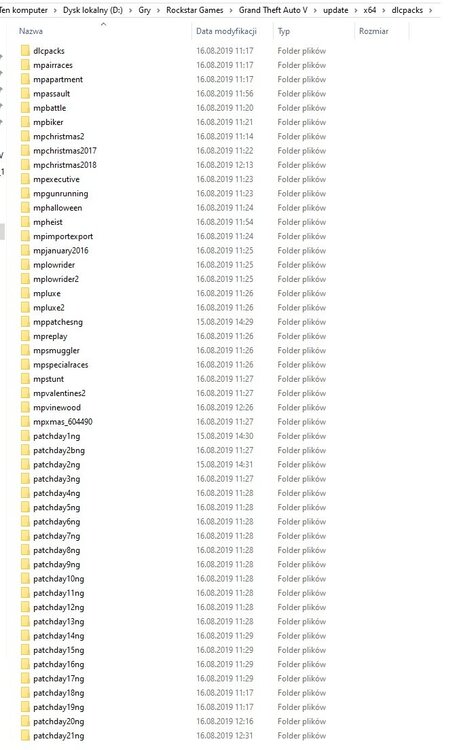
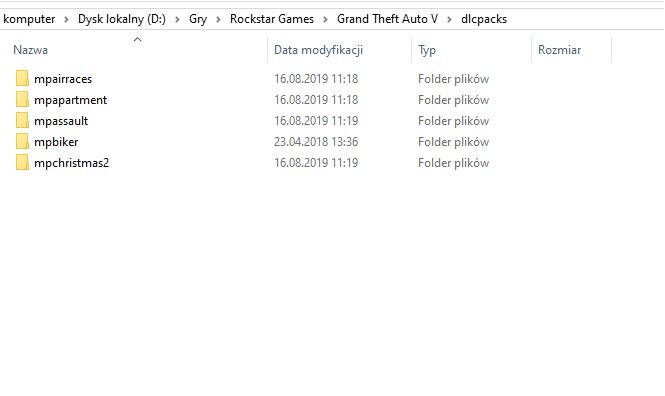
  3. Sorry for replying so late. Here is my dlcpacks folder. Thanks! 🙂
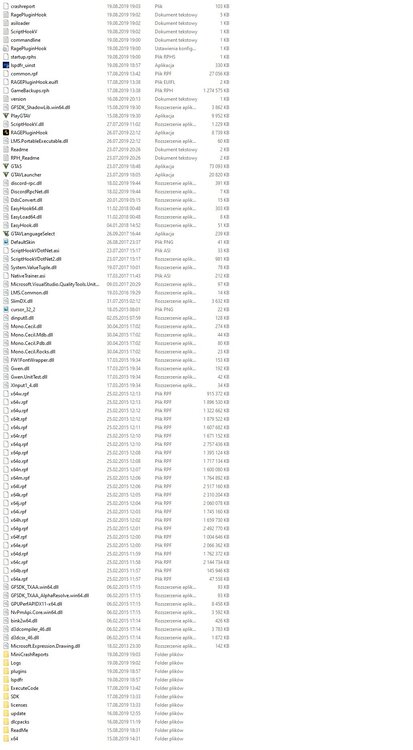
  4. Hi, thanks for your answer! This is my GTA 5 main directory.
  5. Hi, I have a problem with LSPDFR mod. I do everything the same as it is written in the guide but the game keeps crashing at the moment of starting the game. I have a new computer, so my GTA V and LSPDFR is newly installed. No other mods are installed. My operating system is Windows 10.

Account

Navigation

Search

Search

Configure browser push notifications

Chrome (Android)
  1. Tap the lock icon next to the address bar.
  2. Tap Permissions → Notifications.
  3. Adjust your preference.
Chrome (Desktop)
  1. Click the padlock icon in the address bar.
  2. Select Site settings.
  3. Find Notifications and adjust your preference.