Skip to content
View in the app

A better way to browse. Learn more.

LCPDFR.com

A full-screen app on your home screen with push notifications, badges and more.

To install this app on iOS and iPadOS
  1. Tap the Share icon in Safari
  2. Scroll the menu and tap Add to Home Screen.
  3. Tap Add in the top-right corner.
To install this app on Android
  1. Tap the 3-dot menu (⋮) in the top-right corner of the browser.
  2. Tap Add to Home screen or Install app.
  3. Confirm by tapping Install.

Catpack

Members
  • Joined

  • Last visited

    Really good lore friendly models, R* should of had this as the standard swat ped model.
  1. The lighbar (coranas or whatever they are called) are actually well made on these, they don't disappear, have floating lights above them or really dim at all etc from a distance of like 20 feet unlike a vast majority of the cars people make. Nice.
  2. Images added to a gallery album owned by Catpack in GTA V Galleries
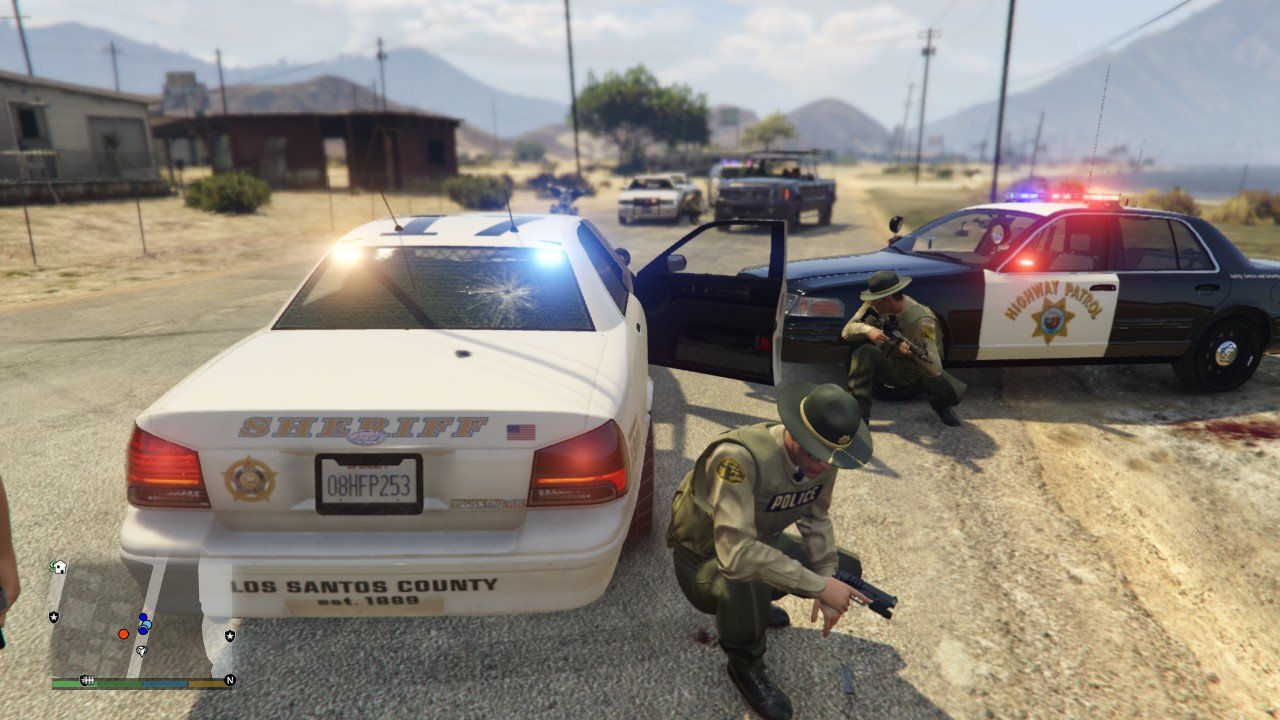
    Recent incident involving heavily armed insurgents. Ring leader apprehended.
  3. Images added to a gallery album owned by Catpack in GTA V Galleries
    Recent LSPD incident involving heavily armed insurgents. Ring leader apprehended.

Account

Navigation

Search

Search

Configure browser push notifications

Chrome (Android)
  1. Tap the lock icon next to the address bar.
  2. Tap Permissions → Notifications.
  3. Adjust your preference.
Chrome (Desktop)
  1. Click the padlock icon in the address bar.
  2. Select Site settings.
  3. Find Notifications and adjust your preference.