Skip to content
View in the app

A better way to browse. Learn more.

LCPDFR.com

A full-screen app on your home screen with push notifications, badges and more.

To install this app on iOS and iPadOS
  1. Tap the Share icon in Safari
  2. Scroll the menu and tap Add to Home Screen.
  3. Tap Add in the top-right corner.
To install this app on Android
  1. Tap the 3-dot menu (⋮) in the top-right corner of the browser.
  2. Tap Add to Home screen or Install app.
  3. Confirm by tapping Install.

OlMi1

Members
  • Joined

  • Last visited

Everything posted by OlMi1

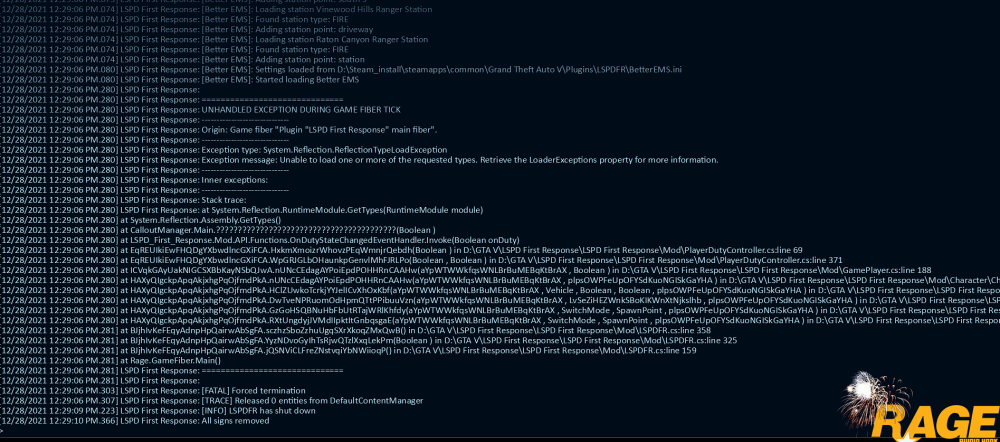
  1. Sadly it crashes for me for no reason... any ideas?
  2. Interesting that you now see how much people are using this, and i think that are 0.001% or so
  3. I deactivated my Antivirus, then it worked.
  4. I am not unpatient, I‘m interested. Sorry.
  5. So, when do you think you‘ll release the update? 27th of July? 28th of July? (Berlin time cuz I dunno your location)
  6. So, it Works again after reinstalling LSPDfr.
  7. Hey, I have installed LSPDFR correctly, and everything was ok. Then I added Assorted Callouts and PeterU Callouts, and then this came: If I order Backup (B Key), my game crashes after 1-3 seconds. Can anyone help me? Thanks 😃 (I hope this is the right Forum :I)
Account

Navigation

Search

Search

Configure browser push notifications

Chrome (Android)
  1. Tap the lock icon next to the address bar.
  2. Tap Permissions → Notifications.
  3. Adjust your preference.
Chrome (Desktop)
  1. Click the padlock icon in the address bar.
  2. Select Site settings.
  3. Find Notifications and adjust your preference.