


IrishGuy77
Members
-
Joined
-
Last visited
Everything posted by IrishGuy77
-
When I tried the new download via cmd, it doesnt work either.
-
Did that many times, doesnt work. I removed LSPDFR so GTA works just fine. I'm just sick of Rockstar updating too often, cause crash. I give up
-
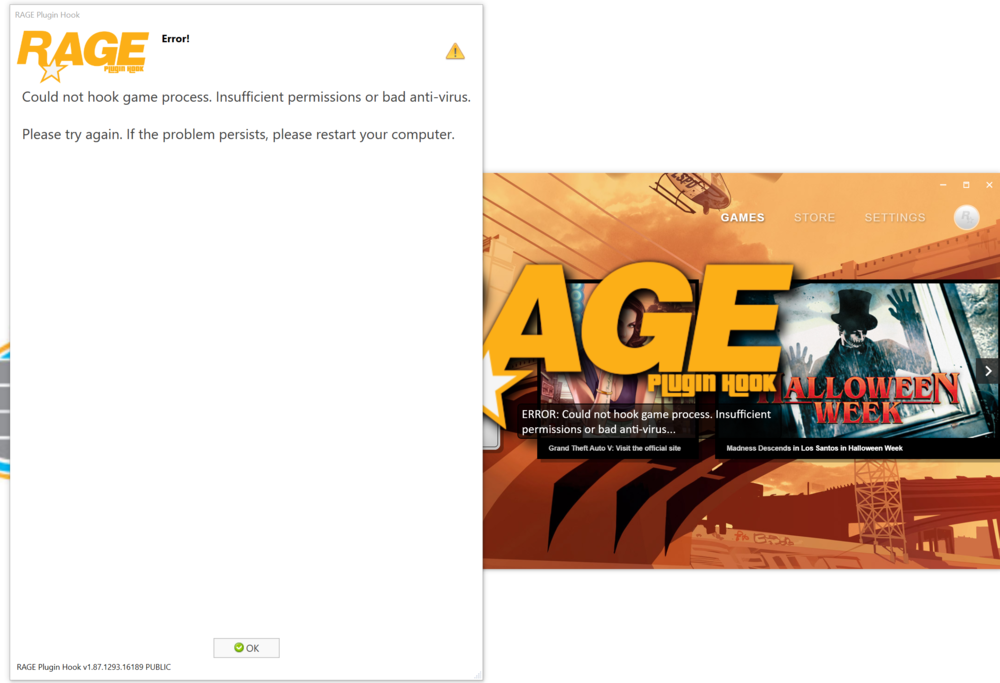
I've been playing GTA V for 5 years now and been using LSPFR for two years and I know Rockstar is being an asshole with all these updates so I keep updating files whenever they comes out. Until today, this error message came up. I'm still pissing off that Rockstar is messing everything. FYI, I dont have anti-virus program. Any idea to fix it?
-
Who says I have goals? I don't care abut my goals, all I want see GTA 6 to be improved.
-
My friend who works with GTA team at Rockstar games confirmed me that the GTA 6 will be release on/or about in Q3 of 2022. All I know he says the map of the GTA will be 6x bigger than GTA V and you will have ability to fly to other country just like Earth. He said Rockstar is aware of million complaints about launcher and social club and says it should be eliminated, instead play straight with GTA software so I hope they do that. It'll make my life much easier.
-
 This answer your question: https://www.lcpdfr.com/forums/topic/87615-open-sourcing-albo1125s-mods-retirement/ He's retiring however he will plan make it open source so someone can take it over and keep it active.
- 1,178 comments
- 137 reviews
-
I ve been playing and never had issue esp. waiting for updates. I ran 60-80fps at most of the time. People need to learn to read and follow the instructions, that all it takes.
-
Honestly, it worked on my end very well after all the updates, as long you do it right way.
-
My suggestion for next version, add these following: Ability to request fire trucks Ability to request Military forces Enable for us to be able to turn off the chase view focus (can edit .ini but make easier in main menu option) More options for Police Officers in the menu rather than install other mod, makes it easier.
- 1,178 comments
- 137 reviews
-
When I did the update, it cause my GTA V to freeze repeatedly for about 30 seconds then it happens often like every 5 min or 10 min. I'm not sure why. How I can fix this? I have video card that is 11GB and ram is 32GB and running win 10 on big gaming pc. Thanks
-
No, that is false, ScriptHookV must be updated to ensure get this work. I just tried, it wont let me play GTA at all so we have to wait for that to be updated first.
-
Also, I forgot to add, if I use the police menu to request for officers, I notice theres no Fire Truck option in case I need it and also I think the Army should be added in case if I need to stop these tough armor car chase that took me long time to end it.
- 1,178 comments
- 137 reviews
-
Hello, I've been GTA fan for years and I am so happy I found this site. I have downloaded this and was so hooked. I have some questions. 1) If you accept the job to chase the criminals, when your close to the red dot on the map, the camera on the screen start to focus/move/zoom by itself where the target is. I really hate that part and it bothers me, how I can disable that? 2) Next time, I suggest to merge LSPDFR+ with several others that you created and make into ONE Mod, that would save lot of headache, trust me. Lot of people are having issues as I noticed becuase of that. I am IT developer and I work with web business for 20-30 years so I can understand the hard work and develop these mods and I think it's great but make it more convenice if you make one mod for all of them. 3) Please enable that I cna be able to carry any wepaons instead of limited one, unless I am missing something? Let me know. Thank you and keep the wonderful work!
- 1,178 comments
- 137 reviews



