


Liveman
Members
-
Joined
-
Last visited
Everything posted by Liveman
-
 This was it - I'm just an idiot. Thanks! The P51 is still holding strong at 28-30FPS
- 19 comments
- 3 reviews
-
-

- 1
-
-
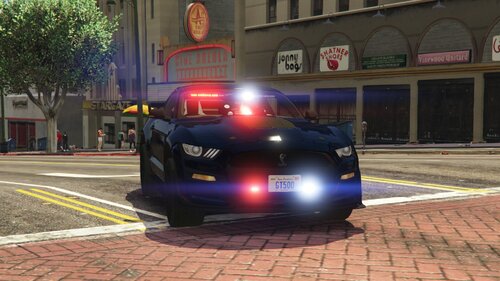
I do have Radiance V installed - I tested by removing Radiance and it is obviously broken in those cases (just flat colors with no shine). But they are still white on the back and maybe a yellowish tint on the front passenger side. The middle dash is an obvious red & blue so it is strange. I do not have Visual V or many other mods installed at this point since it is a fresh install following the new DLC. I am wondering if it is my graphics settings as I'm running this on a Lenovo ThinkPad P51 - so not the ideal gaming computer. At some point I'm going to investigate modifying this to have all blue lights but new to LSPDFR. Either way awesome work.
- 19 comments
- 3 reviews
-
The back bar and the passenger side look white instead of red. Is this expected? Is there a way to change it so the passenger light bar and the back are red/blue?
- 19 comments
- 3 reviews
-
-
So this breaks the bindings that ELS has for lights - B being siren temp, Left Pad being light cycle, Button Pad being siren toggle. Any ideas how to get them back? I really just want Phones & Left/Right Shoulder disable so I can't shoot someone from the car, and don't have to deal with the cell phone.
- 40 comments
- 16 reviews
-
 Hello, I keep getting the following error whenever I use Compter+ system to check on a ped. Running a fresh install for today. Any suggestions? [7/27/2019 21:33:19.292] LSPD First Response: C+: Get Citation for ped hash=JohnFisher5/5/1975 [7/27/2019 21:33:19.295] LSPD First Response: C+: Found citations for ped [7/27/2019 21:33:19.296] LSPD First Response: C+ DEV: Creating ComputerPedViewExtendedContainer [7/27/2019 21:33:19.304] LSPD First Response: C+ DEV: Creating ComputerPedViewExtended [7/27/2019 21:33:19.305] LSPD First Response: C+ DEV: Creating ComputerPedView [7/27/2019 21:33:19.308] LSPD First Response: C+ DEV: InitializeLayout ComputerPedView [7/27/2019 21:33:19.333] LSPD First Response: C+: Citation time is 1/11/2018 10:10:52 [7/27/2019 21:33:19.368] [7/27/2019 21:33:19.368] ============================== [7/27/2019 21:33:19.368] EXCEPTION DURING FRAME RENDER [7/27/2019 21:33:19.368] ------------------------------ [7/27/2019 21:33:19.368] Origin: Plugin "LSPD First Response" (LSPD First Response.dll). [7/27/2019 21:33:19.368] ------------------------------ [7/27/2019 21:33:19.368] Exception type: System.MissingMethodException [7/27/2019 21:33:19.368] Exception message: Method not found: 'LSPD_First_Response.Engine.Scripting.Entities.ELicenseState LSPD_First_Response.Engine.Scripting.Entities.Persona.get_LicenseState()'. [7/27/2019 21:33:19.368] ------------------------------ [7/27/2019 21:33:19.368] Inner exceptions: [7/27/2019 21:33:19.368] ------------------------------ [7/27/2019 21:33:19.368] Stack trace: [7/27/2019 21:33:19.369] at ComputerPlus.Controllers.Models.ComputerPlusEntity.get_IsLicenseValid() [7/27/2019 21:33:19.369] at ComputerPlus.Interfaces.ComputerPedDB.ComputerPedView.BindData() in D:\GTA Mod Dev\git\ComputerPlus\ComputerPlus\Interfaces\ComputerPedDB\ComputerPedView.cs:line 281 [7/27/2019 21:33:19.369] at ComputerPlus.Interfaces.ComputerPedDB.ComputerPedView.Layout(Base skin) in D:\GTA Mod Dev\git\ComputerPlus\ComputerPlus\Interfaces\ComputerPedDB\ComputerPedView.cs:line 158 [7/27/2019 21:33:19.369] at Gwen.Control.Base.RecurseLayout(Base skin) [7/27/2019 21:33:19.369] at Gwen.Control.Base.RecurseLayout(Base skin) [7/27/2019 21:33:19.369] at Gwen.Control.Base.RecurseLayout(Base skin) [7/27/2019 21:33:19.369] at Gwen.Control.Base.RecurseLayout(Base skin) [7/27/2019 21:33:19.369] at Gwen.Control.Base.RecurseLayout(Base skin) [7/27/2019 21:33:19.369] at Gwen.Control.Base.RecurseLayout(Base skin) [7/27/2019 21:33:19.369] at Gwen.Control.Base.RecurseLayout(Base skin) [7/27/2019 21:33:19.369] at Gwen.Control.Canvas.DoThink() [7/27/2019 21:33:19.369] at Gwen.Control.Canvas.RenderCanvas() [7/27/2019 21:33:19.369] at Rage.FormsManager.OnRender(Object obj, EventArgs e) [7/27/2019 21:33:19.369] at Rage.FormsManager.TriggerRemoteDraw(Graphics graphics) [7/27/2019 21:33:19.369] at Rage.RemotePlugin.OnRender() [7/27/2019 21:33:19.369] at Rage.RemotePlugin.OnRender() [7/27/2019 21:33:19.369] at Rage.Plugin.OnRender(Object sender, EventArgs e) [7/27/2019 21:33:19.369] ============================== [7/27/2019 21:33:19.369] [7/27/2019 21:33:19.376] LSPD First Response: [FATAL] Forced termination [7/27/2019 21:33:19.379] LSPD First Response: [TRACE] Released 0 entities from DefaultContentManager [7/27/2019 21:33:19.381] LSPD First Response: C+: LogPositionAndSize : W 200 H 20 X 467 Y 0 [7/27/2019 21:33:21.470] LSPD First Response: [INFO] LSPDFR has shut down [7/27/2019 21:33:21.474] LSPD First Response: C+: LogPositionAndSize : W 200 H 20 X 467 Y 0 [7/27/2019 21:33:22.433] LSPD First Response: ============================== [7/27/2019 21:33:22.444] LSPD First Response: ============================== [7/27/2019 21:33:22.530] LSPD First Response: All signs removed [7/27/2019 21:33:22.655] LSPD First Response: ============================== [7/27/2019 21:33:22.665] LSPD First Response: ============================== [7/27/2019 21:33:22.856] LSPD First Response: STP: EXIT CONTROL PED (FORCED) [7/27/2019 21:33:22.865] LSPD First Response: LSPDFR might have crashed and Police Buddy is despawned [7/27/2019 21:33:22.888] LSPD First Response: Added ambient event fibers to cleanup [7/27/2019 21:33:22.932] LSPD First Response: Added ambient event fibers to cleanup
- 1,743 comments
- 172 reviews
