


Realize
Members
-
Joined
-
Last visited
Everything posted by Realize
-
Remove COMPONENT_AT_PI_FLSH off UB and set EnableTaserLaser to no into STP ini.
-
What plugins do you use? If STP and UB is one of them, then disable corresponding options in the .ini. Although regarding flashlights (No clue why would you disable this though) you may be having some fun around UB removing the flashlight line out of there.
-
use a trainer and look for the specific gloves you want to use then just see theirs number and type it into the police menu. It's between 80-100 at enhanced native trainer IIRC.
-
It was made like this by the authors. You can always increase its radiance in visualsettings.dat file, but watch out, you cannot adjust a value of brightness of a specific car, it'd apply to all the ELS cars you've got.
-
Add the entire GTA folder to exclusions in windows settings.
-
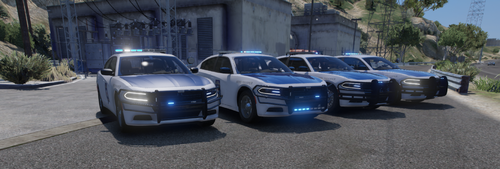 The most authentic Alabama pack with high quality liveries. Thanks for another update, keep up the good work, love ya.
- 33 comments
- 5 reviews
-
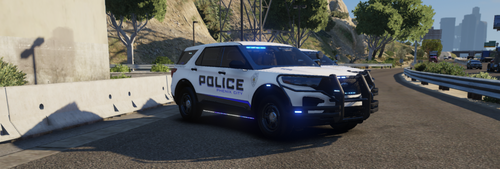 Nice, thanks for an update. Probably the only Alabama based modder who doesn't abandon the projects a moment after their initial release. Any plans on Birmingham pack?
- 52 comments
- 2 reviews
-
Make sure you have "police ignore you" or alike option disabled in your trainer.
-
Go into your lspdfr.ini and reduce values of these options: AmbientSpawn.MaxCopsInArea ; AmbientSpawn.MaxSpawnedCopsInArea.
-
No, there's no way. It is just a bug, which cannot seem to be fixed anytime soon.
-
It may be just an outdated plugin that causes the crashes. Have you spotted them tending to happen at specific places either during particular callouts?
-
It is basically the file you attached in your main post - you can find it in your root game folder. Let's get straight to the point. Have you tried launching the basic game? If the answer is yes and it's failed, rename mods folder to _mods and launch the game once again then let me know what happens.
-
Provide log, btw do you use a trainer?
-
Yup, its name doesn't matter. All what matter is a proper installation of the addon and also adding it to dlclist if it's not going through installation package. That's all.
-
Like the guy above said, there's no way to manually edit it in the files (at least not a single one I know of). Every time you start your gameplay you got to go through the entire process.
-
You can even apply real life police chatter in to your game, there's plenty of opportunities.
-
Backup never does anything with apprehended ped's car. You have to call on tow truck on your own, but it still is odd it hasn't just disappeared as soon as you drove off for a longer distance. Bugs happen.
-
Does your game launch properly when you are not using the RPH? Provide your log, please.
-
As far as I know, there's no way to do it. You have to either dismiss them or simply make them your partners and force to stand still. Maybe try changing the values of corresponding parameters, but I really doubt it is going to work.
-
Then you've got a wrongfully typed code in your UB. I've had this too, all you can do is looking for it on your own - which is extremely time consuming and still has a low chance to fix or just type back your UB config done from the scratch. UB is an extremely vulnerable plugin, where at for example an absence of a space between code can immediately make lspdfr crash while going on duty either just delay it in time which is even worse due to lack of sign in the log.
-
What plugins do you use?
-
Gameconfig, heapadjuster and packfile limit - try putting these into your root game folder and see if the crashes stop.
-
Reinstall LSPDFR using manual option, disable GeForce overlay and give administrator privileges to RPH and Rockstar Launcher. IIRC disabling Real Time Protection in Windows settings helped people out too.
-
Have you edited any plugin or data xml recently?
-
As far as I know it is up to a specific department. LSPD being based on LAPD tend to use it just as an alternate option. I've been to LA last summer and I've spotted officers wearing BDU uniforms as well as these with standard Class A you see on daily basis. On the other hand, there are departments, which do not use them at all, either only during particular conditions - night shifts or simply season of a year for instance.

