Snakepit92
Members
-
Joined
-
Last visited
Everything posted by Snakepit92
-
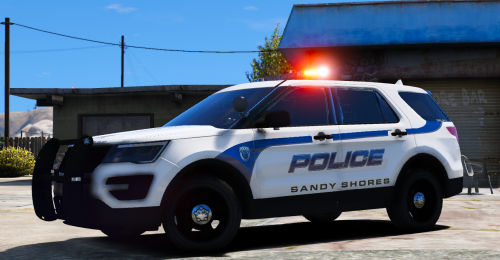 Looks great, I love it. But do you know if your Charger skin fits a different model? The one linked has weird LOD issues with the doors and hood popping out at a distance edit: Found one that works better. Policeco's beautiful Charger https://www.lcpdfr.com/files/file/14674-2016-els-los-santos-police-charger/
 -
-
 Installed some custom weapon sounds, but weapon sounds were muted in game because the folder was too large. Quickly created some dead air files to make the folder smaller, decided to share to save anyone else the time of having to do it themselves. Enjoy! Mutes the lazer sounds
- 5 comments
- 1 review
-
-

- 1
-
-
 Love the cars, REALLY love the patterns, especially the directional blue and amber on a traffic stop. But should the front steady burn red stay on even when the lights are off?
- 964 comments
- 158 reviews
-
Sorry was away for a few days. Here's my latest crash log. I did some more testing and disabled a few plugins and I can play for a good 20+ minutes now but still crashing after that rphlog.txt
-
It's a big improvement. I can play for 15-40 minutes now without crashes
-
I'm going to guess no since I don't think I know what that means, haha. Is it the timeout threshold on the general RPH menu?
-
Right I knew what you meant. I just tried it and it ran fine. And for good measure I tried to replicate where I was when the game ran fine and it crashed anyway. So just a coincidence. Back to square one I guess
-
I'll try it right now. Following up on my car theory, I was playing in one I downloaded for the fbi2 slot without issue. The last few days I was having trouble in my LSPD cars. Then today after hours of no issues in my fbi2, I switched to the one in my sheriff2 slot and bam, crashed immediately. The only thing I can think of is my FBI unmarked cars I just installed without doing anything else to them, whereas the LSPD and Sheriff ones I renamed the files since the packs were large had sheriff cars in police slots, vice versa, and I wanted to make sure I wasn't going to have LSPD cars out in the desert and whatnot. Did I maybe miss a step there? All I did was rename the vehicle and els files, is there something else I have to do to make them work better? Either way, I'll test them out right now without loading with RPH and see what happens. Although now they I type that I realise it might not make sense since it was RPH that was crashing
-
Could vehicle models cause the crashes? I just played for hours without an issue, but I was playing out in the county. I'm wondering if the LSPD cars I have could be what's causing it, it's the only thing I can think of that was different tonight. Unless it's something as simple as the population density in the city
-
Alright, here's the last crash report. I managed to play for a few minutes, do one traffic stop, then as I pulled away from that it crashed. RPHcrash.txt
-
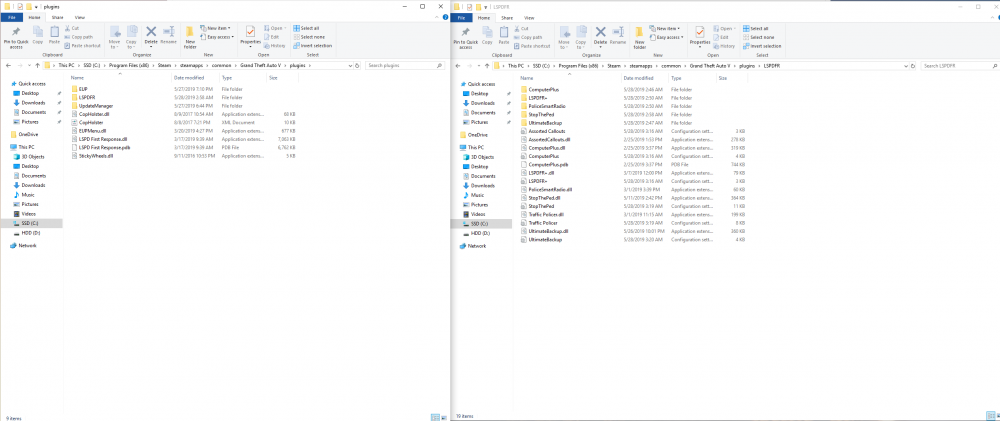
Alright, so I went ahead and just completely re-did all the plugins just to play it safe. Also decided to give Stop the Ped a try since I had luck removing Arrest Manager earlier. So far things seem more stable but I do still get crashes, although less frequently. Here's how the folders are now, I'm about to jump in game again so we'll see how far I get this time.
-
So it seems like Arrest Manager might be the culprit. I took out every plugin and put them back one by one then tested. Ran great until the final plugin went in, which was arrest manager. Crashes within minutes every time
-
That's cool! Nice work, can't wait to give it a try
-
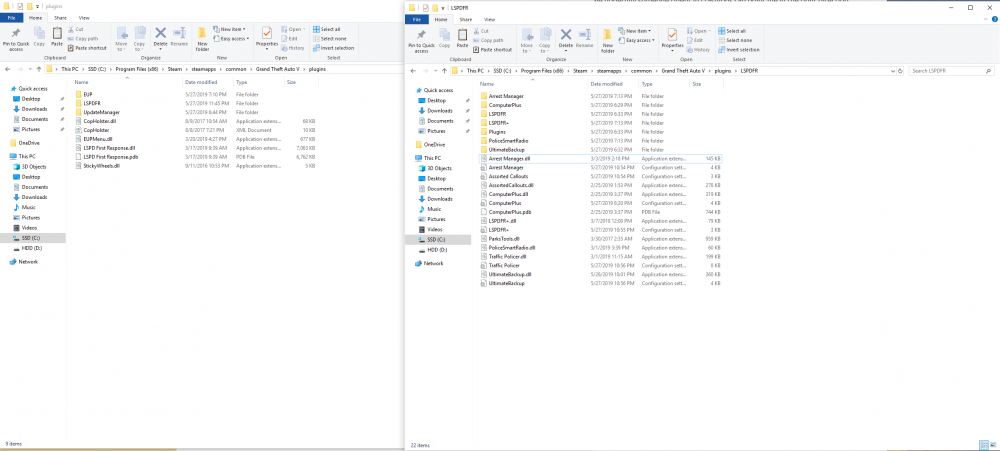
Sure, I've attached it. Also, I took out the Better EMS plugin and it stabilized things a bit but I'm still getting random crashes. Not as fast or frequent but still happening. Thanks for taking a look! Edit: Hm, looking at my own screenshot I see I have a weird LSPDFR folder, within my LSPDFR folder, within my plugin folder. Likely just a mistake moving files around, looking at it closer and it was files from Better EMS that I must have missed while deleting it. Could be why that wasn't working well in the first place, I'll see if it changes anything else removing those stargglers
-
Hey guys, Hate to ask for help like this but I've spent the last 3 days trying out different plugins and getting the hang of modding GTA. I've finally got a group of plugins that I like but today I started to get random crashes. Was hoping someone could help me. Going to start disabling different plugins to see if I can isolate something but in the meantime hopefully someone fluent in crashlogs can point me in the right direction crashreport.txt
-
You nailed it (and juuuust beat my ninja edit, haha) That was the problem I had, I'd installed the 0.3 compatible version like a dummy
-
Thanks Pazzi, I had a custom gameconfig but not these other two files. Unfortunately it still crashes as soon as I enter a ped or vehicle database. Edit: Update, turns out the mod works great if you install it correctly haha. I had the wrong version installed.