totemsteiner
Members
-
Joined
-
Last visited
Everything posted by totemsteiner
-
 i really like this mod, thank you very much! FYI i tested it with "sync time to real time" (via QuantV) and it seems to work.
- 75 comments
- 2 reviews
-
-

- 1
-
-
-
would save so much time<3
-
seems like eupmenu.dll is in the wrong folder. make sure its placed into Grand Theft Auto V\plugins and not in the lspdfr folder. best, totem
-
for the sake of documentation: i removed all while loops and game.fiber wait etc. and did everything with if statements. solved. thanks, totem
-
Hi, thanks for your response. Yea that would make sense, that i cannot End it then, when the whole lspdfr plugin is paused. I will rethink it and try another way. Thank you both:) best, totem
-
you are right, i misread. best, totem
-
Hi guys, i'm currently fiddling with Game.Fibers, everything work so far ingame, the only thing is, i cannot End() the callout with the "end" key. I think its because i am "stuck" in the while loop, until the callout ends automatically within the procedure itself? i want to add "if (Game.IsKeyDown(Keys.End)) End();" I tried everything, but it seems not to work within the while loop - read comments please;) Here is the code, please dont hate i'm a noob public override void Process() //...more code here... else if (MainScenario > 60) { CalloutRunning2 = true; while (CalloutRunning2) { //somewhere here i want to add the possibility to End() the callout with "if (Game.IsKeyDown(Keys.End)) End();" if possible? // Wait until the player is within 30 units of the area while (Game.LocalPlayer.Character.DistanceTo(area) >= 30) { GameFiber.Wait(0); } // Wait until the player exists and is within 10 units of the area while (Game.LocalPlayer.Character.Exists() && Game.LocalPlayer.Character.DistanceTo(area) >= 10) { GameFiber.Yield(); } if (Game.LocalPlayer.Character.Exists() && Game.LocalPlayer.Character.DistanceTo(area) < 10) { Game.DisplaySubtitle("~y~Search the area for the caller. (Wait a few seconds, callout ends automatically!"); // Wait a few seconds till callout ends GameFiber.Wait(10000); Game.DisplayNotification("~b~Player:~w~ Dispatch, Nothing found."); GameFiber.Wait(500); End(); //callout ends here automatically then (on purpose) break; } } CalloutRunning2 = false; } if (Functions.IsPedArrested(Suspect)) End(); if (Suspect.IsDead) End(); if (Game.LocalPlayer.Character.IsDead) End(); if (Game.IsKeyDown(Keys.End)) End(); // this only works in my first Mainscenario < 60 base.Process(); } thanks, totem
-
Hi, i would remove every replace vehicle and try again. Then adding them one after another with testing in between. best, totem
-
Hi, well, i highly recommend to uninstall LSPDFR+ and Albos Arrest Manager. I would say that best practice is not to use them, as they are really outdated. Remove these Plugins and try again. You can use StopThePed for arrests. best, totem
-
Hi, i would delete everything related to CallOutInterface from your GTAV Folder, then try again. Seems like there is an exception thrown with CalloutInferace. If it works then, re-install Calloutinterface and make sure everything is in the right folders. best, totem
-
just for any oncoming noob like me: I spawn every ped now in a seperate function.. e.g. spawnDeadPed(){ xyz} then call this function an OnCalloutAccepted() The dead ped is now spawning 9/10 on the ground, as it should be. best, totem
-
Hi, try run your RPH.exe as administrator. Seems like there is an permissions error. Also you can check the following: Right click the GTAV folder and go to properties > security and check if your user has the required permissions. Tick the box that says full control and hit apply + ok. That should fix the access is denied issue. best, totem
-
Hi, Mit EUP kenne ich mich leider auch nicht so gut aus. Kann Dir da leider nicht helfen. Falls das mit den Uniformen nicht klappt, würde ich sie einfach aus dem Spiel lassen. Ich meine: lieber ohne Uniformen spielen können, als nicht spielen können oder? Falls du amerik. Uniformen willst (LA based), empfehle ich Dir EUP 9.3, relativ einfach zu installieren mit Open IV, da es ne OIV datei hat, die Du einfach nur ausführen musst mit OpenIV. Viel Erfolg. Die amerik. Uniformen sind doch eh viel cooler;) VG, totem
-
Hi, Bitte prüf mal, ob dein EUPMenu.dll wirklich im plugins Ordner liegt, dort wo auch die LSPD First Response.dll liegt. Außerdem installier bitte mal die aktuelle RageNativePlugin Version, die RageNativeUI.dll einfach ins GTA5 Hauptverzeichnis kopieren und die alte ersetzen. https://github.com/alexguirre/RAGENativeUI/releases Manche Plugins haben eine veraltete Version drin, deshalb wird die aktuelle manchmal überschrieben, wenn man die blind reinkopiert und nicht aufs Datum achtet. Grüße, totem
-
hi @GTAbear hi @Charlie686 thank you very much to both of you, i have cut my teeth on this. I was aware that the process() calls this every second, but didnt know to handle this:/ But the switch statement in my if statement makes total sense! I overlooked that! Thanks again!!!💓 Its working like a charm now:) best regards, totem
-
Well, I rejoiced too soon, the spawned peds are still in the air from time to time, anyone have any ideas? thanks, totem
-
Hi Guys, i have another problem. I did a simple switch case and in the last case, the Ped is attacking me. All works fine, but when i try to arrest the ped with STP (holding E in my case), the Ped glitches between the Attack and Arrest Animation, and if i stop aiming, the Ped runs away. Here is my process code, what do i miss? Is this not possible? public override void Process() { if (Game.LocalPlayer.Character.DistanceTo(Suspect) <= 10f) { if (!convoStarted) { Game.DisplayHelp("Press 'Y' to advance converstation", false); convoStarted = true; Suspect.Tasks.AchieveHeading(Game.LocalPlayer.Character.Heading - 180); } if (Game.IsKeyDown(Keys.Y)) counter++; switch (counter) { case 0: Game.DisplaySubtitle("~y~ Approach the person and talk to it with y."); break; case 1: Game.DisplaySubtitle("1/6 ~b~Player: ~w~ " + IntroAnswersCop[rnumber1]); break; case 2: Game.DisplaySubtitle("2/6 ~r~Suspect: ~w~ " + IntroAnswersSuspect[rnumber2] + " " + ProcessAnswersSuspect[rnumberProcessSuspect]); break; case 3: Game.DisplaySubtitle("3/6 ~b~Player: ~w~ " + ProcessAnswersCop[rnumberProcessCop]); break; case 4: Game.DisplaySubtitle("4/6 ~r~Suspect: ~w~ " + ProcessAnswersSuspect[rnumberProcessSuspect2]); break; case 5: Game.DisplaySubtitle("5/6 ~b~Player: ~w~ " + ProcessAnswersCop[rnumberProcessCop2]); break; case 6: Game.DisplaySubtitle("6/6 ~y~ handle the situation as you like. Probably survive?"); //starts attacking Player, but cannot be arrested, as it glitches between attacking and arrest animation Suspect.Tasks.FightAgainst(Game.LocalPlayer.Character); hasAttacked = true; break; } } any help appreciated, thanks, totem
-
Hi Kateyln.ross, you can read through this Topic please: maybe this helps you already, best, totem
-
ok, i fixed it myself, i think. I put in an GameFiber.Wait(10); so the peds reach the ground with their feet, and then the suspect dies with the kill command. i have to try it out with all my spawns, but looks promising, thanks, totem
-
Hi all, i currently face an issue, where my spawned ped, which i Suspect.Kill(); at spawning, floats in the air, like 1m above the ground. If i touch it with my Character, it falls down to the ground, as it should be. e.g. at this position new Vector3(1571.504f, 3592.323f, 35.362f) Is there anything i can do or is it some limitaion of the game? thanks, totem wrong forum, damn, sorry, please move it to the right forum 🙂
-
Hi all, I literally thought about this today as well. I had a problem, when i had a ped fight against me(Suspect.Tasks.FightAgainst(Game.LocalPlayer.Character) , and i aim at him, and then he flees, i was not able to put him into a pursuit with B. I solved it by making a bool variable and put it into the switch-case when he started fighting, but then he is always on pursuit, although he might will surrender. I find this ok, because its some kind of immersive and i can call the AI Cops if needed in pursuit mode. Maybe i'm missing something, but i didnt find another solution. best, totem
-
try this: Suspect.Inventory.GiveNewWeapon("WEAPON_CROWBAR", -1, true);
-
Hi guys, just want to add another comment here. After taking many many babysteps, i finally got my plugin running. I Followed this tutorial https://docs.google.com/document/d/1wpxOp67iJNu3V0z0ZLkjgGewni_Umu80UNiaaXVjS7w/edit but unfortunately there is nothing described regarding the GameFiber function. After i understood the united callout code a bit more, i adapted mine and now it works. I just want to share it for any newbies like me, because it took me like 2 days to figure this out 😄 thanks, best regards, totem namespace ConventionalCallouts { public class Main : Plugin { public override void Finally() { Game.LogTrivial("ConventionalCallouts version 1.0.0 has been cleaned up."); } public override void Initialize() { Functions.OnOnDutyStateChanged += OnOnDutyStateChangedHandler; Game.LogTrivial("ConventionalCallouts version 1.0.0 has been initialized."); } static void OnOnDutyStateChangedHandler(bool onDuty) { if (onDuty) GameFiber.StartNew(delegate { RegisterCallouts(); Game.Console.Print(); Game.Console.Print("=============================================== ConventionalCallouts ================================================"); Game.Console.Print(); Game.Console.Print("[LOG]: Callouts and settings were loaded successfully."); Game.Console.Print("[LOG]: The config file was loaded successfully."); Game.Console.Print("[VERSION]: Detected Version: " + Assembly.GetExecutingAssembly().GetName().Version); Game.Console.Print("[LOG]: Checking for a new UnitedCallouts version..."); Game.Console.Print(); Game.DisplayNotification("ConventionalCallouts", "~y~v" + Assembly.GetExecutingAssembly().GetName().Version + "successfully loaded!"); GameFiber.Wait(300); }); }
-
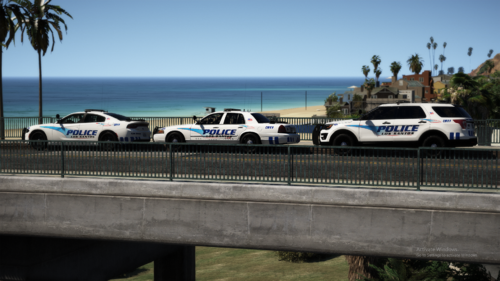 man, this pack is by far the most epic pack i've ever seen! looking forward to more;) thank you so much, totem
- 66 comments
- 19 reviews