


.jpg.2edf757a8232cb592e38951001820463.jpg)
Corey6501
Members
-
Joined
-
Last visited
Everything posted by Corey6501
-
 Hmm so people should be forced to download a file then piss around opening it just to hear what it sounds like? same as people who don't put videos up of sirens who tf wants to sit downloading siren packs just to preview it? use your brain pal.
- 17 comments
- 1 review
-
I first did manual but didn't work so i tried auto and didn't work, will try that thanks.
-
Updated LSPDFR using the auto installer and updated scripthook but now when i launch the game it just black screens and crashes? renamed my mods folder and the game loads but i haven't changed anything in my mods folder for ages, so just to play the game i need to delete my mods folder and start again?
-
Hi, currently got ELS installed and from what i understand your limited to a horn and 4 sirens? i have a rumbler pack so was wondering if there was any way to have more sirens in the game? i would need 6-8 sirens in the game, is this possible? So for example i would want - - Wail - Wail Rumbler - Yelp - Yelp Rumbler - Hilo - Hilo rumbler and so on.
-
Hi, so i want to record gameplay normally with shadowplay but also do a few cinematics with the rockstar editor but whenever recording i get this red notification in bottom left saying its recording and it just ruins it! How can i stop this popping up? or else during my gameplay i just have recording in bottom left through out...
-
Never mind got it working, just reinstalled everything again and restarted PC.
-
"Loading story mode with rage plugin hook" just loops and loops....tried pretty much everything at this point except deleting my mods folder which i cant be bothered redownloading every model etc again. How do i just stop GTA from updating on steam? so sick of the game breaking all the time and having to mess around just for it to work for another week then a update or something comes out and it breaks again!
-
Doesn't work
-
Fixed - didn't realise i installed a free roam cam that took up the F1 key and stopped recording from working.
-
To sum it up every time i press F1 nothing happens, F2 turns on action replay and F3 turns it off but i don't want that i want it to record my gameplay....i have tried resetting key binds but hasn't done anything, when i press F1 i get put into a free roam cam probably by the trainer menu but it still doesn't pop up saying recording...does the menu replace and stop rockstar recording from working?
-
-
Confused though as i haven't made any changes to my mods folder except sirens, could sirens crash my game without giving a error code? going to try a backup siren file and see if it makes a difference.
-
Believe i posted in the wrong section before. Long story short my game keeps crashing, i have tried removing all plugins and just having default LSPDR but it still crashes, its not from spawning something or going on duty its more just randomly when driving around, my game is fully updated and i have spent a good 7 hours trying to figure it out but these logs don't seem to be telling me anything useful or maybe i just don't understand them and someone with more understanding can spot the issue. I first thought it was maybe a bad model that when i drive near it crashes as just running around in middle of no where doesn't seem to crash, only issue is i haven't added any new models since. I have noticed always at the bottom of the log it mentions some sort of event created like stolen car, i also see logs for outfits etc but i have been using the same agency and outfit files for ages without issue. Just need someone who knows what their doing to try and get to the bottom of the cause for me pls. RagePluginHook.log
-
Its weird because i just managed to play the game for like 25 mins while being in middle of nowhere...moment i TP into city it crashed Edit, i feel like i have narrowed it down to random events around the map like every time i drive past a stolen car that blips red on the map my game will crash so is this a LSPDFR issue? is anyone else having random crashes just driving around with just LSPDFR?
-
Normally i don't get much crashing thankfully but when i do i can normally pin point it to either a plugin or a error on my behalf installing models etc, currently got a issue where even with every plugin and script removed except EUP menu my game crashes and its not from doing a certain thing i.e spawning something, i spawn in and can run around or drive around for a few mins then it randomly crashes. I'm leaning towards a bad model install but then again i have been playing the game fine before the update and i have installed quite a few different models without fault, only thing i have done today before playing is install new sirens but i get no errors from openIV when importing and even still would sirens cause a game to crash? I'll attach my log, if someone can help end my mystery it would be highly appreciated lol and again i have removed all plugins except EUP menu so the game is just LSPDFR. How it happens - i load in and can walk or drive around for a few mins then all of a sudden it crashes, noticed in the logfile something about agencies and outfits but i have been using the same outfit and agency settings for ages. RagePluginHook.log
-
 How to get this working with newest version? added to game and it just closes on launch or in game, remove it and game is fine.
- 1,365 comments
- 87 reviews
-
Its updated now and nope wasn't aware he's from Ukraine but says a lot that he's updated it fairly fast to say his country is at war so gg...
-
When does he normally update it? like a few days after a update or weeks etc?
-
My game is up to date, RPH and LSPDFR is but scripthook isn't updated yet so i just removed it so the game would still run but now whenever i try to spawn a vehicle etc i get this : I have done what it says and verify my files and it finds nothing wrong....gonna try spawning a different car and see if its just the new car i added but i doubt it, is it because im using the RPH console to spawn the vehicle but removed scripthook? Fixed - new model i installed was causing the issue.
-
Nope, seems once your steam force updates you to the newest version '2628' there is nothing you can do to get the game working, tried reverting to backups but all 6 of them are apparently unsupported even though i backup ever game file through RPH. Seems only solution now is to wait for RPH to be updated, looked into steam settings and turns out there is no way to stop steam auto updating GTA, can set it so it only updates when launched which is useless too as when you launch RPH it will work just start updating your GTA. Seems LSPDFR and RPH just got updated thank god.... Update, don't get your hopes up lol as now the game works but scriphook isn't updated.....now we have to wait for that lmfao.
-
Seen people saying to use the RPH included in the manual LSPDFR but i already have this version and it doesn't work for the latest game patch, any ETA on when updates will roll out?
-
So after ages of messing around a week ago i managed to get LSPDFR working again, my GTA just updated today by itself and now i have game version 2628 and surprise surprise its not supported, looking in game backups none of them are supported...any way to botch it to make it work still or downgrade? its so annoying i'd rather just not have GTA updating until i want it to than it auto update and then i cant play LSPDR for however long it takes to update things.
-
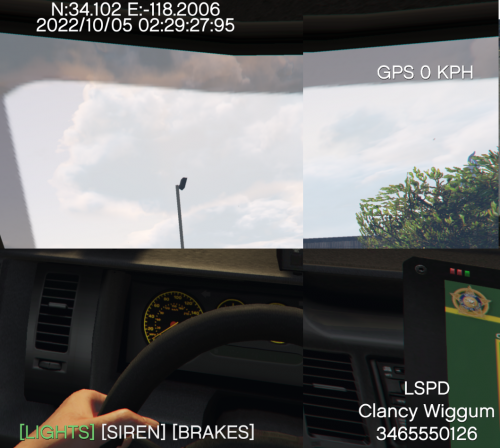 Surely this would need its own view? rather than a dashcam template over first person view? this is more like a bodycam overlay rather than dashcam as it doesn't make sense for this overlay to be on first person but maybe its just me... Personally think this overlay is better than dashcam v....if this got turned into an actual dashcam where you cycle through views and it has its own rather than on first person this would be really good...
 -
Ultimate backups panic button feature relies on smart radio to work, without it the panic doesn't work. I'll try grammar police, thanks.
-
Fixed it, removed super callouts and went into open IV and disabled everything in ASI manager then enabled it again and now zero crashes.
.thumb.jpg.48269b44c5ae15b3e19586d2526db995.jpg)


