Skip to content
View in the app

A better way to browse. Learn more.

LCPDFR.com

A full-screen app on your home screen with push notifications, badges and more.

To install this app on iOS and iPadOS
  1. Tap the Share icon in Safari
  2. Scroll the menu and tap Add to Home Screen.
  3. Tap Add in the top-right corner.
To install this app on Android
  1. Tap the 3-dot menu (⋮) in the top-right corner of the browser.
  2. Tap Add to Home screen or Install app.
  3. Confirm by tapping Install.

ThatGenericGuy

Members
  • Joined

  • Last visited

Everything posted by ThatGenericGuy

  1. THANK YOU. This worked. I can't believe I missed this. I've literally tried everything and this is the only thing that worked lol. Again thank you so much.
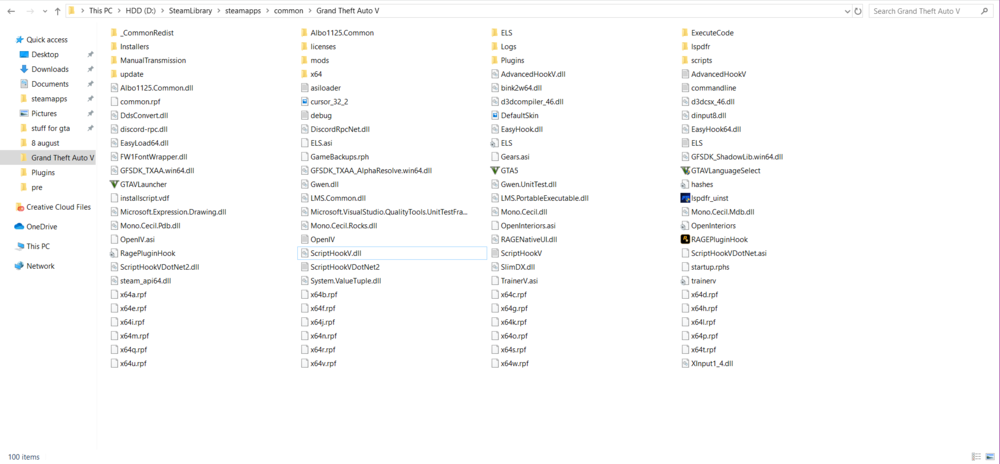
  2. When I click on the .exe file to run Rage Plugin Hook, nothing happens. There's a slight loading animation for my cursor, but that's it, it doesn't even show up in Task Manager. I've tried: -Reinstalling the .NET framework -Reinstalling the redistributable packages -Reinstalling Rage Plugin Hook -Reinstalling LSPDFR -Disabling my anti-virus/windows firewall -Many other things I have no idea what's caused this, it was working literally yesterday just fine. Here attached is an image of my GTA 5 main folder
Account

Navigation

Search

Search

Configure browser push notifications

Chrome (Android)
  1. Tap the lock icon next to the address bar.
  2. Tap Permissions → Notifications.
  3. Adjust your preference.
Chrome (Desktop)
  1. Click the padlock icon in the address bar.
  2. Select Site settings.
  3. Find Notifications and adjust your preference.