GavinR
Members
-
Joined
-
Last visited
Everything posted by GavinR
-
Ah right I didn't realise all these models are made from scratch, I thought they're mostly just taken from other games. That's incredible that people can make such accurate representations of these cars! It's a shame though, I only really want to use them for my own purposes. I wouldn't ever claim someone else's hard work as my own, it's a shame that certain people can't be trusted to do the same. Do you know anywhere that I can download more models to play around with in zmodeler? I'd really like to get to grips with it more
-
Hi everyone, so I just very recently got into modding as I wanted a new hobby. I wanted to make the Ford Falcon police interceptor from Mad Max (the yellow one from the first film), so I just started by building a lightbar, downloading this awesome gumball siren, and found a model for the car online. I've got the lightbar sorted now and the car in-game and it looks pretty great! Not even close to how it looks in the movie but it's a start and I'm pretty proud of myself after lots of long, frustrating hours. Anyway, I figured I was enjoying my time with zmodeler and I wanted to become more familiar with it so I bought a month's subscription and have been trying to mod a few more sirens onto cars to have in my game. My trouble is, every time I try to import a car into zmodeler the "import" button is greyed out so I can't actually edit it or do anything. I just wondered if anyone knew of a way to fix this? It worked fine with the Ford Falcon but I want to try doing some different things using different lightbars and cars. If anyone could help, that'd be greatly appreciated. Thanks, Gav
-
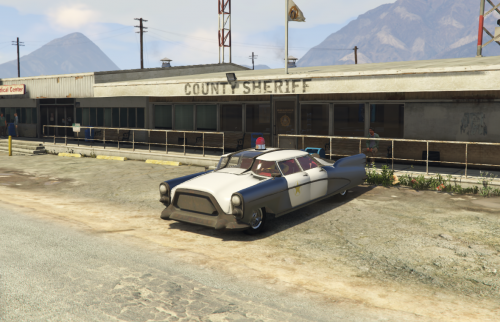 Ah right cool, lets see the one you made then. Nice! I love fallout. What does non-els actually mean?
- 16 comments
- 1 review
-
Ah! I suspected that might be the case. at least I have half a clue what I'm doing now lol. I reckon what happened was when I built my custom lightbar, I just built it in the same z3d file as the car was in and carried on from there. Do you think to avoid this happening again, I should build the lightbar separately and merge it with the car, follow the steps to make it ELS compatible as normal and then import it after that? Thank you so much for your help as well, really appreciate it. It's such an intimidating thing to start out with when you don't have a clue what you're doing, but I feel like I'm learning bit by bit.
-
The car itself looks like this
-
You mean when you do select > quadr > polygon > by material? The box that appears lists multiple materials
-
Sorry mate I'm out at the moment, I'll get back to you asap
-
Sorry, do you mean in OpenIV or in zmodeler?
-
As far as I'm aware yes. I used the original ytd called "xbgt" and changed it to "police4" which is the slot I put the car in and exported the car as, and then I added the included texture from the light I was using and added that to the ytd. Is it worth noting that I sort of build the lightbar myself? I downloaded the single beacon light, duplicated it and used it to make the dual beacon lightbar you see in the photo.
-
Like this:
-
Well I really appreciate the help 🙂 From what I can tell, no. Here she is: And when I was having the original issue of it refusing to export, I changed Default Material from whatever it was before to this:
-
Ah okay I see. Apologies for the ignorance, I'm very new to all this. Here's my texture browser:
-
Like this: And here's my material browser if that helps too:
-
Great, thanks for your help! So my car is now in the game, but it looks like this. Do you know where I fked up?
-
Hi guys, so I've been watching some video tutorials and learned how to attach a lightbar to a custom car in zmodeler3. My issue now is when I go to export the file and open it in OpenIV, it will not open and the file size says 0kb. Here's the error that it throws up: "Can not obtain Shader material from "Default Material". file:RageExportMaterial.cpp line:126" And here's the error when I go "select > polygon > by material > properties" and try to change the default material like one post suggested I do. "Can apply on polygons level only. file:byMaterial.cpp line:282" When I imported the car at the beginning, the name was "xbgt" but I wanted it to be in the police6 slot so in ZM3, I changed it to "police6" and exported it as such, to which I was faced with this issue. Someone suggested the name you export it as has to be the same as the ZM3 name so I tried changing it back to "xbgt" and exporting it as such but that did not work. Please, if anyone has any solutions it would be much appreciated.
-
Did you fix it? I'm having this issue too
-
Hi guys, I've followed albo's fantastic tutorial on installing add on vehicles using his Modding DLC Pack tool and managed to get a car into the game. The car I installed also has a lot of customisation options for the garage, but it's not explained how to install these in the tutorial I watched. Could someone explain how to do this, or point me in the direction of where I can find out? It would be much appreciated. I did attempt one thing that didn't seem to work. I tried to replicate the original game's method like this: E:\SteamLibrary\steamapps\common\Grand Theft Auto V\mods\update\x64\dlcpacks\MODDING\dlc.rpf\common\data\levels\MODDING\vehiclemods\police6_mods.rpf\ NOTE: I also changed the names of the individual vehicle mod files to match the slot I installed the vehicle in. E.g: I turned "XBGT_spoiler.yft" into "police6_spoiler.yft" If anyone could help me out with this, I'd be grateful. Thanks.
-
-
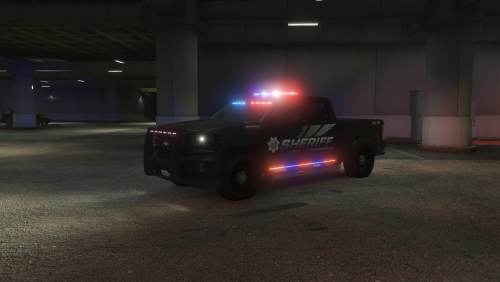 Hey, I put this vehicle in my game and it looks pretty good, but the texture comes up as white - not black like in the photos - and also, the lightbar on the roof is completely blacked out. Did I install it improperly? Here's the place I installed it, it was the only folder with a pranger file: Grand Theft Auto V\mods\x64e.rpf\levels\gta5\vehicles.rpf\pranger+hi.ytd
- 68 comments
- 8 reviews
-
No problem, your screenshots are fantastic. I posted one earlier but it's quite dark and grainy. How do you make yours so sharp and clear? I know you said you do a bit of post-editing in one post but is it down to your PC quality too? Also, I'd love to know those vehicle your using. The lights look awesome on some of those cars and I've been trying to get a less modern vibe in my game.
-
Have you tried searching for playGTAV.exe in your system as a whole? I don't know what the chances are but it could be that if it's located elsewhere, you could get to the bottom of why it's not launching properly
-
As a new player as well, I can only tell you what's worked best for me. I'd start by suggesting you reinstall GTA as a clean copy if you're already having issues, or load your backup. I don't know if the bug you described is caused by comp+ but it's best to start with a clean game, run it to check everything's working so then when you add mods bit by bit and something goes wrong, you can identify which mod did it. The temptation is there to install a bunch of mods in one go before booting your game but you run the risk of creating issues you can't identify the origin of. Now that's out of the way, here's some mods and packs I'm using that work well for me: - Assorted Callouts - Common Callouts - Tacco Highway Callouts - Smart Radio - Computer+ - Arrest Manager - Stop the ped - Ultimate backup - ELS - No More Feathering - AI Fluidity & Discipline - Speed Radar Lite In terms of vehicles, I'm currently using cars from packs such as: - Blaine County Sheriff's Office (for the awesome Corvette) - Blaine County Sheriff's Pack - San Andreas Pack Honestly, just check the front page or go into the vehicle models section and you'll eventually see something you like the look of. A final thing I'd suggest is becoming familiar with editing inis, especially when it comes to changing key commands. It's very common to run into key conflicts and it takes a lot of fiddling to get your keys set up in a way that works best for you, especially if you're using your keyboard in tandem with a controller. I hope this helps, feel free to drop me a message if you have any problems and I'll try to help if I can.
-
You going for a sort of 90's vibe? If so, I think you're nailing it
-
Bad Start to a Long Night
-
Hello! Is there a dedicated list of downloaded files that I can access? I'd like to post some file reviews but I thought I'd check if this feature is available before I manually track down the files myself. Thank ya. The default key is M, then you go to the section marked "vehicle" (maybe vehicle options, I can't remember) and from there you should be able to control the radio stations. I get this issue quite often because of the smartradio plugin opening when you scroll through vehicle selection. When you try to close the smartradio after having just selected your vehicle, it activates the radio so perhaps try waiting to close your smartradio until you're on the street and in your car. Hope that helps.