


NoahB18
Members
-
Joined
-
Last visited
Everything posted by NoahB18
-
-
-
You have a few mispellings: it should be Warrant not warrent; Licenses not licences; also, I would suggest Warrent: Not wanted or No Warrent, instead of Not Warrant
-
-
-
-
What CVPI model is this? I used to have it, and restored my game, I especially liked the slicktop version of it... a lot Thanks, and superb skin
- 12 comments
- 3 reviews
-
-
Just a heads up, EMS means Emergency Medical Services. You forgot the second 's' above the rear doors
- 7 comments
- 8 reviews
-
IT WORKS :D Thank you both so much. In the Vision control center, my default settings were for the game, and I had the game's settings there too (under the applications title). I kept the game's settings, and made reset my other applications to the defaults. Now both will work. I am very happy that I can now have an ENB (because ELS are sexy :p ).
-
I'll try it now, thanks. I've only been playing GTA IV PC for 5 months, but It's happened in the past two months. Nothing different happened to my cpu within those two months though. I get what you are saying about hardware. 8Actually, the only different thing was tweak my AMD VISION Engine Control catalyst to make Manhattan Mod (Emergency 4/911:First Responders game) work. Could this be the root of my ENB issue? Thanks!
-
I attached the Diagnostic report. My Specs are http://h20000.www2.hp.com/bizsupport/TechSupport/Document.jsp?objectID=c03639067&prodSeriesId=5330773 Keep in mind that ENB's used to work, so I don't think it is a hardware issue. Take a look at the report though.
-
UPDATE: I Figured out the 1 file that was causing this problem: enbeffect.fx Anyone know why that causes my problem, and if the file is important/how to overcome that problem then
-
Please take a look at the video, it explains a lot. This happens any time I install any kind of ENB/Texture enhancer. It is not the fonts or fonts_r. The intro looks however it should look like with whatever enb- sometimes the intro is zoomed in, other times it is normal, but that is how the menu+enb should look like according to the creators. The problem is anything showing up on the screen other than GFWL, such as my menu, radar, scripting (~ button), DAS, ELS menu, trainer, etc. as well as gameplay (it is also jumpy). My game works fine, but I'd love to have a working ENB so my ELS looks good. I used to be able to use ENB's, but not one works now without this problem. I appreciate the Help ~Noah dNb
-
They are the same exact vehicle- 2011 and 2013. It is the 6th generation Taurus regardless of 2011-13. So that is accurate, and the Vision lightbar is NYPD, so that is also accurate 5/5 bro
- 15 comments
- 17 reviews
-
-
-
Yeah the graphics are pretty bad, since it came out a while ago. If only there was a modern American Truck Simulator! SCS software, the creator of 18 WoS and ETS, reserved the domain http://www.americantrucksimulator.com, but it is only to protect the game, if it were to be created. I'm really hopeful!
-
-
It works without ENB, but I knew that. I just don't get why it ENB's (I've had many) used to work, but not one works. I've replaced the fonts/font_r etc. but I still cant get ENB to work without this problem.
-
Watch the videos: http://www.youtube.com/watch?v=rXh91wGJBtI (This video was after I added an ENB) This video is like the next, but in the next video the whole gameplay is like the menus http://www.youtube.com/watch?v=-9gfTEftWAk (This video was from a backup that was saved when the game worked fine) Whenever I quit the game (ALT+F4), it appears fine for a second (all the menus work), but then of course quits! I use steam, so I believe GTA IV is up to date. I posted a topic for the first video a while back: '?do=embed' frameborder='0' data-embedContent>> Thank you all! ~dNb
-
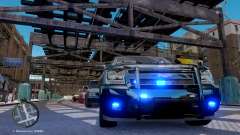 Sweet! Do you use an enb?
 -
-
It's the ENB. No specific ENB though, I've tried many ENB's, and all of them glitch my menus. When I quit GTA (ALT+F4) it appears normal, but then quits obviously. I read a forum about it being the fonts and fonts_r, but I replaced them with the original, but it didn't fix it, and the forum also had a mediafire link with the fonts and fonts_r. so I tried those too, with no luck. Any Ideas?
-


