


.png.f38697a3309bc1920dfbf82d0690f7c3.png)
.png.96d8fd6c9714da4abc63489ba854378b.png)
TSTP350
Members
-
Joined
-
Last visited
Everything posted by TSTP350
-
Yup!
-
I don't think it's a bug haha, anyways I got it sorted out, just have to turn the "true" into a "false" lmao😂
-
Thanks man, I'll take a look into it and see if I can change something in the ini file to disable it.
-
Is there a way to disable the "Available for call" label that's overlapping the PLD? I'm sure this is not there before I updated my Ultimate Backup, Stop the Ped and Force a Callout plugin. The example is shown in the screenshot. Thanks!
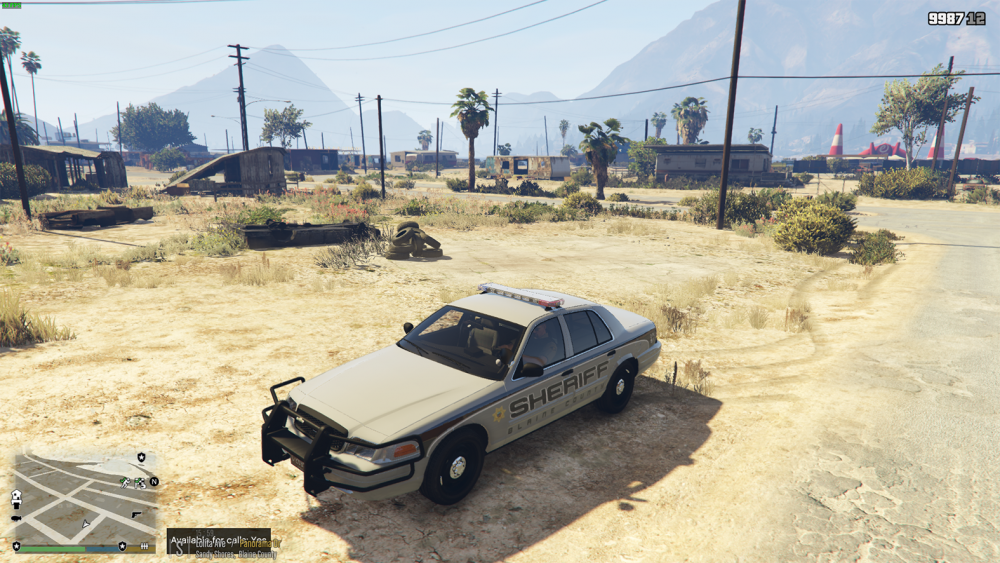
-
 One of the best callout mods on the website, have been waiting for its update since 0.4 is out and gotta say the update of this mod is real quick! But still waiting for police radio to update tho, cause I can't tow the cars or call the coroners to pack the dead bodies away after the scene is clear, I kinda have to leave dead bodies all over the ground lmao! but thanks!
- 1,081 comments
- 166 reviews
.thumb.png.3657ff151792135f2c14a1cb3689f3fb.png)

