TameScissors
Members
-
Joined
-
Last visited
Everything posted by TameScissors
-
Beautification project it's on Nexus though.
-
Personnaly I use the GTA V beautification mod + make visual great again and it is the best light setting I found for the game.
-
Premiere possibilité c'est l'anitivirus qui bloque GTA d'ouvrir. Il faut créer une exception dans l'antivirus pour régler ce problème c'est commun quand on modifie GTA. Si tu peux lister les script que tu as installé ça aiderais beaucoup pour t'aider.
-
So I recently did a clean install of GTA5. Now when I try to install car model certain slot load and other do not. for instance Police, Pranger and Fbi load modded model. As for the other police slot like police2 and the other the car model that spawn is the one of the original game. I put the model in Patchdays23 for all of them. I tried different car model from different creator and even full pack but always the same result. Edit: found the problem. the car model need to be put in patchday 22 and not 23...
-
I run the albo troubleshooter and it found issue with traffic policer and prisoner transport, maybe a third one. I could not do the fix for some reason so I just uninstalled his mod and it worked.
-
fixed it was Albo mod causing the crash...
-
I had some issue with GTA V with the update so I did a clean install. the game load fine well until I want to go on duty. I can't use ForceDuty since I need to create a character. So I go in a police station, press go on duty. I tried with a preset and an own made model. After that the game simply freeze I am either let with a black screen or sometimes I see the loading just stop. What I tried was to load in my character and go on duty after and when I did that it give me this logs.
-
 with this mods installed my game crash in police mods within minutes without receiving any callout. Here is a part of the logs. I tried more than once with the mods on and I experienced crash try it without the mod and it worked fine. I am playing on 0.4 with the updated version.
- 1,081 comments
- 166 reviews
-
The build in radio is the key m
-
anyone have a mods that lets you call a tow truck/coroner that works in 0.4 stop the peds was deleted
-
Old ELS is working with no issue on my part
-
Can you describe the crash like when and how it happen
-
 Not it no longer works and if you perform a traffic stop the lsdpfr just crash. And the record check no longer works either. Do you play on LSPDFR 0.3 or 0.4?
- 1,005 comments
- 68 reviews
-
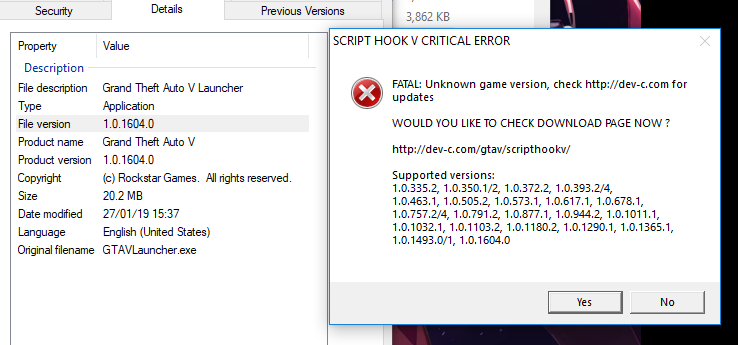
Hi so I made a clean install of GTAV and when I tried running scriptHookV I had a critical error. I put a picture for what happened to me so we see on the left the version of my game and the critical error with scriptHookV. So my scripthookV is up to date and my game is also up to date. If any of you can help me that will be appreciated because I really don't know what to do. ScripthookV support up to 1.0.1604.0 and my game is version 1.0.1604.0 Solved the forum have many of those question already answered. The game is updated even if the number didn't change...