


MidwestBen
Members
-
Joined
-
Last visited
Everything posted by MidwestBen
-
.thumb.png.27e592c446d00eba2803858d7b7c2f08.png) Hello everyone, this is my second EUP belt as a public release and there will be more soon to come. Join my discord https://discord.gg/fARe5sewcb! I no longer do custom orders for belts however I might start soon. Enjoy!
Hello everyone, this is my second EUP belt as a public release and there will be more soon to come. Join my discord https://discord.gg/fARe5sewcb! I no longer do custom orders for belts however I might start soon. Enjoy! -
.thumb.png.7f23732d0b9675c6c548ed7680fe35f7.png) Unfortunately, I am not capable of doing holsters yet however this is a really good suggestion and I will look into it. Thanks.
Unfortunately, I am not capable of doing holsters yet however this is a really good suggestion and I will look into it. Thanks. -
Hello everyone, this is my second EUP belt as a public release and there will be more soon to come. Join my discord https://discord.gg/fARe5sewcb! I no longer do custom orders for belts however I might start soon. Enjoy!
-
.thumb.png.3f5dec4868a8bfc4b0cd5d5253d8adbb.png) Wow! I appreciate your support! Get a life.
Wow! I appreciate your support! Get a life. -
@BaenkeBideren Join my discord for support. https://discord.gg/HfbnfCJVxy If anyone would like a custom belt or would like to inquire about receiving one my premade belts, please join the discord. https://discord.gg/HfbnfCJVxy
-
Hello everyone, this is my second EUP belt as a public release and there will be more soon to come. Join my discord https://discord.gg/fARe5sewcb! I no longer do custom orders for belts however I might start soon. Enjoy!
-
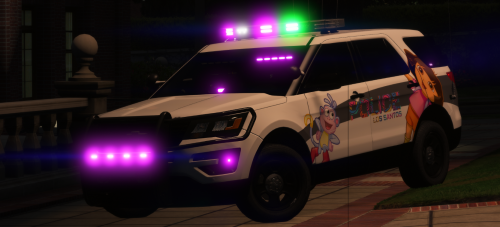 The moment when you put a chevy sign on an explorer. By the way if this was Non-ELS I would do a youtube review on it. K thx 🙂 ❤️
- 55 comments
- 5 reviews
-
-

.thumb.png.27e592c446d00eba2803858d7b7c2f08.png)

.thumb.png.7f23732d0b9675c6c548ed7680fe35f7.png)
.thumb.png.3f5dec4868a8bfc4b0cd5d5253d8adbb.png)

.thumb.png.bdfc4fd2a9e16cf4f60b5f8fde6b47cf.png)