


cptryan
Members
-
Joined
-
Last visited
Everything posted by cptryan
-
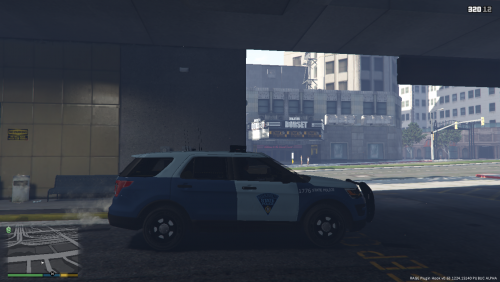 I am from Mass, so I am aware that these are unrealistic to the vehicles used by the MSP, just wanted to put out skins for the common vehicles.
- 4 comments
- 1 review
-
 The person who requested this also mentioned the DSP, so maybe we will see one.
- 22 comments
- 1 review
-
Thanks. Maybe I will but I don’t have time so if I did, it would be in a couple of weeks
- 22 comments
- 1 review
-
-
orange in my game, do you have RadianceV settings to extra bright? if so, just make it bright and it will look fine. never made a crown vic before, so just used the one I put on every other vehicle.
- 22 comments
- 1 review
-
-
This car pack was requested by someone, without equipment, didn’t have time to add anything else to it, so I just released it as is.
- 22 comments
- 1 review
-
here you go, this is where I downloaded them from.
-
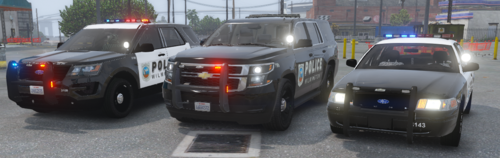
Police Pack based off of Wilmington, DE. Includes their 16 FPIU, 15 Tahoe, and 11 CVPI, others coming in the future Let me know what you like and don't like in there, and leave suggestions as to what you want in the comments. I have 2 more cars planned, but due to me being very busy, these will be a while. Donations are greatly appreciated, and will go towards future projects. Let me know of any bugs or something that doesn't look right in the comments so I can fix it. If used in a video, please link back to this file. Thank you for downloading and leave a review. PM if you want custom cars, this is why I made this pack, or skins. More to come in the future. I use VisualV and RadianceV, so if yours looks different than, this is probably why.
- 22 comments
- 1 review
-
-

- 3
-
-
what is the other error now?
-
how do you launch rage and gtav? by just clicking on rage or starting up gtav and then rage.
-
PM me if you still need it. Thanks
-
PM me if you still need help
-
PM me if you still need help.
-
PM me about if you are still interested.
-
I could try, look at the screenshots from stuff I have uploaded, and let me know if you want my help.
-
are scripthookv and scripthookvdotnet both installed?
-
yes, you can hit alt+J, or change that xml so that it goes from stage 1 to 2 to 3.
-
go to whatever antivirus software you have, and make sure that both RAGE and GTAV are whitelisted
-
try search warrant and stop the ped. for some reason in my game, i have vehicle search so i thought thats where it came from
-
PM me I could help
-
use https://www.myfonts.com/WhatTheFont/ to find it. then google the font it gives you somewhere else to get it for free. Works well
-
I use gimp and set everything 4k to 4028x4028. nothing else like you described.
-
dismiss it, go through the names it gives, pick which one looks best visually, and just make that L0-L4
-
I could help. PM me please.

