



Jesyx
-
Joined
-
Last visited
File Comments posted by Jesyx
-
-
On 7/19/2022 at 2:52 PM, belicfr said:
Hello, i don't know if you know this issue but when I hide my minimap and enable BodyCam script, the Axon logo is glitched. Anyone knows how fix that please?
Thanks!
Hello there,
I don't know if this mod is incompatible with BodyCam, I'll try it out to see what it does for me and to recreate the issue. The program is written very aggressively, as I'm not aware of any native code that only removes the mini map and doesn't interfere with other UI elements or mods such as PLD and potentially BodyCam, I know it's out there because Simple Trainer has a function for this, but I can't find it.
But again, I'm sorry it doesn't work and I'll try my best to fix the issue. I'll keep you posted
Also, sorry for the late response I was on vacation.
On 7/28/2022 at 1:57 AM, TrannerBigSis said:hi, can't seem to get it to work. i've tried changing the key to no avail, theres no error messages. it just.. doesnt do anything?
Could you please send the ini (contents)
-
11 hours ago, Robo22 said:
yeah in the download section it shows 1-1 as the old version even tho its the updated one, I downloaded the main file, which is the old one. Ill get the 1.1 and should fix the problem
Old versions
-
HUD_Toggler_1-1.zip
Updated May 26
4.56 kB
I'm very sorry about the confusion, I put the 1-1 version as the main file now. Again, sorry!
-
-
Edited by Jesyx
22 hours ago, Robo22 said:Where this ToggleRadarKey= located, your Ini or LSPDFR ini?
It's located in Grand Theft Auto V\Plugins\HUDController.ini
It should look something like this:
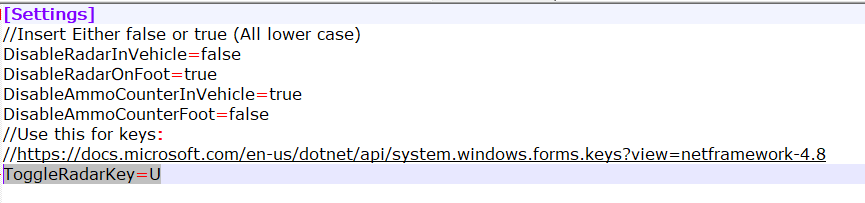
If not you might have an old version or need to reinstall the plugin
It's a standalone plugin and should not be installed in Grand Theft Auto V\Plugins\
So, technically it doesn't really have anything to do with the LSPDFR.
-
-
On 6/28/2022 at 8:49 AM, Robo22 said:
Mod works, but for some reason, i have to unload plugin and reload in game for the mini map to disappear properly. Probably a bug but its not a huge deal. This is very random, this happens sometimes when loading into the game
Have you tried toggling the mini map via the key in the INI (default = U)? Maybe that'll work if not please let me know, it might be a incompatibility issue with another mod then.
-
On 6/14/2022 at 3:21 AM, OldtimerGamer6351 said:
I see the you mentioned about the files being corrupted for this package. Are you planning on re doing airport callouts? I worked at LAX for over 10 years on the fire side and can give some ideas for OPS, Airport Police, ARFF, Fire responses, and EMS dispatches at LSIA.
I'm currently working on something else. I might remake them after a while, but if I do I'll definately shoot you a message, thanks for the offer.
-
Edited by Jesyx
55 minutes ago, LaBombitaGG87 said:Not sure if it'll help but i'll drop it anyways. So i've noticed that when you turn off the HUD with SimpleTrainer, PLD stays put, i don't know much about developing and script making but again just wanted to let you know 🙂
Thanks for everything you do!
Yeah I know, I just found out today too. However I don't know what native they used to accomplish this. I appreciate it though, thank you.
-
Edited by Jesyx
On 5/31/2022 at 8:59 PM, LaBombitaGG87 said:Is there a way to make PLD appear when map is not being shown?
On 5/31/2022 at 10:51 PM, Mattedious said:i also wanna know this. not knowing my direction or road is one super bad feature when i cant rely on my map.
Not to my knowledge. When you disable the mini map in the code, PLD also disappears for some reason. If anybody knows a native method to only remove the mini map it'd be greatly appreciated. I can't really do anything about this as PLD is coded so it follows the mini map when 'bigmap' is enabled. I genuinely don't know if this can be coded around. As the developer of PLD, LtCaine is not really active I'd doubt he'd be available to comment on this matter or give any advice on how to fix or circumvent this issue.
I really wish there'd be something I could do. If anyone has an idea how to fix this, please let me know.
Edit: I found out that NativeTrainer uses a method that doesn't make PLD dissapear, I don't know what that native is however.
-
7 hours ago, jogbot500 said:
I loved your airport callouts I hope you can update it soon
I'm sorry man I lost all the files on that 😑
I am currently in the process of making another plugin for LSPD:FR though.
-
12 hours ago, AllIsVanity said:
would it be possible to have the script toggle between the normal map in the car and the blips only map when your on foot? (to still see health, armor) Like automatically switch between the two different radar types from the settings menu
I'm not sure if there's a way to enable the blip only map, however I'm looking into a toggle map button in the script
-
-
32 minutes ago, XTREMEHEAT said:
This is great; been looking for something like this!
I was wondering if this can be modified down the line to hide vehicle pursuit blips on the map in LSPDFR (while in-vehicle); the GPS route to a call/pursuit vicinity would still show but the actual blip of the suspect won't. A realistic pursuit would require maintaining a visual, not keeping track of it on your own GPS.
Or a simpler workaround would be if there can be a keypress so we could disable/enable the map at will while in a vehicle without having to go to the trainer or in-game menu. That way we can simply keep the map on for the GPS functionality when driving to a call and then shut off the map during a chase etc.
I could try that, thanks for the feedback. There are limitations, I don't know what blips are what, disabling all red dots will work most of the time, but not always for example.
-
1 hour ago, K2021 said:
Is this callout any good, or does it crash your game?
I haven't tested it in a while, I put effort in these callouts, so I don't know if they work, but if they do they are good :), that's my unbiased opinion.
-
-
-

-
 1 minute ago, Siracusa said:
ok thanks , but I can't get up , I dont have no more memory available , I should reduce the population density to a minimum , and raise the texture , and the memory would work in "yellow" to the limit , I don't know if it's worth it , thanks anyway , just for your advice , playing with the high texture level , with the limit memory (orange) can create problems to the video card ? ( i dont have PC gamenig )
I get you, I mean it's up to you. And have fun playing lspdfr
-
-
-
12 hours ago, Citizen844 said:
In the demo video, on the bottom left by the map it showed the street name he was driving on. My mini-map has no such information
That mod is called PLD (Player Location Display) You can download it here:
11 hours ago, Siracusa said:
where do I raise the setting ? but don't you mean gta ? because I have them all high , I re-downloaded the "atlas map" mod to open the metafile but I don't see resolutions , maybe that's where I have to change something ? or from another setting ?I saw you also posted this issue on gta5-mods com, if you look in the comment section, the developer of the map says: 'Your settings will need to be at least the minimum of high.'
It worked for me. I don't know any other fix, are you sure your graphics settings are at medium or high?
-
On 4/8/2020 at 4:07 PM, Siracusa said:
the mod looks fantastic , only once has it been presented to me so far , and it has been a nice , realistic dive , about the suggestion of the visual mod of the atlas map the street names appear grainy , if zoomed in , the street name is unreadable , I don't know if it was meant for a 65 inch hdr tv , I don't know if it will be this , but for me it's unreadable , if anyone has advice , to make it look less blurry please , for the rest your mod it nice jobHi, sorry for the late response, you need to put (I think it's graphics) on medium or high. You definitely need to change a graphics setting to fix it. I will look for it and edit this when I've found it
1 hour ago, Citizen844 said:Awesome!
I added the streets name add on, but how do I make them show up like in the video?
I don't know what you mean exactly, could you explain your question a bit more?
-
15 hours ago, Armando_Monteza said:
my wont load the plugin, what folder again I dont have the /plugins/LSPDFR I only have /plugins I have tried making a folder and calling it LSDPFR but it will only regonize the plugin if its in gta v/plugins folder but when I load it ingame it fails to load.
It's a callout plugin, that way you don't have to load it yourself, LSPDFR will do it for you. You will need LSPDFR though. And make sure you spell LSPDFR correctly. If you need further help you can DM me on here.
-
15 hours ago, Flyingplanes3 said:
Well Done for creating such a great and unique callout,
I was just wondering whether you could make it an option in the ini file to have a large highlighted area on the mini map of where the suspect is for those who do not have such a good knowledge of the names of areas in the GTA V map, so that they do not have to pause the game and search for where the area is on the internet. Both me and several other members would highly appreciate this.
Thank You for your time and work
Kind Regards,
Flyingplanes3
I'll try and implement it
-
10 hours ago, Siracusa said:
esattamente, come è nella realtà, inoltre, domani proverò questa mod se è come penso che questa mod 5 \ 5 sia incredibile, bel lavoro @ Jesyx30 seconds interval is not too close ? I have a lot of callouts , and I am also very slow in the details on the patrol ride , I stop at checkpoints for several minutes , and I stop in details , I don't like being remotely controlled , this is why this mod inspires me , you can set like 5 minutes ? if you would be more detailed in the first two difficulties of the dispatch , with English I am not very grasped , sorry
Yeah I'll try to make the description more detailed and descriptive in the next update.






Airport Callouts [No Longer Under Development]
in Script Modifications & Plugins
Have you tried taking a look at the logs in Grand Theft Auto V\Logs\ maybe that'll tell you something