


Pawss
Members
-
Joined
-
Last visited
Everything posted by Pawss
-
 What an amazing pack the "ultra" says it all. Cars are great, I was willing to make my own ultimate backup .xml file for this, and what a pleasant surprise it was to find one was included with the file. Huge thanks for including that, it saved me and probably a ton of other people a great amount of time! Literally everything you could want is in this pack, I really with other developers would make packs like this! Amazing work!
- 215 comments
- 38 reviews
-
I put in a ticket with official gta v support,but if anyone has an idea, please share.
-
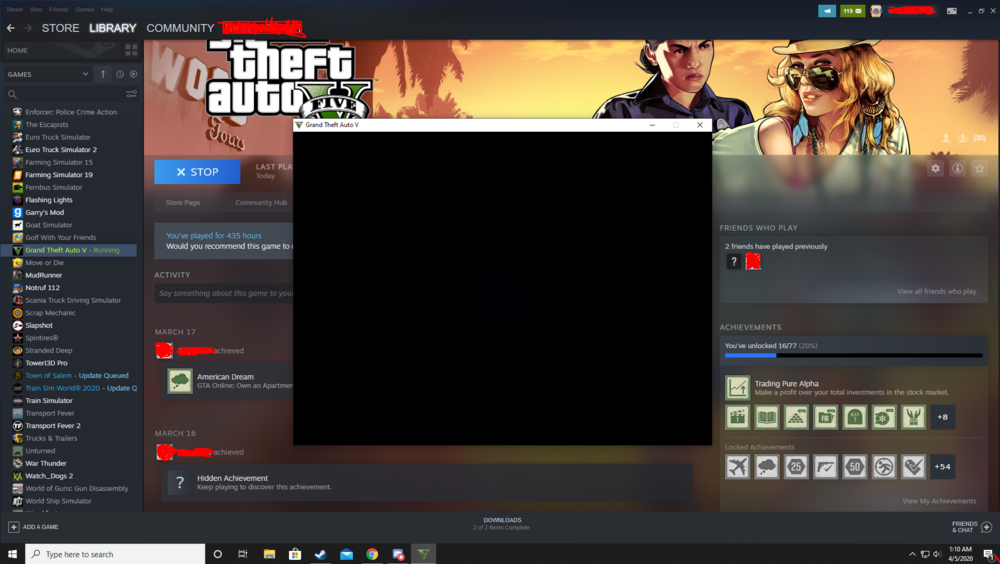
I even forced read only on my settings.xml and downloaded higher settings. I replaced the settings.xml with a higher settings file, the window still opens small, with minimum graphics.
-
This has been driving me crazy. I have not played GTA V without FiveM for a while and wanted to get back into LSPDFR. But when I launch GTA V it opens in a small window on my main monitor with all the settings at minimum. When I enter my desired settings and restart it just deletes all my settings and prompts me to configure my screen with the Rockstar logo on it again. I have tried deleting my settings files and retrying to no success, I have even reinstalled GTA V, and the Rockstar launcher with no success. Im only able to get as far as fixing the resolution and full screen option, as that does not require restarting GTA V. If I try to change anything else it prompts me to restart the game for the changes to take effect, but it just goes back to default. Attached is how GTA V looks when I pull it up initially every time.
-
Im having the issue as well and I'm on the latest Rage Plugin hook.
-
 Does your vehicle have ELS? If so when its responding try hitting X there is a message that shows up the first time you call for but I don't believe it shows up again. I don't know weather the message has to be present for this to work or not. If that doesn't work try taking out the els vehicle and reinstalling it again. Then you should get the message.
- 783 comments
- 86 reviews
-
I did as you suggested and looked through everything nothing has been updated before the first time I had the lag I removed my mods folder from OpenIV and it seems to have done the trick I must have screwed up in there somewhere. Kind of frustrating Ill have to reinstall everything in there so I put that off until the very last. Thanks for your help!
-
Two days ago my game was working fine I have a ton of LSPDFR related things installed. I was working all day yesterday and woke up today to find that my game lags whenever I seem to be moving or using a vehicle, or being chased by police, or attacking. I tried launching without rage plugin hook and I'm still having the problem. Seeing that it started up when I got wanted I removed all modded police cars. Still nothing... Any help would be nice even if you have a hunch cause its almost unplayable at this moment.
-
I am in the process of editing the betterems.xml for medics pack right now. When finished I plan on making it public, however in no way am I a developer/scripter so there may be some problems that I have not found and I am taking my time as I have a busy life outside of this. So far I have blaine fire units that respond from the SS station/hospital, and PB station/hospital, and Davis units responding from Davis. I haven't messed around with LSPDFR's backup xml but I can tell you how to edit the betterEMS.xml. 1. First find the station you want to edit of course. 2. If its a fire station and you don't want an "SUV" or whatever you use in the appropriate slot to respond change the VehicleSet chance to 0 above the name of the vehicle. And set the VehicleSet chance above the fireengine to 100. 3. At the very end of one of the lines you should see "firetruk" or whatever vehicle slot its using change this to the appropriate name. 4. To edit liveries add livery="(LIVERY NUMBER)" before "prep" IF ANYTHING AS MUCH AS AN EXTRA SPACE IS WRONG IT WILL CRASH BETTER EMS MAKE A BACKUP! For something to go off of heres my sandy shores fire setup it spawns the Yellow Blane fire engine and the Yellow Blaine Fire ambulance at the sandy hospital: </Station> <Station name="Sandy Shores Hospital" type="hospital"> <SpawnPoints> <Point name="delivery" x="1827.179" y="3694.178" z="33.95454" h="298.6161" delivery="true" /> <Point name="spawn" x="1837.281" y="3699.688" z="33.84263" h="298.5501" /> </SpawnPoints> <VehicleSet> <Vehicles> <Vehicle chance="100" livery="1" prep="a" name="ambulance" audio="VEHICLE_AMBULANCE">ambulance</Vehicle> </Vehicles> <Peds> <Ped>s_m_m_paramedic_01</Ped> </Peds> <NumPeds min="2" max="2" /> </VehicleSet> </Station> <Station name="Sandy Shores Fire Station" type="fire"> <SpawnPoints> <Point name="inside" x="1695.222" y="3588.936" z="35.69734" h="208.6499" /> </SpawnPoints> <VehicleSet chance="100"> <Vehicles> <Vehicle chance="100" livery="2" prep="a" name="firetruck" audio="VEHICLE_FIRETRUCK">firetruk2</Vehicle> </Vehicles> <Peds> <Ped comp_accessories="0" prop_head="0" tex_head="2">s_m_y_fireman_01</Ped> </Peds> <NumPeds min="4" max="4" /> </VehicleSet> <VehicleSet chance="0"> <Vehicles> <Vehicle color="red" extra_1="false" prep="a" name="FDTahoe" audio="VEHICLE_SUV">fdtahoe1</Vehicle> </Vehicles> <Peds> <Ped chance="0" comp_accessories="0" prop_head="0" tex_head="2">s_m_y_fireman_01</Ped> <Ped chance="100" RandomizeProps="true">s_m_m_paramedic_01</Ped> </Peds> <NumPeds min="2" max="2" /> </VehicleSet>
- 783 comments
- 86 reviews
-
Hey Im relatively new to this community (been here for like 2 weeks) and I'm still getting to know things. I have an EMS ambulance, Pumper, and Tahoe installed but sometimes they show up non code. I saw a message appear that said something about ELS breaking, and a spawn distance limit, but I couldn't read it before it went away. Haven't been able to make it reappear. Ive made the warp distance if greater than 500 lower to 400. Thanks for any help in advance!
- 783 comments
- 86 reviews

