
Harryhzzzzzz
Members
-
Joined
-
Last visited
Everything posted by Harryhzzzzzz
-
if anyone encounters this problem here is what worked for me personal SOLUTION: delete all existing gta v files and do a fresh install of the game. after redownloading adjust the graphics to ensure there is no lag and fps is good. note ur game may crash after a fresh install what i done was verify integrity of game files and everything worked. install only plugins LSPDFR and scripthookv in game directory and run RAGE. if your game works correctly then good. next i tried getting my mods back but openiv server appears down so i downloaded openiv offline version and it installed and worked perfectly. now i have my mods back so if you just follow my steps hopefully this will work for you!
-
Having same issues how you getting on ? Any idea how to fix ?
-
-
plan was to delete my mods folder as thought it was the cause of one of the many "crash while loading" and also to ensure no mods were slowing my pc down, and i reinstalled my mods folder got back in game noticed none of my mods were working or loaded so i done a fresh install of my mods folder once again no solution. at a loss as to what is causing this. when i load the game lspdfr runs and loads but i have no mods whatsoever eup menu loads plugin but doesn't toggle when i press f11 same with trainer v when i press f3 nothing happens. els is installed but doesn't work and the graphics mods i had are not in the game. my mods folder is completely fresh and stock and have all asi managers from openiv in and a new scripthook v. also got game config installed and all of the limiters in the directory this stopped my game from crashing. but now no mods. (note if i add scripthookv.net game crashes on load.) no clue what's causing mods to not work but pulling my hair out over this. spent hours figuring to stop the game crashing on startup (feels like its a continuous problem for many after rockstar keeps updating a 10 year old game every 3 weeks XD ffs kmo not even like i play online) and once i finally got it working no mods... all i wanna do is play lspdfr spent hours of my life tryna sort this now and on im mouse number two now as my other mouse got sent a bit to hard... if anyone knows a solution plz feel free to give suggestions and i will happily try them. i cant let this game beat me. 🥲
-
I think that red dead 2 is more suited for being a US marshal. probably make for more fun gameplay as well :)
-
did you find a solution? im having the same problem now, just wondering if you have an idea.
-
for me I launch Rage Plugin Hook and it stays stuck on the "launching game via steam" I have updated to the new update for gta v and updated Rage and LSPDFR but still no luck! does anyone know a solution or fix as been trying for days now.
-
 Really enjoyed playing all of the callouts! great job five stars well deserved . The callouts very diverse and thought out, also enjoyable, one callout took about 20 minutes to play through but I thought it was exciting and well made.
- 221 comments
- 63 reviews
-
launch rph and click the settings on the bottom left. or you could run rph as an administrator. hope you can resolve your issue.
-
probably not, can you launch every body, I have found a solution to our problem. if you go into the rage plugin hook settings and change "plugin timeout threshold" change the value from what should be 10,000 to 50,000. then launch rph. this may not be your problems fix but it solved my issue, glad to help you guys! 🙂
-
I'm sure its just because its a fresh release. hope they iron out though, for now I'm just thinking of staying with 0.3.
-
I looked at the asi tools and that is where I created the mods folder from. also tried loading lspdfr after being in the game but it says its a game fibre fatal error and that lspdfr was terminated. still not any luck.
-
I still have the issue what did you do? I deleted my mods folder but still have the issue. I recreated it and put only the update folder in but still have it. any ideas pal,
-
Hi there, I hope you are enjoying lspdfr 0.4! cant wait to join in but for now I was wondering if you could help me out I. when I launch rage plugin hook it loads me into grand theft auto and after about ten seconds it tells me that my "lspdfr was terminated because it caused the game to freeze." hope somebody can help me out here. Thanks 🙂
-
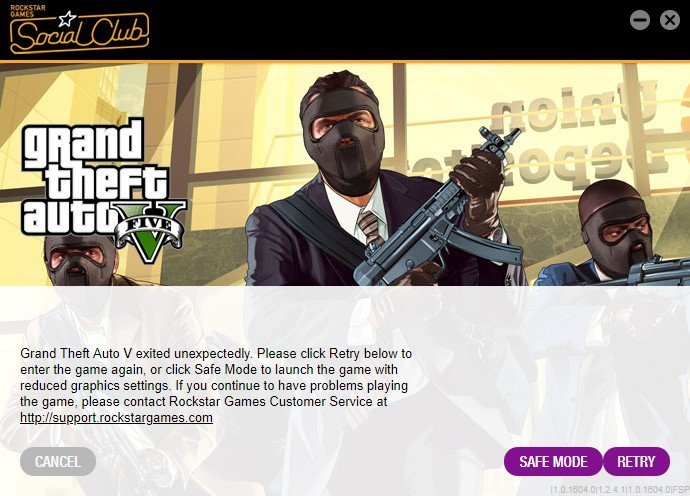
Hello, this message appears when I try to launch rage plugin hook. the game works perfectly through steam however. I have recently bought a new hard drive and wiped the previous one for any corrupt files, so rage plugin hook is the only thing installed in my gta v main directory. there is no other mods that would be stopping it. I have binged for hours trying to identify this issue and its coming up to the fourth month of not being able to play anything on rage. if you have any idea on how this issue can be resolved please enlighten me. as I'm LOSING MY MIND.
-
make sure you haven't got the launcher on run as administrator. this works for me.
-
this file is not causing the problem I have taken it out and relaunched steam gta v. is there any other things that you think may be causing the issue?
-
I have updated them both but the problem is still in game.
-
merry Christmas! unfortunetly I cannot play gta v as it keeps saying gta v exited unexpectedly enter game again with reduced graphics. However I have done this and nothing has helped me. I have looked for hours for a solution and cannot seem to find one. the game worked perfectly before the arena war update.