Td84mn
-
Joined
-
Last visited
Everything posted by Td84mn
-
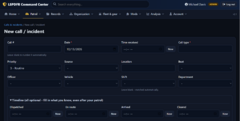
From the album: LSPDFR Command Center
-
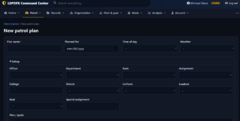
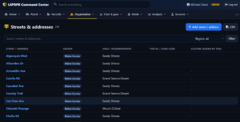
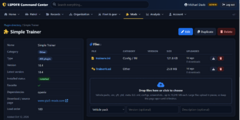
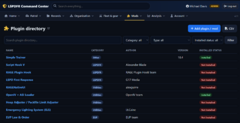
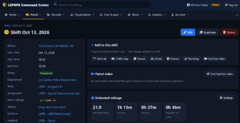
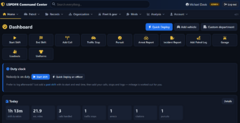
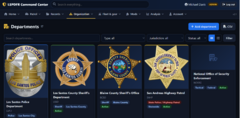
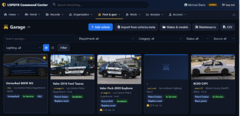
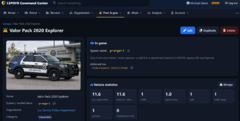
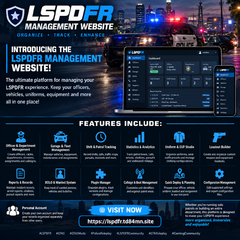
🚨 INTRODUCING THE LSPDFR MANAGEMENT WEBSITE! 🚔🎮 Attention, LSPDFR players! Looking for a better way to manage your law enforcement roleplay experience? Check out the LSPDFR Management Platform, designed to help you organize your patrols, officers, vehicles, uniforms, equipment, and much more — all in one place! 🌐 Visit now: https://lspdfr.td84mn.site 🔥 FEATURES INCLUDE: 🚔 Officer & Department Management – Create your own officers, ranks, departments, divisions, assignments, and callsigns. 🚘 Garage & Fleet Management – Organize your police vehicles, track assignments, manage vehicle equipment, and keep maintenance records. ⏱️ Shift & Patrol Tracking – Record your shifts, patrol activities, calls, traffic stops, pursuits, and incidents. 📊 Statistics & Analytics – Track patrol hours, calls handled, arrests, citations, pursuits, and estimated patrol mileage. 👮 Uniform & EUP Studio – Organize your uniforms, save outfit presets, and manage clothing configurations. 🔫 Loadout Builder – Create and organize custom weapon and equipment loadouts for your officers. 📋 Reports & Records – Maintain incident reports, arrest reports, citations, pursuit reports, and other important records. 🚨 BOLO & Wanted System – Keep track of wanted persons, vehicles, and bulletins. 🔌 Plugin Manager – Organize your LSPDFR plugins, track installed versions, and manage plugin configurations. 📻 Callsign & Patrol Beat Management – Customize your unit identifiers and organize patrol areas. ⚡ Quick Deploy & Patrol Planning – Prepare your officer, vehicle, uniform, loadout, and assignment for your next patrol. 📁 Configuration Management – Organize, edit supported settings, and export configuration files. 👤 Personal Account – Create your own account and keep your management records organized separately from other users. 🎮 Whether you're running solo patrols or building an entire law enforcement department, this platform is designed to help make your LSPDFR experience more organized, immersive, and enjoyable! ✅ One platform. More organization. Better patrols. 👉 Check it out today: https://lspdfr.td84mn.site 💬 What feature are you most excited to try? Let us know in the comments! #LSPDFR #GTA5 #GTA5Mods #PoliceRoleplay #LSPDFRCommunity #GTARoleplay #GamingCommunity
-
Screenshot 2026-10-13 205407.png
-
 Screenshot 2026-10-13 205337.png
-
 Screenshot 2026-10-13 205306.png
-
 Screenshot 2026-10-13 205225.png
-
 Screenshot 2026-10-13 205151.png
-
 Screenshot 2026-10-13 205128.png
-
 Screenshot 2026-10-13 204946.png
-
 Screenshot 2026-10-13 205053.png
-
 Screenshot 2026-10-13 205006.png
-
 Screenshot 2026-10-13 205029.png
-
 69e9474b-c7e1-4675-a465-e1633c6f4bba.png
-
-
From the album: LSPDFR Command Center
-
From the album: LSPDFR Command Center
-
From the album: LSPDFR Command Center
-
From the album: LSPDFR Command Center
-
From the album: LSPDFR Command Center
-
From the album: LSPDFR Command Center
-
From the album: LSPDFR Command Center
-
From the album: LSPDFR Command Center
-
From the album: LSPDFR Command Center
-
From the album: LSPDFR Command Center
-
 You have to run the game and go on duty and then the folder containing the ini file will be generated. Not able to pull up the menu key using R keybind.
- 44 comments
- 1 review
-
You have to run the game and go on duty and then the folder containing the ini file will be generated. Not able to pull up the menu key using F7 or R. LSPDFRPartners.txt
- 44 comments
- 1 review
-
I've created a new CAD?MDT fir roleplaying. It doesn't pull data from GTA V/LSPDFR/FIVEM but with the right setup you can still roleplay it just like you would with Sonoran CAD. If any developers are interested in helping me pull data from the game message me. It can also be used for dispatch training. The software is ran on PC browser, android or iPhone. It is currently in beta and new features are currently being added. Visit youtube video for beta tutorial and link to sign up for it https://youtu.be/HMW3HkJ1QgI
-

From the album: Most Realistic CAD/MDT for roleplaying
-

From the album: Most Realistic CAD/MDT for roleplaying
-

From the album: Most Realistic CAD/MDT for roleplaying
-

From the album: Most Realistic CAD/MDT for roleplaying
-
-
 This uniform will fit both male and female.
-
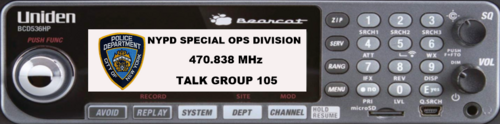 Add a touch of realism to your LSPDFR gameplay with the NYPD Police Radio Display Plugin! This simple yet immersive addition brings an authentic-looking NYPD police radio interface into your game for enhanced roleplay. Features: Realistic NYPD Radio Display: A digital radio interface featuring the NYPD agency name, scanner frequency, and talkgroup. Static Display: Designed purely for visual immersion, the display is non-functional and does not light up, staying true to its role as a realistic prop. Immersive Design: Perfect for creating the look and feel of a real NYPD patrol car without unnecessary distractions or functionality. Whether you're setting up the ultimate NYC-inspired patrol vehicle or just looking to enhance your roleplay environment, this plugin is the perfect detail to complete the scene! Installation: Install Prowler Radio. You do not need to unzip this folder simply open the NYPD Police Radio Display Plugin folder, find the display you want and drag it in the textures folder on the next step. Go to your game directory/plugins/lspdfr/prowler radio and replace the textures folder with the textures folder inside the file you want, choose from Citywide patrol, special operations division or New York State Police. Sorry if the directions are confusing but i'm available to hlp if you cannot figure it out. Requirements: Prowler Radio
-
 Poiunt of reference this is Derek Chauvin:
-
Eup wardrobe file included in download folder. This is Vest 4 Setup 2 from Vest created by HANAKO Texture created by Td84mn Installation: Navigate to mods/update/x64/dlcpacks/eup/dlc.rpf/x64/eup_componentpeds.rpf then drag and drop the folder "mp_m_freemode_01_mp_m_january2016". Required Files: Recommended:
-
Anyone know where I can find the links to the fire trucks for this texture I do not see them on thr creators profile, there was one on there but it is in gta4 format .wft
- 6 comments
- 1 review