Tyceberg
Members
-
Joined
-
Last visited
Everything posted by Tyceberg
-
Totally forgot about the carvariations! x.x Thank you! I just added this to mine and it started working: <Item> <modelName>statetroop2</modelName> <sirenSettings value="1"/> </Item>
-
I've driven myself nuts trying to figure this out. I have been adding ELS police cars to GTA V and installing them as add-ons. So far I have added 3 vehicles. All of them install and load in just fine, light patterns and siren function, the game recognizes all of them as police/emergency vehicles. The only weird exception is the third add-on vehicle. No matter what I change or adjust-- no matter what vehicle model is used-- the game will recognize the third add-on vehicle as an emergency/police vehicle and list it as such, the LSPDFR computer and other police car related things work, but it will not be recognized by NPC drivers, so they will not pull over when blipped and lit up, they will not move out of the way when you're racing down the road lights and sirens. I'm at such a loss as to why everything works except that. I'm fairly certain I have a modified GameConfig file of some kind. I've tried making sure that the ELS file had: <DfltSirenLtsActivateAtLstg>3</DfltSirenLtsActivateAtLstg> The vehicle.meta for it has: <flags>FLAG_LAW_ENFORCEMENT FLAG_NO_RESPRAY FLAG_DONT_SPAWN_IN_CARGEN FLAG_REPORT_CRIME_IF_STANDING_ON FLAG_HAS_LIVERY</flags> and <audioNameHash>Police</audioNameHash> What am I missing????????😭😭😭😭😭
-
Can't lie, I feel a little stupid not having realized that RagenativeUI was the issue seeing how straight forward and in my face it actually was. x.x
-
That was it! 😄 Thanks a bunch! Just out of the curiosity of learning, what line in the log file did you look at to find that? Also glad you noticed the VocalDispatch thing! I stopped using that long ago in favor of GrammarPolice, but when I was reinstalling everything I must've brain-farted. ^^'
-
Was updating everything after the 2699 update, however, now LSPDFR is crashing when going on duty. Haven't added anything new. I'm not great at reading these crash logs so I'd appreciate a knowledgeable eye taking a look. RagePluginHook_03082022_223918.log
-
 Love the functionality added by this mod, however, I've noticed since installing it that the Peds in the front vehicle in the line will often despawn (specially if the path is still being created,) random empty cop cars have started spawning throughout the map, and vehicles randomly stop in the middle of lanes or sit crooked in the middle of the whole road and just sit there not moving. even if you hit their vehicles or move it in anyway they just sit there broken. Has anyone else experienced this? Does anyone know any way to repair this issue? Since this mod Author has chosen to retire, does anyone know if someone has taken up the mantel of updating it or creating a new mod with similar functionality?
- 237 comments
- 24 reviews
-
-

- 2
-
-
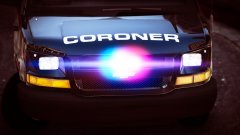 I think it looks awesome! I wish I could download it, it's best coroner vehicle I've seen.
 -