SnR
Insiders
-
Joined
-
Last visited
Everything posted by SnR
-
Will there be any videos released by LSPDFR YouTubers like for 0.3?
-
-
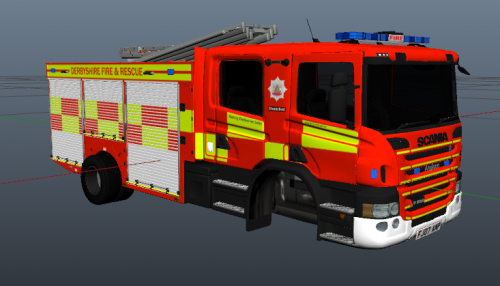 Hey All! Today I bring you a new livery that I have been working on for the Scania P280 by Raddz Modding. I created this due to there not being a lot of models or skins out there for the Emergency Services in my Area. This is the second skin that I have created so any criticism is accepted 😁 Requirements Scania P280 by Raddz Modding Emergency Lighting System by Lt.Caine Installation Before installing the vehicle into your game, drag the YTD file provided in my download into the WinRAR file provided by Raddz Modding
 -
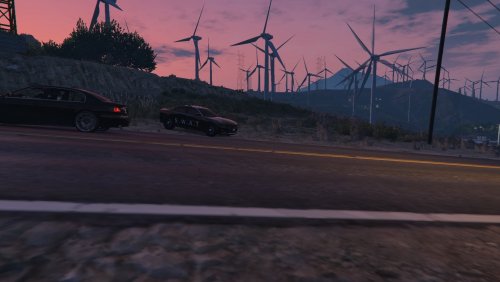 **YOU NEED TO HAVE A DODGE CHARGER MODEL INSTALLED FOR THIS TO WORK** Do you want to patrol as SWAT but have to drive in a standard skinned police vehicle? Well not for long! Introducing the Specialist Weapons and Tactics decal for the Dodge Charger! The San Andreas State has been in talks with Dodge to have a new decal made for their response vehicles within Los Santos and Blaine County. It has been rolled out across the West starting with San Fierro in 2017 and finally Los Santos in 2018. The skin is best off with a Dodge Charger with Red ELS . You could also use EUP Law and Order for the NOOSE gear. ~ This is what I use in my game for the best emersion. This is my first skin, so any advice for future skins is accepted