Skip to content
View in the app

A better way to browse. Learn more.

LCPDFR.com

A full-screen app on your home screen with push notifications, badges and more.

To install this app on iOS and iPadOS
  1. Tap the Share icon in Safari
  2. Scroll the menu and tap Add to Home Screen.
  3. Tap Add in the top-right corner.
To install this app on Android
  1. Tap the 3-dot menu (⋮) in the top-right corner of the browser.
  2. Tap Add to Home screen or Install app.
  3. Confirm by tapping Install.
Due to overzealous filtering on Microsoft’s side, some emails to Outlook and Hotmail addresses may not be delivered. If you’re affected, please use a different email address or try again later.

KLE0

Insiders
  • Joined

  1.    dillcp1978 reacted to a file: [ELS] LAPD FPIS Mini-Pack
  2. ThomasPolicePhotography started following KLE0
  3. Al Harbi started following KLE0
  4. nige789 started following KLE0
  5. Donza1000 started following KLE0
  6. Layalyn started following KLE0
  7. Slick.18 started following KLE0
  8. The420Jamaican started following KLE0
  9. Riki.PR.15 started following KLE0
  10. chris15405 started following KLE0
  11. Coastal Customs started following KLE0
  12. Thank you! Yes, I have a 16 and a 13 FPIU planned, possibly a unmarked too.
  13. It's a certain Whelen siren. I am not sure about the exact model, though. Leave it as is in the dlc pack. You only need to take the vehicles.meta file out. Again check out my other download to see how it is structured to replace sheriff2. There is no plan since these cars are based on the real life department. That said they have an unmarked FPIU with ALPRs that I may make in the future.
  14. If you are talking about siren settings they use 71 and 72, which is included in the carcols file. There are a few generations IRL, mine is based on the older version. You can do it yourself. Just rename the car's model name (dcpd, dcpd2) to the car you want replaced in both the rpf archive and all data files, then copy the vehicles.meta section to the update.rpf one. Checkout my BCSO FPIU (valor) which replaces sheriff2 in a similar way if you are unsure what to do.
  15. Thank you! That sounds like the carcols file is not working, if you have other custom cars there might be a lighting siren settings id conflict, try changing the siren settings id to another value in both carvariations and carcols. It's loosely based on the Daly City Police Department, fpis, fpis2.
  16.    KLE0 reacted to a review on a file: [ELS] Paleto Bay PD FPIS Mini Pack
  17.    KLE0 reacted to a comment on a file: [ELS] BCSO 2016 FPIU with Federal Signal Valor
    • 9,154 downloads
    • Version 1.0.0
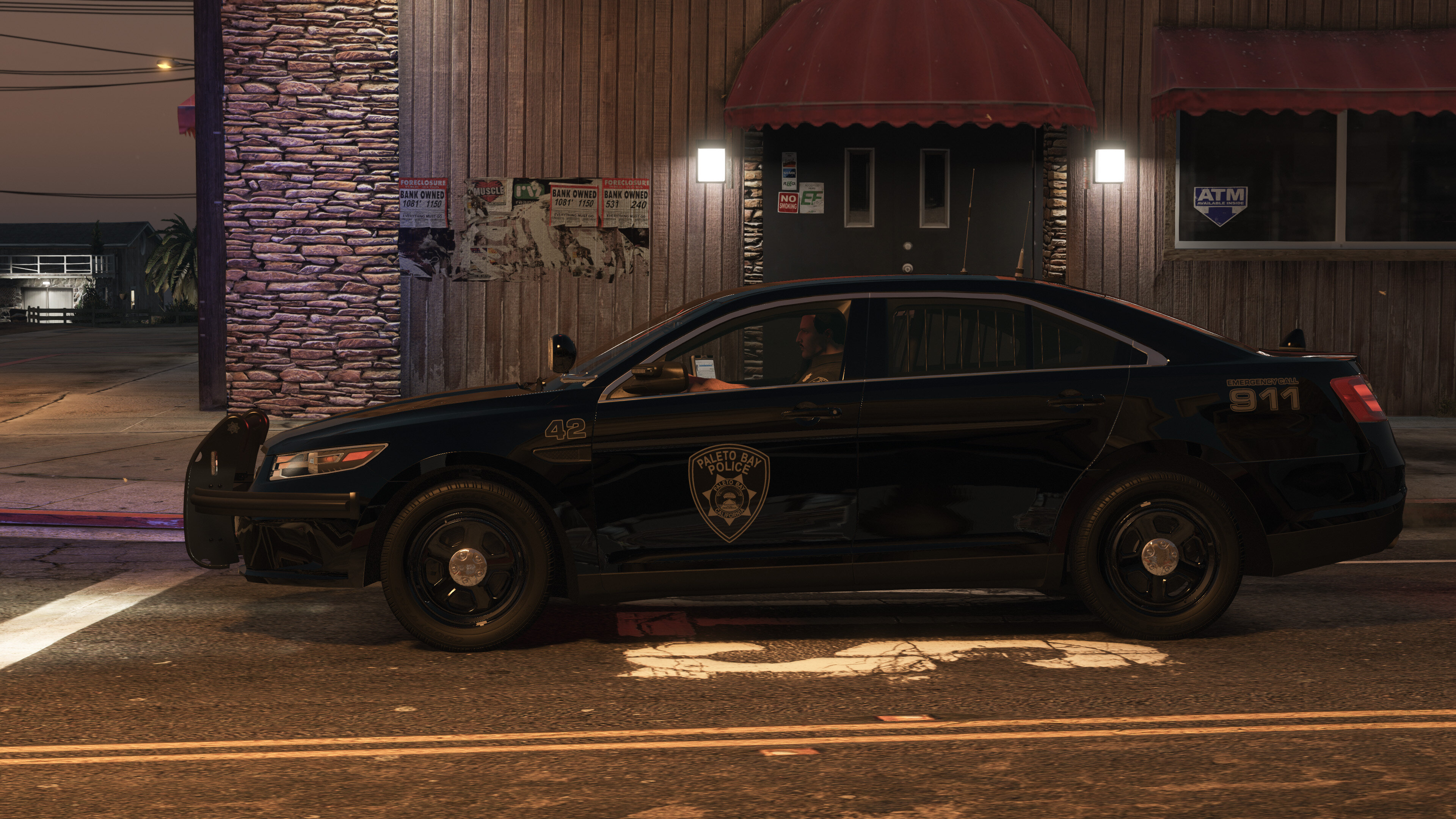
    Vehicles (add-on) dcpd: FPIS (add-on) dcpd2: FPIS Slicktop/Traffic Features Realistic 3-stage lighting with takedown and rear directional support Frontal flashing takedowns automatically shut off when the vehicle is in park Breaking glass, working dials, bullet resistant windshield, animated exhaust pipes, leaking fuel tank, etc Impressive and accurate environmental lighting in all stages 4K liveries Optimized model, parts, and textures Optional Equipment FPIS (one will spawn) EXTRA_10: ALPR cameras EXTRA_12: LoJack antennas FPIS Slicktop/Traffic (the PB5 will always spawn, the radar spawns randomly) EXTRA_10: Radar EXTRA_12: Setina PB-5 wraparound Notes This pack uses an ELS/non-ELS hybrid setup with custom dials, paint, lighting ids, and custom EXTRA configurations, therefore it is highly recommended to use the DLC pack for easier installation. If you have to install the files manually, make sure to install everything correctly (vehicles.meta, carcols, carvariations) otherwise the vehicle will not function as expected. Please do not re-upload this vehicle to other websites or use this model for your own financial gain in any way, shape or form. Video Preview The video was taken in beta stage and the spotlight and brake/reverse lighting setup on the Liberty I version has since been changed - see screenshots instead.
  18. Johnny McKenzie Went on-duty at Paleto Bay Police Department in Mission Row, Atlee St
  19. John Marcos Finished responding to a [UC] Reports of an Armed Clown in Paleto Forest, Great Ocean Hwy
  20. John Marcos Responded to a [UC] Reports of an Armed Clown in Paleto Bay, Great Ocean Hwy
  21. John Marcos Performed a traffic stop on a Black Steal Emperor with registration 27YWK052 in Paleto Bay, Great Ocean Hwy
  22. John Marcos Finished responding to a [UC] Stolen Truck Pursuit in Mount Chiliad, Great Ocean Hwy
  23. John Marcos Responded to a [UC] Stolen Truck Pursuit in Paleto Bay, Procopio Dr
  24. John Marcos Finished responding to a Pursuit in Paleto Bay, Paleto Blvd
  25. John Marcos Responded to a Pursuit in Paleto Bay, Paleto Blvd
  26. John Marcos Finished responding to a Stolen Vehicle Tracker in Paleto Forest, Procopio Promenade
  27. John Marcos Performed a traffic stop on a Matte Lime Green Tailgater with registration 71YWU467 in Paleto Forest, Procopio Promenade
  28. John Marcos Performed a traffic stop on a Matte Lime Green Tailgater with registration 71YWU467 in Paleto Forest, Procopio Promenade
  29. John Marcos Responded to a Stolen Vehicle Tracker in Paleto Forest, Procopio Promenade
  30. John Marcos Finished responding to a Pursuit in Paleto Forest, Procopio Promenade
  31. John Marcos Responded to a Pursuit in Paleto Bay, Great Ocean Hwy
  32. John Marcos Finished responding to a [UC] Traffic Stop Backup Required in Paleto Forest, Great Ocean Hwy
  33. John Marcos Responded to a [UC] Traffic Stop Backup Required in Paleto Bay, Great Ocean Hwy
  34. John Marcos Performed a traffic stop on a Graphite Black Serrano with registration 83UKT501 in Paleto Bay, Great Ocean Hwy
  35. John Marcos Performed a traffic stop on a Graphite Black Serrano with registration 83UKT501 in Paleto Bay, Great Ocean Hwy
  36. John Marcos Finished responding to a Outstanding Arrest Warrant in Paleto Bay, Procopio Dr
  37. John Marcos Responded to a Outstanding Arrest Warrant in Paleto Bay, Paleto Blvd
  38. Thanks. I use Visual V mostly.
    The quality of the vehicle and attention to detail is phenomenal. Only the FPIS has been released as of now, but Agent has put more effort into this single vehicle than most people have in an entire pack on this site. Get it if you want an authentic NPS experience.
  39.    KLE0 reacted to a comment on a file: [ELS] BCSO 2016 FPIU with Federal Signal Valor
  40. I don't think so. Yup, that's what the livery and setups are mostly based off of. Though, I took some creative liberty on the lighting.
  41.    KLE0 reacted to a comment on a file: [ELS] BCSO 2016 FPIU with Federal Signal Valor
  42.    KLE0 reacted to a comment on a file: [ELS] BCSO 2016 FPIU with Federal Signal Valor
  43. The carcols are not working. Did you use the DLC and follow all the installation instructions? I can't think of any other reasons outside of what's already mentioned in the instructions on top of my head. I won't be able to repackage my vehicles, sorry. You can try downloading my FPIS add-on pack from here and see how the files are structured. It's something that's hard to describe but quite easy to do.
  44.    KLE0 reacted to a gallery image: SGT. Stevens Portrait
  45. Visual V. I am not a fan of the idea of making a fleet of vehicles with the same lightbar and exact same setup/lighting pattern etc. It feels very repetitive and isn't really fun to make (or play with). Not to mention that, at least in my area, departments don't just stick with one lightbar for all their vehicles. My BCSO vehicles are mostly inspired by the San Mateo County Sheriff where they use Valor for the new FPIUs but Code 3 21TR and 2100 for their FPIS and CVPIs. More BCSO vehicles are planned but like I said the setup is going to vary a bit.
  46.    KLE0 reacted to a comment on a file: [ELS] BCSO 2016 FPIU with Federal Signal Valor
  47. Well, it's an extra step for me to package it into a DLC. For you it's easier to install because you don't have to individually replace the carcols and carvariations files.
  48. Yes more BSCO vehicles are planned. I won't be adding a Liberty on this vehicle specifically, sorry -- but I do have another FPIU with the Liberty 2 planned.
  49. If the lights are messed up it means you did not add the carcols and carvariations properly. Check these files. You can try downloading my FPIS add-on pack from here and see how the files are structured. But since you are able to get the car to spawn you are already very close to victory.
  50. I explained this in the notes section in the instructions. Exactly one of extra_10 and extra_12 need to be enabled. This is because ALPR and non-ALPR mounts are different so you need to choose one. The cars will spawn correctly because of the extra settings defined in the vehicles.meta. If you manually toggle extras, remember to follow this requirement too.

Account

Navigation

Search

Search

Configure browser push notifications

Chrome (Android)
  1. Tap the lock icon next to the address bar.
  2. Tap Permissions → Notifications.
  3. Adjust your preference.
Chrome (Desktop)
  1. Click the padlock icon in the address bar.
  2. Select Site settings.
  3. Find Notifications and adjust your preference.