



Joes2fst4u
Members
-
Joined
-
Last visited
Everything posted by Joes2fst4u
-
Alright think I got it fixed, I basically wiped all the mods/plugins folders and started over again and so far smooth sailing.
-
Still having more crashes, latest logs and crash report attached. RagePluginHook_31122021_025557.log
-
Ah ok thank you so much, I'll go get those removed.
-
If anyone could help me figure out what's wrong I'd really appreciate it. I'm 90% sure it's a mod I just don't know which one, or it's one of the police vehicles. Below are the most recent logs with crashes. RagePluginHook_30122021_200338.log RagePluginHook_30122021_053107.log Here's a crash report I forgot:
-
I'm getting the exact same error in my RPH log.
-
I've been getting all sorts of random crashes for no reason (probably something else dumb like windows updates). Attahced is the RPH log, but I found it interesting that when looking at it the error stack shows something about possible corrupt memory. Any pointers or help would be appreciated! Thank you! (Windows 10, current updates for all plugins and LSPDFR) RagePluginHook.log
-
Hey guys I got it fixed, for your info too open the OpenIV app, if you see a green banner about the update.rpf file being out of date then click it and let it update.
-
That got it! Thank you!
-
I have not, what do I need to do to update that folder? (I know how to edit it etc in OpenIV, I just didn't realize it has an update that it needs). Where do I find the update?
-
It's like it just stops loading, no error or anything, updated to latest version of everything. RagePluginHook.log Here I have a newer better log here, my bad for that. RagePluginHook.log
-
How are you restarting the game? The launcher? The rage app?
-
I'm glad to know I'm not the only one seeing this! Yep what I'm seeing too.
-
Attached is log, it'll start loading plugins then that's about it and it just sits there. I've selected don't load any plugins and set the timeout to 60000 with no luck. Just staying at the loading screen and that's it. Any help is much appreciated! RagePluginHook.log
-
Everything is fine until I go on duty. Only mods I have are LSPDFR (obviously haha), ELS, and a couple of cop cars. Attached is the log, any help is much appreciated. RagePluginHook.log
-
I ended up having to reinstall the game but that got it for me.
-
Log attached... RagePluginHook.log
-
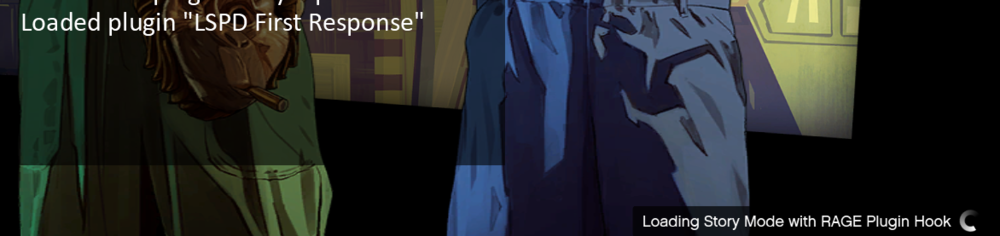
Fresh files, all updated, LSPDFR stuck at loading screen. I will get a "LSPDFR Plugin Loaded Successfully" and then that's it. It just sits there with the spinning wheel of "Loading Story Mode with RAGE Plugin Hook" and that's as far as it goes. If you hit Alt-F4 you do get the option to quit gently. Any help would be appreciated.
-
I'm experiencing the same problem, game gets stuck after the "Loading LSPDFR Plugin" screen, it just has the spinning wheel in the bottom right, you can gently exit it but that's about it. Here's all I see...
-

