


RCS943
Members
-
Joined
-
Last visited
Everything posted by RCS943
-
Does polgauntlet use its own engine sounds? Engine sounds are great but if I try to add handling or the sound to police4 it crashes. I understand they are 2 different vehicle meta but maybe someone could tell me if a different vehicle sounds the same.
-
Appreciate it very much!!
-
There's a file path but I don't know off the top of my head. When I play again I'll post the file path.
-
Off and on today I have been searching and googling where the polgauntlet vehicle meta is with no luck. I have successfully replaced the car but would like to know where that meta is since I do not see it in the vehicle meta I've edited for police4. Thanks for any information.
-
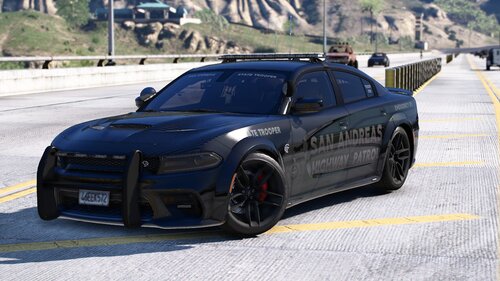 Great car but I do not see the rambar mounting brackets. Rambar is just floating. Great car!!
 -
-
-
This is a custom sound file for the siren mastery plugin. Credits: Sounds Code 3 and SVP. Me for making them come together. Disclaimer: I take no resposibility for files changed that may affect your gameplay or system. install: Put the sound file in the plugins/sirenmastery/customsirens folder and change your vehiclesirensetup file so it says "ScrollWarning" under whichever siren number you want it to be. Basically I liked how squads were able to auto scroll through all the tones. With the great new siren mastery that is now possible. It is as it says. It automatically scrolls through all the siren tones without the user having to do anything.
-
-
-
-
-
-
-
Just deal with it. no offence but really are we getting a bit to nit picky
-
Uhmmm what? Like window lights?
-
I usually don't post about work because I can't. But, dispatch gave out footage so here you go. Responded to a 10-52 rollover(accident w/injuries) this morning. I was the second to arrive just as the trooper asked for fire for extraction. She was alert and in pretty good spirits considering she just went off a 60 to 80 ft drop from a bridge overpass(not real sure of the height). What saved her in my opinion is her small size. Anyone over 160 lbs prob and over 5'7" would of had some broken legs or neck injury. Anywho figured since I don't get to share real life work that deals with the game fundamentals of LCPDFR, this kind of gave me a window. I have my own video of the scene but cannot upload it sorry. Here is a link from the news http://minnesota.cbslocal.com/2014/01/07/car-plunges-from-bridge-in-st-paul/
-
Oh yea for sure. Usually I just respawn my car. Thanks again.
-
That is weird. Never happened to me before. Gives me a good reason to upgrade now. Thanks for the response.
-
Nice job gents! Seems to be more stable for me. The only issue is my squad will disappear when I walk across the street to ID someone and see what they are up to. I turn around and my squad is gone. Any ideas?
-
Well since I didn't see a scan or loop mode siren I liked, figured I'd make one myself. The WAV file sounds great out of the game but in game all the tones are scrambled except for one. It is right at 6 sec loop so that shouldn't be the problem but I'm stuck. Help would be great. Included I would have attached my wav file I am trying to use as the ALT1 siren but LCPDFR website won't let me upload it in this message(error IO). I have it ready it just doesn't sound correctly at all in-game.
-
It is not an ENB but, but ,but it will be night and day difference then what stock GTA is. It's the only thing I use. Just try it. It made my game even run faster. http://gtapolicemods.com/downloads.php?do=file&id=1649
-
Figured this might be a good place to post this since we are talking about keys. Not trying to hijack just help. For those using a controller besides xbox. Beginning of the traffic stop, why you pulled them over: F9= vehicle not road worthy F10= Aggressive driving F11= Speeding F12= Other After giving them a reason: F9= Ask for license F10= Don't ask for license After checking there ID: F9= Issue citation F10= Ask to step out of the car F11= Give them a warning Ctrl-N= Air support Alt-N= Noose ground support Alt-E= call into dispatch, report in That's all I figured out so far, hopefully this helps a bit.
-
Alright, guess I will have to go buy another contoller. Thanks for the quick response.
-
I understand that. But it is fine if the shortcuts don't work on my controller. It would be nice for the keys to be binded to the keyboard without the need for a xbox controller. RC2 worked fine with a keyboard and controller combination. Not trying to be an ass just seems wierd that since this intergration of an xbox controller has made the keybindings not work correctly.

