



Giovanny881
Members
-
Joined
-
Last visited
Everything posted by Giovanny881
-
This callouts are really usefull also Check out Albo1125 callouts Traffic control
-
@KDenv01 With visual studio you can create your own UI menu, If you need some help you can ask me
-
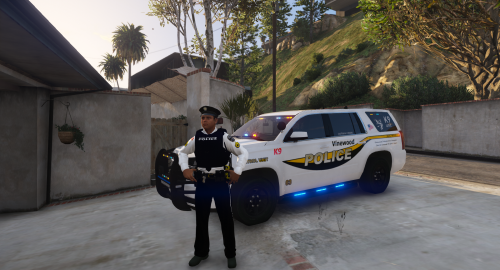 Good pack! which uniform do you use?
 -
-
thanks for the messageHello, I have a question i want to add playscanner audio when the callout has ended example all units we are code4 someone know how to do that?do you have set your proccesor to x64 and net.framework to4.6? send a screenshot of the errors on visual studio
 Which carpack do you use?? it looks nice
 can someone help me to install it it says error cannot locate the languange
- 587 comments
- 106 reviews
Respect People here so helpfull Thankyou NoNameset I will take a look
I have updated the text and added the readme when I have to add other things I like to hear greetings giovanny
ofcourse I will do it now thanks for feedback
This Stolen Callout is created By Giovanny881. If there any bugs or problems you can contact me on LSPDFR. This is my first callout that I have made!!! Stolen Callout Version 3.0.0 is now available Scroll Down to see whats new! Special thanks to @mbk2008 special thanks to @NoNameSet enjoy GTA V lcpdfrthanks for reply ik heb nog een vraag ik heb alles gedaan wat hij ook deed maar als ik m wil doorverwijzen om mijn callout te registreren vind ie m niet en komt er een spellingsfout using System; using System.Collections.Generic; using System.Linq; using System.Text; using System.Threading.Tasks; using LSPD_First_Response.Mod.API; using LSPD_First_Response.Mod.Callouts; using Rage; namespace LSPDFRFirst { public class Main : Plugin { public override void Initialize() { Functions.OnOnDutyStateChanged += OnOndutyStateCHangeHandler; Game.LogTrivial("plugin LSPDFR_API_GUIDE." + System.Reflection.Assembly.GetExecutingAssembly().GetName().Version.ToString() + "By Officer Gio Has been initialised"); Game.LogTrivial("Go on duty to fully load LSPDFR_API_GUIDE."); } public override void Finally() { Game.LogTrivial("LSPDFR_API_GUIDE has been cleaned up."); } private static void OnOndutyStateCHangeHandler(bool Onduty) { if (Onduty) { RegisterCallouts(); } } private static void RegisterCallouts() { Functions.RegisterCallout(typeof(Callouts.stolenvehicle)); } } } ik heb de fout dikgedruktAls je wilt graag in het Nederlands uitleggen is wat makkelijker alvast bedanktthanks for the message using System; using System.Collections.Generic; using System.Linq; using System.Text; using System.Threading.Tasks; using Rage; using LSPD_First_Response.Mod.API; using LSPD_First_Response.Mod.Callouts; using LSPD_First_Response.Engine.Scripting.Entities; using AdvancedHookManaged; [assembly: Rage.Attributes.Plugin("pursuitGtav", Description = "pursuitGTAV.", Author = "GioJamie")] namespace pursuitGTAV.Callouts { public static class Entrypoint { } [CalloutInfo("stolenVehicle", CalloutProbability.High)] public class Stolenvehicle : Callout { private Ped suspect; private Vehicle Suspectvehicle; private Vector3 Spawnpoint; private Blip suspectblip; private LHandle Pursuit; private bool Pursuitcreated = false; public override bool OnBeforeCalloutDisplayed() { Spawnpoint = World.GetNextPositionOnStreet(Game.LocalPlayer.Character.Position.Around(350f)); ShowCalloutAreaBlipBeforeAccepting(Spawnpoint, 35f); AddMinimumDistanceCheck(35f, Spawnpoint); CalloutMessage = "StolenCar"; CalloutPosition = Spawnpoint; Functions.PlayScannerAudioUsingPosition("We_HAVE Crime_STOLEN_CAR IN_OR_ON_POSITION", Spawnpoint); return base.OnBeforeCalloutDisplayed(); } public override bool OnCalloutAccepted() { Suspectvehicle = new Vehicle("SULTANRS", Spawnpoint); Suspectvehicle.IsPersistent = true; suspect = Suspectvehicle.CreateRandomDriver(); suspect.IsPersistent = true; suspect.BlockPermanentEvents = true; suspectblip = suspect.AttachBlip(); suspectblip.IsFriendly = false; suspect.Tasks.CruiseWithVehicle(25f, VehicleDrivingFlags.Emergency); return base.OnCalloutAccepted(); } public override void Process() { base.Process(); if (!Pursuitcreated && Game.LocalPlayer.Character.DistanceTo(suspect.Position) < 35f) { Pursuit = Functions.CreatePursuit(); Functions.AddPedToPursuit(Pursuit, suspect); Functions.SetPursuitIsActiveForPlayer(Pursuit, true); Pursuitcreated = true; } if (Pursuitcreated && !Functions.IsPursuitStillRunning(Pursuit)) { End(); } } public override void End() { base.End(); if (suspect.Exists()) { suspect.Dismiss(); } if (Suspectvehicle.Exists()) { Suspectvehicle.Dismiss(); } if (suspectblip.Exists()) { suspectblip.Delete(); } } } } I AM a beginner so i dont need some helpHello can anybody help me GTaV can find my plugin when i press enter this message com on my screen ERROR: Could not load plugin from "C: \ Program Files (x86) \ Steam \ steamapps \ common \ Grand Theft Auto V \ Plugins \ firstpursuit.dll". Can not load one or more of the requested types. Get the LoaderExceptions property for more information.Hello everybody I have a Question can anyone help me to make a callout pack in visual studioThanks for helping it work's😊😊Hello Guys i have a question i have download traffic policer and I have install it, now i want to open the traffic policer menu that i can ask question's to the driver and passenger so when im ingame and i stop somebody i get the standard menu and can only ask this questions ask for id/ issue citation/issue warning/ask to leave vehicle can somebody help me to fix it sorry for my bad english im from The Netherlands...
Thankyou NoNameset I will take a look
I have updated the text and added the readme when I have to add other things I like to hear greetings giovanny
ofcourse I will do it now thanks for feedback
This Stolen Callout is created By Giovanny881. If there any bugs or problems you can contact me on LSPDFR. This is my first callout that I have made!!! Stolen Callout Version 3.0.0 is now available Scroll Down to see whats new! Special thanks to @mbk2008 special thanks to @NoNameSet enjoy GTA V lcpdfrthanks for reply ik heb nog een vraag ik heb alles gedaan wat hij ook deed maar als ik m wil doorverwijzen om mijn callout te registreren vind ie m niet en komt er een spellingsfout using System; using System.Collections.Generic; using System.Linq; using System.Text; using System.Threading.Tasks; using LSPD_First_Response.Mod.API; using LSPD_First_Response.Mod.Callouts; using Rage; namespace LSPDFRFirst { public class Main : Plugin { public override void Initialize() { Functions.OnOnDutyStateChanged += OnOndutyStateCHangeHandler; Game.LogTrivial("plugin LSPDFR_API_GUIDE." + System.Reflection.Assembly.GetExecutingAssembly().GetName().Version.ToString() + "By Officer Gio Has been initialised"); Game.LogTrivial("Go on duty to fully load LSPDFR_API_GUIDE."); } public override void Finally() { Game.LogTrivial("LSPDFR_API_GUIDE has been cleaned up."); } private static void OnOndutyStateCHangeHandler(bool Onduty) { if (Onduty) { RegisterCallouts(); } } private static void RegisterCallouts() { Functions.RegisterCallout(typeof(Callouts.stolenvehicle)); } } } ik heb de fout dikgedruktAls je wilt graag in het Nederlands uitleggen is wat makkelijker alvast bedanktthanks for the message using System; using System.Collections.Generic; using System.Linq; using System.Text; using System.Threading.Tasks; using Rage; using LSPD_First_Response.Mod.API; using LSPD_First_Response.Mod.Callouts; using LSPD_First_Response.Engine.Scripting.Entities; using AdvancedHookManaged; [assembly: Rage.Attributes.Plugin("pursuitGtav", Description = "pursuitGTAV.", Author = "GioJamie")] namespace pursuitGTAV.Callouts { public static class Entrypoint { } [CalloutInfo("stolenVehicle", CalloutProbability.High)] public class Stolenvehicle : Callout { private Ped suspect; private Vehicle Suspectvehicle; private Vector3 Spawnpoint; private Blip suspectblip; private LHandle Pursuit; private bool Pursuitcreated = false; public override bool OnBeforeCalloutDisplayed() { Spawnpoint = World.GetNextPositionOnStreet(Game.LocalPlayer.Character.Position.Around(350f)); ShowCalloutAreaBlipBeforeAccepting(Spawnpoint, 35f); AddMinimumDistanceCheck(35f, Spawnpoint); CalloutMessage = "StolenCar"; CalloutPosition = Spawnpoint; Functions.PlayScannerAudioUsingPosition("We_HAVE Crime_STOLEN_CAR IN_OR_ON_POSITION", Spawnpoint); return base.OnBeforeCalloutDisplayed(); } public override bool OnCalloutAccepted() { Suspectvehicle = new Vehicle("SULTANRS", Spawnpoint); Suspectvehicle.IsPersistent = true; suspect = Suspectvehicle.CreateRandomDriver(); suspect.IsPersistent = true; suspect.BlockPermanentEvents = true; suspectblip = suspect.AttachBlip(); suspectblip.IsFriendly = false; suspect.Tasks.CruiseWithVehicle(25f, VehicleDrivingFlags.Emergency); return base.OnCalloutAccepted(); } public override void Process() { base.Process(); if (!Pursuitcreated && Game.LocalPlayer.Character.DistanceTo(suspect.Position) < 35f) { Pursuit = Functions.CreatePursuit(); Functions.AddPedToPursuit(Pursuit, suspect); Functions.SetPursuitIsActiveForPlayer(Pursuit, true); Pursuitcreated = true; } if (Pursuitcreated && !Functions.IsPursuitStillRunning(Pursuit)) { End(); } } public override void End() { base.End(); if (suspect.Exists()) { suspect.Dismiss(); } if (Suspectvehicle.Exists()) { Suspectvehicle.Dismiss(); } if (suspectblip.Exists()) { suspectblip.Delete(); } } } } I AM a beginner so i dont need some helpHello can anybody help me GTaV can find my plugin when i press enter this message com on my screen ERROR: Could not load plugin from "C: \ Program Files (x86) \ Steam \ steamapps \ common \ Grand Theft Auto V \ Plugins \ firstpursuit.dll". Can not load one or more of the requested types. Get the LoaderExceptions property for more information.Hello everybody I have a Question can anyone help me to make a callout pack in visual studioThanks for helping it work's😊😊Hello Guys i have a question i have download traffic policer and I have install it, now i want to open the traffic policer menu that i can ask question's to the driver and passenger so when im ingame and i stop somebody i get the standard menu and can only ask this questions ask for id/ issue citation/issue warning/ask to leave vehicle can somebody help me to fix it sorry for my bad english im from The Netherlands...



