


xXHardToBeatXx
Members
-
Joined
-
Last visited
Everything posted by xXHardToBeatXx
-
I am wondering if I should redo my GTA MODS folder or if it is okay to keep everything in there... most of my mods are obviously for the old lspfdr version and also alot of my mods were from Aldo which seems to be taking a break so not sure if we will have anything for this new application and not sure if we will need anymore mods for this new thing.
-
Without your how to videos I would of never figured out how to get this thing modded right and even though eventually it got messed up to the point where I got sick of trying I am hoping this new mod for lspdfr will be good I won't have to add so much stuff. thanks to everything you did and will always follow the work you continue to do should you come back again when you have more time.. we all need a break sometimes.
-
yeah I did update rpf before I even knew the game wasnt loading the last time i tryed to play everything was working expect for some reason my side mirrors were blinking when I would try my sirens and also some of the sound wasnt happening so not sure what that is or how to fix that I just updated albos common file and might try and play again
-
i did update it but it didnt help the only thing i did was delete the rockstar games folder which not sure if that helped because it kept crashing then I got on a discord help area called rage plugin hook and asked people what I should do and he told me to look at my commandline txt and see what it says and then I also was told to change my mods folder from mods and rename it to _mods and for some crazy reason it worked also with deleteing what was in the command line thing which said ingore graphics card i just left windowless in that one. so yeah everything works now and loads up now the only new problem I am having is when i turn on my sirens it does make a sound inless i hit the letter G and siren mastary is crashing and the side mirros and stuff are blinking with the lights?
-
anything that will run GTA V on high settings would be good start
-
I hear ya man it will not be fun if I do a clean install and the game without the mods in the file still won't load story mode. still not sure what to do. other than download it again which takes way to long haha
.thumb.png.eeacef664f8074c36d6ef2eb4fc9a003.png)
-
[8/2/2018 4:40:11 PM.709] Started new log on 8/2/2018 4:40:11 PM.709 [8/2/2018 4:40:11 PM.710] ==================================================================================================== [8/2/2018 4:40:11 PM.699] Log path: C:\Program Files (x86)\Steam\steamapps\common\Grand Theft Auto V\RagePluginHook.log [8/2/2018 4:40:11 PM.711] Log verbosity: Trivial [8/2/2018 4:40:11 PM.712] Initializing input system [8/2/2018 4:40:11 PM.714] Initializing game console [8/2/2018 4:40:11 PM.720] Console key has been set to F4 (key code: 115) [8/2/2018 4:40:11 PM.784] Initializing console variable "ConsoleScrollAmount". [8/2/2018 4:40:11 PM.784] Type: System.Int32, Reading section: "Miscellaneous", key: ConsoleScrollAmount [8/2/2018 4:40:11 PM.786] Read value: <null> [8/2/2018 4:40:11 PM.787] Initializing console variable "DisableRenderVersionText". [8/2/2018 4:40:11 PM.787] Type: System.Boolean, Reading section: "Miscellaneous", key: DisableRenderVersionText [8/2/2018 4:40:11 PM.790] Read value: False [8/2/2018 4:40:11 PM.790] Setting value of console variable "DisableRenderVersionText" to stored value. [8/2/2018 4:40:11 PM.790] Initializing console variable "ConsoleKey". [8/2/2018 4:40:11 PM.791] Type: System.Windows.Forms.Keys, Reading section: "Miscellaneous", key: ConsoleKey [8/2/2018 4:40:11 PM.791] Read value: <null> [8/2/2018 4:40:11 PM.791] Initializing console variable "PluginTimeoutThreshold". [8/2/2018 4:40:11 PM.791] Type: System.Int32, Reading section: "Miscellaneous", key: PluginTimeoutThreshold [8/2/2018 4:40:11 PM.792] Read value: 10000 [8/2/2018 4:40:11 PM.792] Setting value of console variable "PluginTimeoutThreshold" to stored value. [8/2/2018 4:40:11 PM.792] Initializing console variable "AlwaysShowConsoleOutput". [8/2/2018 4:40:11 PM.792] Type: System.Boolean, Reading section: "Miscellaneous", key: AlwaysShowConsoleOutput [8/2/2018 4:40:11 PM.793] Read value: <null> [8/2/2018 4:40:11 PM.793] Initializing console variable "ShowConsoleCommandInfoOnPluginLoad". [8/2/2018 4:40:11 PM.793] Type: System.Boolean, Reading section: "Miscellaneous", key: ShowConsoleCommandInfoOnPluginLoad [8/2/2018 4:40:11 PM.793] Read value: <null> [8/2/2018 4:40:11 PM.793] Initializing console variable "ShowOnScreenWarnings". [8/2/2018 4:40:11 PM.793] Type: System.Boolean, Reading section: "Miscellaneous", key: ShowOnScreenWarnings [8/2/2018 4:40:11 PM.794] Read value: <null> [8/2/2018 4:40:11 PM.794] Console initialized [8/2/2018 4:40:11 PM.794] Initializing forms manager [8/2/2018 4:40:11 PM.796] Version: RAGE Plugin Hook v0.63.1224.15140 PUBLIC ALPHA for Grand Theft Auto V [8/2/2018 4:40:11 PM.801] ================ RAGE Plugin Hook ================ [8/2/2018 4:40:11 PM.808] Detected Windows 10 Home (64-bit) (10.0.17134.0)! [8/2/2018 4:40:11 PM.808] Checking game support [8/2/2018 4:40:11 PM.968] Product name: Grand Theft Auto V [8/2/2018 4:40:11 PM.969] Product version: 1.0.1493.0 [8/2/2018 4:40:11 PM.969] Is steam version: True [8/2/2018 4:40:11 PM.970] Initializing DirectX [8/2/2018 4:40:11 PM.971] Initializing Direct3D [8/2/2018 4:40:11 PM.972] Loading C:\WINDOWS\system32\d3d11.dll [8/2/2018 4:40:11 PM.972] Loaded at 0x7FFECAAD0000 [8/2/2018 4:40:11 PM.972] D3D11CreateDeviceAndSwapChain at 0x7FFECAAE5950 [8/2/2018 4:40:11 PM.973] Creating Direct3D 11 device and swap chain [8/2/2018 4:40:12 PM.000] Swap Chain created: 0x18D11B754F0 [8/2/2018 4:40:12 PM.000] Swap Chain VTable: 0x18D11B754F0 [8/2/2018 4:40:12 PM.001] Swap Chain VTable_2: 0x7FFECC53EC80 [8/2/2018 4:40:12 PM.001] 0x748948000BB255E9;0x8D48564157552024;0x170EC814890246C [8/2/2018 4:40:12 PM.001] D3D11Present: 0x7FFECC4D5070 [8/2/2018 4:40:12 PM.002] D3D11ResizeBuffers: 0x7FFECC4E9E60 [8/2/2018 4:40:12 PM.002] D3D11ResizeTarget: 0x7FFECC532600 [8/2/2018 4:40:12 PM.002] D3D11SetFullscreenState: 0x7FFECC4F2460 [8/2/2018 4:40:12 PM.008] Getting device [8/2/2018 4:40:12 PM.010] Retrieved device [8/2/2018 4:40:12 PM.010] Creating wrapper [8/2/2018 4:40:12 PM.013] Direct3D initialized [8/2/2018 4:40:12 PM.013] Initialized DirectX [8/2/2018 4:40:12 PM.013] Direct3D watcher thread spawned [8/2/2018 4:40:12 PM.083] Wrapper created [8/2/2018 4:40:12 PM.088] Effect created [8/2/2018 4:40:12 PM.088] Creating buffer [8/2/2018 4:40:12 PM.088] Created buffer [8/2/2018 4:40:12 PM.088] Creating blend state [8/2/2018 4:40:12 PM.089] Created blend state [8/2/2018 4:40:12 PM.089] Done with creation [8/2/2018 4:40:12 PM.130] Initializing texture system. [8/2/2018 4:40:12 PM.130] Initializing texture system; phase 1 [8/2/2018 4:40:12 PM.131] Initializing texture system; phase 2 [8/2/2018 4:40:12 PM.136] Initializing texture system; phase 3 [8/2/2018 4:40:12 PM.137] Initializing texture system; phase 4 [8/2/2018 4:40:12 PM.146] Initializing texture system; phase 5 [8/2/2018 4:40:12 PM.147] Initializing texture system; phase 6 [8/2/2018 4:40:12 PM.149] Initializing texture system; phase 7 [8/2/2018 4:40:12 PM.151] Initializing texture system; phase 8 [8/2/2018 4:40:12 PM.152] Initializing texture system; phase 9 [8/2/2018 4:40:12 PM.157] Initializing texture system; phase 10 [8/2/2018 4:40:12 PM.161] Initializing texture system; phase 11 [8/2/2018 4:40:12 PM.162] Initializing texture system; phase 12 [8/2/2018 4:40:12 PM.163] Initializing texture system; phase 13 [8/2/2018 4:40:12 PM.164] Initializing texture system; phase 14 [8/2/2018 4:40:17 PM.015] Direct3D watcher thread ended [8/2/2018 4:40:42 PM.640] LoadingScreenMsg: Initializing game support [8/2/2018 4:40:42 PM.891] Initializing game support [8/2/2018 4:40:43 PM.336] LoadingScreenMsg: Velocity limit removed [8/2/2018 4:40:43 PM.636] Compatibility level: 0 [8/2/2018 4:40:43 PM.636] Supported version detected [8/2/2018 4:40:43 PM.636] ================================================== [8/2/2018 4:40:43 PM.636] LoadingScreenMsg: Patching code [8/2/2018 4:40:43 PM.888] LoadingScreenMsg: Waiting for game initialization [8/2/2018 4:40:44 PM.138] Waiting for game initialization [8/2/2018 4:40:44 PM.239] LoadingScreenMsg: Initializing core [8/2/2018 4:40:44 PM.489] Initializing hook [8/2/2018 4:40:44 PM.489] LoadingScreenMsg: Completing interoperability [8/2/2018 4:40:44 PM.740] Completing interoperability [8/2/2018 4:40:44 PM.740] Initialization code 1. [8/2/2018 4:40:44 PM.740] Initialization code 2. [8/2/2018 4:40:44 PM.740] Initialization code 3. [8/2/2018 4:40:44 PM.748] 1 Address: 0x00007FF702144FB0 [8/2/2018 4:40:44 PM.748] Calling func 1 [8/2/2018 4:40:44 PM.761] 2 Address: 0x00007FF702C99AEE [8/2/2018 4:40:44 PM.761] 3 Address: 0x00007FF701735C92 [8/2/2018 4:40:44 PM.785] Address: 0x00007FF702C99A98 [8/2/2018 4:40:44 PM.785] Unknown var: 0x00007FF703C44110 [8/2/2018 4:40:44 PM.785] Initialization code 4. [8/2/2018 4:40:44 PM.786] Initialization code 5. [8/2/2018 4:40:44 PM.786] Completing interoperability, phase 1 [8/2/2018 4:40:44 PM.786] Completing interoperability, phase 2 [8/2/2018 4:40:44 PM.786] Completing interoperability, phase 3 [8/2/2018 4:40:44 PM.786] Completing interoperability, phase 4 [8/2/2018 4:40:44 PM.786] Completing interoperability, phase 5 [8/2/2018 4:40:44 PM.786] Completing interoperability, phase 6 [8/2/2018 4:40:44 PM.786] Completing interoperability, phase 7 [8/2/2018 4:40:44 PM.787] LoadingScreenMsg: [8/2/2018 4:40:45 PM.037] LoadingScreenMsg: Loading Story Mode [8/2/2018 4:40:57 PM.941] LoadingScreenMsg: Loading and Populating Game World [8/2/2018 4:40:58 PM.191] LoadingScreenMsg: [8/2/2018 4:41:07 PM.552] Initializing console variable "IsDeveloperModeEnabled". [8/2/2018 4:41:07 PM.552] Type: System.Boolean, Reading section: "Miscellaneous", key: IsDeveloperModeEnabled [8/2/2018 4:41:07 PM.552] Read value: <null> [8/2/2018 4:41:07 PM.553] Initializing console variable "TimeScale". [8/2/2018 4:41:07 PM.553] Type: System.Single, Reading section: "Miscellaneous", key: TimeScale [8/2/2018 4:41:07 PM.553] Read value: <null> [8/2/2018 4:41:07 PM.565] Loading plugin from path: C:\Program Files (x86)\Steam\steamapps\common\Grand Theft Auto V\Plugins\LSPD First Response.dll [8/2/2018 4:41:08 PM.791] <UNLOADED PLUGIN>: Initializing input system [8/2/2018 4:41:08 PM.792] <UNLOADED PLUGIN>: Initializing game console [8/2/2018 4:41:08 PM.793] <UNLOADED PLUGIN>: Initializing forms manager [8/2/2018 4:41:08 PM.840] Plugin "LSPD First Response" was loaded from "LSPD First Response.dll". [8/2/2018 4:41:09 PM.028] --------------------------------------------------------------------- [8/2/2018 4:41:09 PM.028] LSPD FIRST RESPONSE [8/2/2018 4:41:09 PM.028] Version 0.3.1 [8/2/2018 4:41:09 PM.028] A G17 Media Modification [8/2/2018 4:41:09 PM.028] - Developed by LMS & Sam [8/2/2018 4:41:09 PM.028] - Special thanks to Cyan, Lt.Caine, Alexander Blade, The OpenIV Team, LukeD & MulleDK19 [8/2/2018 4:41:09 PM.028] © Copyright 2015-2016, G17 Media, www.lspdfr.com [8/2/2018 4:41:09 PM.028] --------------------------------------------------------------------- [8/2/2018 4:41:09 PM.028] [INFO] Running LSPD First Response 0.3.1(0.3.38.5436) [8/2/2018 4:41:09 PM.028] [INFO] Copyright © 2015-2016, G17 Media, www.lspdfr.com [8/2/2018 4:41:09 PM.072] [8/2/2018 4:41:09 PM.172] C:\Program Files (x86)\Steam\steamapps\common\Grand Theft Auto V\lspdfr\lspdfr.ini [8/2/2018 4:41:09 PM.172] C:\Program Files (x86)\Steam\steamapps\common\Grand Theft Auto V\lspdfr\lspdfr.ini [8/2/2018 4:41:09 PM.176] Callouts: 250 [8/2/2018 4:41:09 PM.234] [TRACE] Thread CopManager #1 initialized
-
how do you update the gameconfig ? curious if it will help me get story mode working again
-
my computer is only a year old I have 1080 ti I7700k and 16 gb of ram I don't think its the computer really but always good to check also I did update the mods that were out to date like scripthook and ragehook I am not sure what the rpf is I think your refering to the rage hook but I am not sure I did redownload the game but I didn't delete the folder it had been in before.... I suppose I could do that and try it again but I feel like its something else.. when I do aldos trouble shooter for the mods anyways it says everything is good. what is the verify command thanks for all the comments I will try the rage hook setting but I doubt it will work since it doesn't load story mode without using rage not yet anyways. for some reason my rage hook settings doesn't have the verify the game installation
.thumb.png.247da6322b46398d0780e878770b7194.png)
.thumb.png.16a38e7900d12cff080834c23da80ba8.png)
.thumb.png.000bd9c0c2a3c9363b72e3788ad72d6c.png)
.thumb.png.d68463287e7d17aae90d832c99c9484a.png)
-
oh man well that sucks I really don't want to have to buy the game twice sheesh lol
-
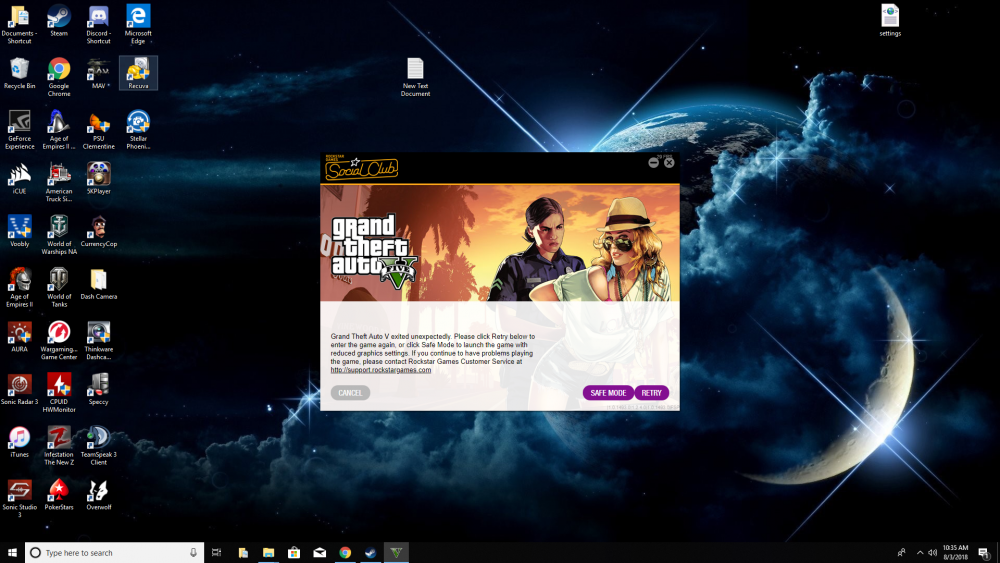
no when I redownloaded it the file it had before with the mods were still there so it went back in there it was working before the new gta 5 update im not sure what mod would make it close when I am just trying to get into the game normally my computer plays every other game fine.this game keeps crashing on me too how do I try and do this repair thing your talking about I freaking redownloaded this darn game and it still won't load story mode.I stopped playing lspdfr for a little bit I then came back and updated the game itself and all the mod files recently when i went to load Ragehook i had to sign into social club again so I did that and then tryed so i tryed to play in normal and it keeps unexpectedly closing I did the steam verify files thing and it didnt help so I dont know what to do now dont really want to have to install a whole new copy and have to put all the mods back in hoping there is way around it and or downloading another copy before trying to if anyone has any ideas I am all ears. UPDATE: I got no support in the other GTA V support forum so I am posting here now I deleted the game and spent 7 hours redownloading this game and it still won't let me play story mode so Im lost.
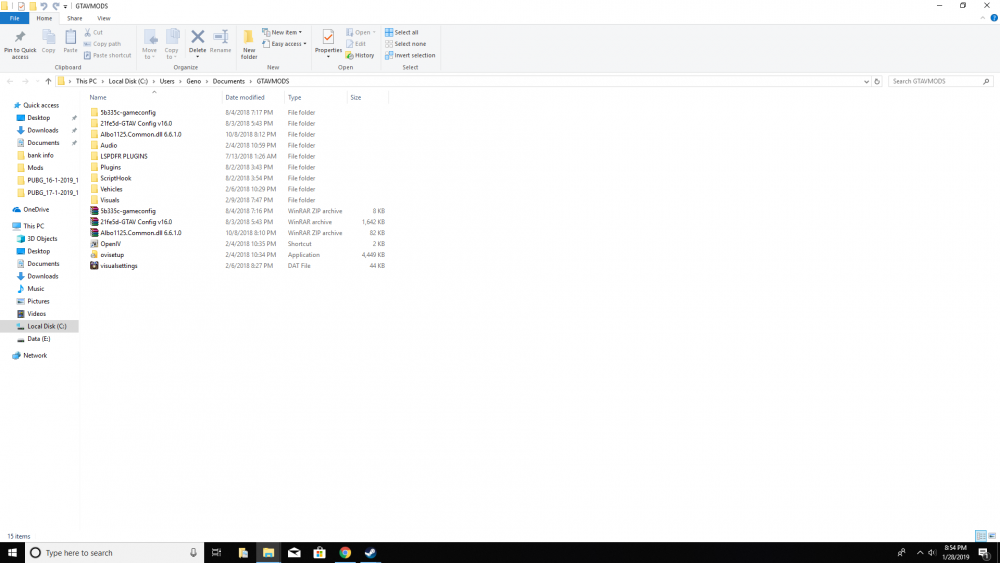
 take a print screen shot of your files so he can better see where your putting things could help bazingflames use the paint program and then save as
- 283 comments
- 95 reviews
yeah well that sucks lol ill try to get used to it and what should I install for better lights because I have them at your settings and on the new cars its kinda blah lolL-STICK Pressed - Sound the vehicle’s main horn; control siren tones when HF siren mode is active. this doesnt work anymore just does horni will do that but it worked with the left control stick before I installed the new cars.... now I have to push either j 3 times and then numbers 1 2 3 4 for the siren to come on or i have to push the left d pad and then press the number 1.... which is pretty pointless when trying to use the controller. the sirens work now but I want the sirens to come on how they did before the new vehicles... weird how it changed HF siren mode is active what is that mode? So i found out I press the left D pad 3 times then press down on D pad and the sirens will turn on.... I just don't understand why it changed from to that when it was the left controller stick.... I also have sirens mastery installed by albo and it usually worked with the other cars and says it is working but does not pop up in these new vehicles....I don't think I changed them but the controller used to turn on sirens with the left controller stick and now it just honks I can try and see if the numbers will work but its still bit a of a bummer because I have to use the d pad or j to turn the lights on then let me check to see if those numbers work.... all i did was put the vehicle models in didnt change anything when it comes to els other wise.I installed this mod and the cars load up great and move fine the problem is when i press down to start the sirens it just honks the horn then if i press J the sirens will blink and i press it 3 times and they all blink but still no sound and still when i press down on stick on controller no sirens come on just honking I feel like I followed directions to a T asking for help....for sure I did it it looks a little better at 6000 and 1500 but not as much as I would of thought I have a second dairy question i just installed a persons vehichles pack they are in the game but the sirens don't come on just honks the horn when i press siren button.... lol ugh if its a pack thing do I have to install every pack of vehicles for the sirens to work? or na also thanks alot guys for helping maybe I should download one of those things to make them brighter.... now just dealing with the sirens not working on new updated vehicles but still works on the older ones
I can't get the sirens to come on? what do I need to fix? just the horn sounds when I press the sirens button other regular police cars sirens still work- 283 comments
- 95 reviews
how do reimport? do i just save it inside openiv or do i have to drag something in to the gta 5 file plus i still have to find car.defualtlightday emissive thing is this the thing your talking about? to change the value? also I am trying to change the number but it won't let me...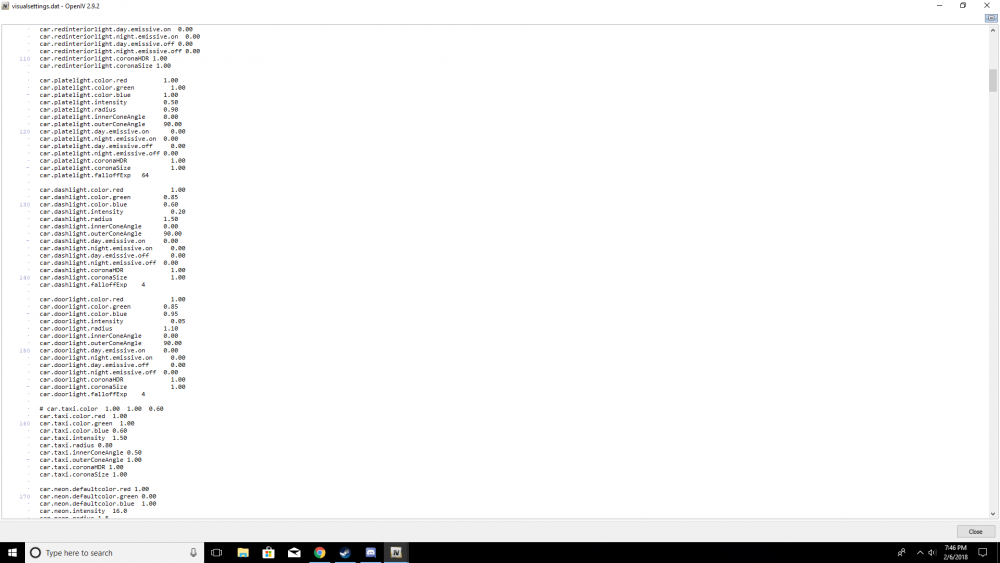 okay cool i found it now what do I do with it?



.png.f30966b3a60870171b03f2bb31ad89a2.png)
.png.a7465d4a9090d9862c32d2163d6bb630.png)
.png.b84ff5846e872f70cf80f184e1a8a48d.png)
.png.c40cdf8e5aae04c4ee40fe32232cc4e8.png)
.png.11aa3602c606c36357353b275af0349e.png)


