Pazzi
Members
-
Joined
-
Last visited
Everything posted by Pazzi
-
[17.12.2019 г. 21:06:35.829] Version: RAGE Plugin Hook v1.73.1260.16018 for Grand Theft Auto V [17.12.2019 г. 21:06:35.845] ================ RAGE Plugin Hook ================ [12/17/2019 9:06:35 PM.865] Command line option "disableCustomLoadingScreen-disableCustomLoadingScreen" is specified twice. Please remove one. [12/17/2019 9:06:35 PM.872] Detected Windows 10 Professional (64-bit) (10.0.18362.0)! Please download and install the latest RagePluginHook https://ragepluginhook.net/Downloads.aspx?Category=1
-
submit your ragepluginhook.log file after crash so we can take a look.
-
Please download and install the latest RagePluginHook https://ragepluginhook.net/Downloads.aspx?Category=1
-
Rockstar doesn't care and doesn't like the modding community. Somehow They treat it as a threat. They even hardened the game with anti modding algorithm which becomes the main reason why your LSPDFR game performance (FPS) drops dramatically.
-
Download and install the latest RPH 1.74
-
Don't forget to put RAGENativeUI.dll in your main GTA V folder.
-
Don't forget to put RAGENativeUI.dll in your main GTA V folder.
-
[12/16/2019 1:45:51 PM.157] LSPD First Response: [TRACE] Started loading LSPDFR [12/16/2019 1:45:51 PM.157] LSPD First Response: [INFO] Running LSPD First Response 0.4.4 (0.4.7204.1487) [12/16/2019 1:45:51 PM.157] LSPD First Response: [INFO] Compiled on 21 Sep 2019 22:49:34 UTC [12/16/2019 1:45:51 PM.157] LSPD First Response: [INFO] Copyright © 2015-2019, G17 Media, www.lspdfr.com Please download and install LSPDFR 0.4.5. Make sure you install the latest RPH 1.74 after that.
-
Hi, you installed it in the wrong folder. Install it in "GTA V\plugins\lspdfr" folder Then put albo common.dll file in the main GTAV folder.
-
[16. 12. 2019 19:43:56.160] Version: RAGE Plugin Hook v1.73.1260.16018 for Grand Theft Auto V [16. 12. 2019 19:43:56.163] ================ RAGE Plugin Hook ================ [12/16/2019 7:43:56 PM.170] Detected Windows 10 Professional (64-bit) (10.0.18363.0)! [12/16/2019 7:43:56 PM.170] Checking game support [12/16/2019 7:43:56 PM.379] Product name: Grand Theft Auto V [12/16/2019 7:43:56 PM.379] Product version: 1.0.1868.0 [12/16/2019 7:43:56 PM.380] Is steam version: False [12/16/2019 7:43:56 PM.380] Initializing DirectX [12/16/2019 7:43:56 PM.381] Initializing Direct3D You're still using RPH 1.73 Please download the latest one.
-
If it doesn't work, I can always revert back 😉
-
http://www.dev-c.com/gtav/scripthookv/ Thanks to Alexander Blade! 😀
-
ALPR+ is not compatible with LSPDFR 0.4.x You may use ALPRLite instead.
-
LSDPFR 0.4.2 only works with GTA patch 1604.x and RPH 0.66 … You should match those three. If not, they won't work. You should also have backups of these files from GTA 1604.x GTA5.EXE GTAVLauncher.EXE update\update.rpf If you have them, just overwrite the same files in GTA V game folder.
-
Please submit your RPH log so, the dev can take a look into it.
-
Yeah, but I think we'll still need to wait for LSPDFR 0.4.5 to be released. Hopefully the dev can release it soon, since LMS is both RPH and LSPDFR dev.
-
I don't use RPH backup/revert feature. I reverted back these 3 files manually: GTA5.EXE GTAVLauncher.EXCE update\update.rpf
-
-
I reverted back using GTA Patch 1604.1 + RPH 0.66 + LSPDFR 0.4.2 and it works fine. But I'm sure it will also work with the previous patch 1737.6 + RPH 1.69 + LSPDFR 0.4.4 You just need to have the right pair/match for all those files.
-
Hi guys!! I reverted back using GTA Patch 1604.1 + RPH 0.66 + LSPDFR 0.4.2 and it works fine. But I'm sure it will also work with the previous patch 1737.6 + RPH 1.69 + LSPDFR 0.4.4 You just need to have the right pair/match for all those files.. also make sure to use the right version of ScriptHookV I can confirm there's no old patch blocker on R* launcher... You can still use the old GTA V patch and play GTA (PS. I'm using Steam version)
-
everything is fine on my side. I'm using Windows10. I don't have antivirus, just the default windows defender. what is your windows? 10 or 7? If you're using Windows 7, make sure you unblock the dll files.
-
If you want a smooth playing experience, I suggest to get a desktop gaming PC. My recommendation: CPU: 4 cores (8 cores would be awesome) GPU: GTX 1060 for mid-level GTA graphic quality (GTX 1070 or 1080 would be awesome) RAM: 16GB
-
I don't even know how marijuana smells like 😀
-
It is not a hardware bottleneck. Even if you have 64 cores CPU, you will end up getting 50-60FPS. The bottleneck is mainly caused by the combination of RPH and LSPDFR. When RPH is hooking (or hacking) to the GTA V instance, it needs to battle the anti-modding protection. (Source: https://kotaku.com/gtav-on-pc-gets-slower-mod-protection-blamed-1717419626) To do that, I assume that RPH must run junk codes (from the protection) on every hooking processes to make it goes through. Those junk codes don't do anything except slowing down the performance (e.g. delaying or skipping CPU cycles)
-
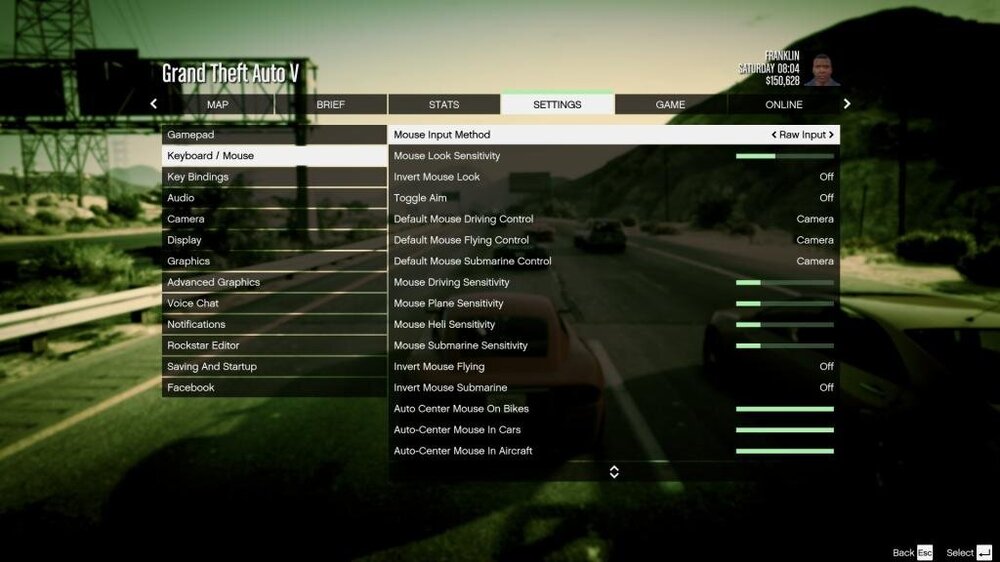
Try to set Mouse Input method to "Raw input"