



TheLoneRanger
Members
-
Joined
-
Last visited
Everything posted by TheLoneRanger
-
RDE has done this except without the multiplayer models, as EUP is based off RDE, you will fit right in without having immersion broken. You can use it with RDE functionality or just extract the peds and replace the vanilla ones in a non-RDE folder.
-
Have you looked at this mod mate? : https://www.gta5-mods.com/misc/uk-police-loadouts-1-0 In the description, it says: "Version 1.1 - Compatibility with LSPDFR, local and state police will respond with tasers, but this sacrifices your use of the pistol. Instead, use combat pistol, npcs, and armed police will now use combat pistol as standard instead. Unfortunately, it had to be done this way as its coded into lspdfr that police respond with certain weapons no matter what you do to the dispatch .meta or loadouts.meta " It seems like it is hard-coded, so that's a shame. Hopefully someone might be able to crack this, but I'm not betting on it anytime soon, especially if it is hard-coded,
-
So I assume you want the vehicles of RDE but not RDE itself, as RDE and EUP are perfectly compatible. Here are the steps: -Extract the RDE Vehicles into a folder of your choice name it something like RDE_Emergency or whatever. Do this for the other ones such as the firetrucks if you're going to use them. - Using a mods folder which DOESN'T have RDE, replace the vehicles in x64e or wherever they're located, do a search to find and replace them. You can't add in vehicles such as battalion as they are a custom slot. -Run the game and make sure the vehicles are working. Essentially, extract the models from the RDE folder(s), and replace them in a folder without RDE and add all the mods you want.
-
For the image, here it is: For the sirens, I'm not sure but closest I know of is the Federal Signal SS2000.
-
The LAPD CVPI with the steelies: The sexy LAPD caprice: This old NYPD 2002 Impala gives me a lot of nostalgic feelings: The new police dodge chargers: Without a doubt this old 1947 LAPD Ford: This Met BMW X5 ARV with the old red DPG paint, much better than the new battenburg imo. EDIT: I think this looks disgusting now. Jam sandwich plus red? No thank you.
-
I'm not 100% sure mate but if I am right that is a data link connector, or at least I think so?
-
Just in case you still haven't made your mind up yet, I've composed a list for you. Enjoy! ;) LSPD PACKS: Some Sherriff packs for you too, these include Highway Patrol and State Patrol: ALSO; this is a pack I recommend you to check out although they are liveries, I highly recommend for the nostalgic feel for all the agencies in the game:
-
"Congress shall make no law respecting an establishment of religion, or prohibiting the free exercise thereof, or abridging the freedom of speech, or of the press, or the right of the people peaceably to assemble, and to petition the government for a redress of grievances." - First Amendment The Free Exercise Clause of the First Amendment gives you the right to worship or not as you choose. The government can't penalize you because of your religious beliefs. The Establishment Clause prohibits the government from favoring religion over secularism or vice versa or from favoring one religion over another. The Free Exercise Clause prohibits the government from imposing special burdens (such as bans or restrictions) on people because of their religious beliefs. You may not believe a ban on Islam is unconstitutional, but the fact remains that a ban or penalization of Muslims or restriction of aspects of Islam is unlikely to happen. The main source of terror in the world is not Islam as a whole, but the ideology of Wahabism. In July 2013, Wahabism was identified by the European Parliament in Strasbourg as the main source of global terrorism. https://en.wikipedia.org/wiki/Wahhabism I would also like to point out that Islamic terrorism was quite unheard of before 1948 and the PLO (Crusades were not acts of terrorism, but a holy war). The rise of Islamic fundamentalism started in the 70's with the Soviet invasion of Afghanistan to secure it as a communist proxy state, and then the Gulf War, 9/11 and the great rise in the early to mid-2000's due to the invasion of Iraq and Afghanistan to bring down terrorist states and punish those responsible for 9/11 in the ongoing "War on Terror" and also to destroy non-existent WMD's. Not only did those invasions create a massive power vacuum which was filled by the previously oppressed Shia's but shattered those countries. Now many Wahabist terrorist groups feel that the West is their #1 enemy and therefore all these terrorist attacks happen in order to cripple us and instill Sharia law which they see as the ultimate symbol of conquering the "infidels".
-
 Hey, loving the pack but even though I've replaced the vehicles.meta file, the handling is a bit sensitive, and the Tahoe is super slow any advice?
- 21 comments
- 23 reviews
-
Yes. For the standalone, Rockstar Warehouse version: Hit "Start", "Run", and type "cmd" without the quotes. Hit enter. Type "cd c:\Program Files\Rockstar Games\Grand Theft Auto V" without the quotes in the cmd window that pops up. Hit enter. Note: If you’ve installed the game to a different directory, enter that directory instead. Type "GTAVLauncher.exe -verify" in this window (no quotes again) and hit enter. For the Steam version: Right-click the game in the “Library” tab. Click “Properties”. Click the “Local Files” tab. Click “Verify integrity of game cache…”
-
Ok, I have FINALLY found a credible solution, to this exact problem from another thread. NEWS: maybe i fix this problem: i just "repair" my gta file from the setup of the game,now i play lspdfr with rage from yesterday without this error,i hope this one helps someone Use Steam "verify integrity" or repair through Rockstar.
-
Try disabling Windows Defender and see, or have you already tried?
-
"unhandled exception" Huh, what AV's do you use (inc Windows Defender)?
-
Ok, try using event viewer and see what it says.
-
Huh, weird. Ok basic question, I know, but you DO use a mods folder, right? With the latest RPH and Scripthook?
-
Try removing those mods, that way we can pinpoint it as those mods are the only explainable causes because AFAIK RPH is fine. Can you tell me what mods you are using?
-
Quick question: Do you have LSPDFR installed or any remainders of any mods? It should look like this + RPH Also, install all the OpenIV tools so OpenIV.asi and such. This is a solution I found in a thread: The only thing I did from that text is to change permissions of the GTA V folder. I went to my steam directory, right clicked the GTA V folder, unchecked 'read-only'. I also ran Rage as administrator. Before it would crash even in admin mode. Maybe the folder being read-only was an issue. Either way, it is working. Stupid windows 'security'. And disabled AVG free. AVG free will F up a lot of games. So if a game crashes. Disable that first. Even with exceptions, I've still seen it crash games :P
-
Ok, no worries, get back to me when you try it, I'll see what I can decipher for you. :) By the way, I just want to say that the work on those CVPI's (i decided to check out your profile) is great, are they going to be ELS?
-
Sorry about that, I'll be more careful when reading next time. Here is a post from the GTAVMods subreddit: "Try launching again. The crash may have been a fluke. MAKE SURE YOU MEET THE REQUIREMENTS Read the Readme.txt file. Kill Fraps. Right-click all .exe and .dll files that come with RAGE Plugin Hook, click Properties, then click the Unblock button. Run RAGEPluginHook.exe as Administrator (Right click > Run as Administrator). Uninstall any other mods that come with .asi, .dll or .exe files (All, or one by one, to identify which one is causing a conflict). Disable or uninstall anything that may interfere or otherwise modify the game besides RAGE Plugin Hook, including, but not limited to, anti-virus, anti-malware, Nvidia Shadowplay and other recording tools and/or overlays (Steam, Xfire, etc.). Make sure .NET Framework 4.6 or later is installed. Make sure the Microsoft Visual C++ 2010 SP1 Redistributable Package (x64) is installed. Make sure the Visual C++ Redistributable for Visual Studio 2015 (x64) is installed." Also, I have seen people recommending to use this to detect what was wrong, let me know if this works and what it says:
-
Make RPH and GTA V as an exception on your antivirus. Try that, I will look for more solutions for you.
-
In your first log it states: "[22/02/2018 17:29:38.548] Failed to retrieve D3D call in reasonable time, changing hooking mode" I am not great with support but do you have the following installed with the latest RPH? Requirements for regular users - A legal copy of Grand Theft Auto V or other supported game. Either of the following operating systems: - Windows 7 with Service Pack 1 - Windows 8 - Windows 8.1 - Windows 10 - Microsoft .NET Framework 4.6, or higher. - Microsoft Visual C++ 2010 SP1 Redistributable Package (x64) - Visual C++ Redistributable for Visual Studio 2015 (x64)
-
Well, I recommend installing Radiance V by Bxbugs123 You can go for the "Bright" option so that it isn't too bright and not flashy. Install the compatibility OIV within the VisualV optional folder. I also recommend ELR (Emergency Lighting Revolution) by Fenix2525WOT. This will improve the environmental reflections from your sirens and give you a much more realistic experience. Hopefully, this is what you were looking for :)
-
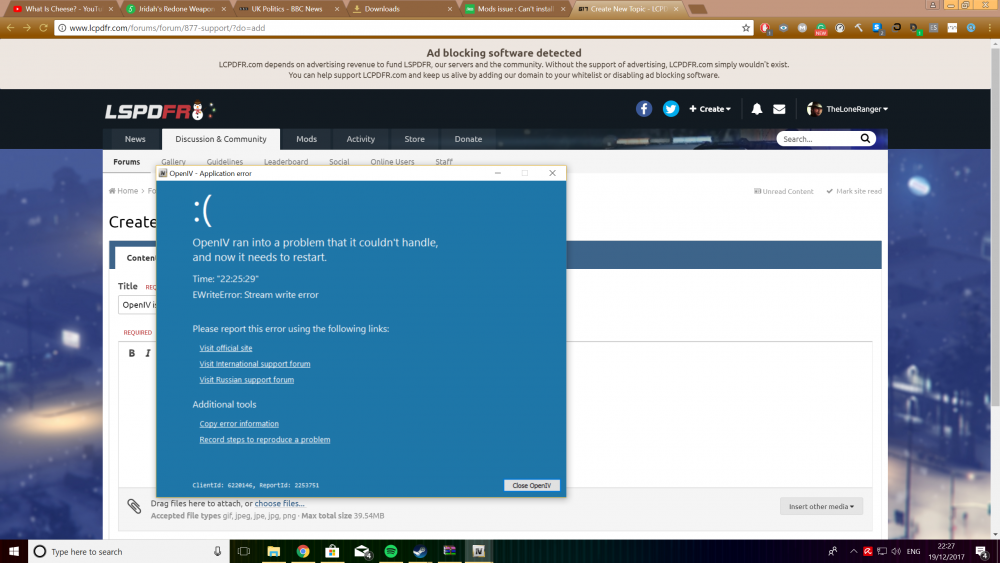
This is what I get when trying to install something like EUP. Can anyone help me figure this out? Error information below: Time: "22:25:29" Type: "EWriteError" Message: "Stream write error" Additional information: [Application Context] App::Temp=C:\Users\User\AppData\Local\Temp\OpenIV_012A764F\ Main::ExploreArchiveNode::WorkItem=D:\Local Disk\Steam\steamapps\common\Grand Theft Auto V\ GetSystemDefaultLangID=2057 SysLocale={ DefaultLCID: "2057", PriLangID: "9", SubLangID: "2", FarEast: "True", MiddleEast: "True" } App::Path=C:\Users\User\AppData\Local\New Technology Studio\Apps\OpenIV\ GetThreadLocale=2057 (0x0809) Game::Platform=pc Main::ExploreArchiveNode::ParentArchive=D:\Local Disk\Steam\steamapps\common\Grand Theft Auto V\ WebClientIndex=585116347 App::PackageInstaller::File=C:\Users\User\AppData\Local\Temp\Rar$DIa11428.49380\ModdingDLCPackV.oiv ApplicationPath=C:\Users\User\AppData\Local\New Technology Studio\Apps\OpenIV\ OS=Windows 10 (Version 10.0, Build 0, 64-bit Edition) Game::ID=Five (GTA V) WebClientToken={721241B3-FF2D-4435-9E44-9D51D344D908} GetSystemDefaultLCID=2057 WebClientId=6220146 App::Lang=en_GB Game::Path=D:\Local Disk\Steam\steamapps\common\Grand Theft Auto V\ [Application Windows] TPackageInstallerWindow2=Modding DLC Pack V - Package installer TActionsModule=ActionsModule TMainWindow=OpenIV - GTA V - [Edit mode] TErrorWindow=OpenIV - Application error Release: 2.9.1.926 05/10/2017 Address: "0x004B6024" Procedure: "System.Classes.TStream.WriteBuffer" Unit: "", Line: "0" Stack: [004B601F] System.Classes.TStream.WriteBuffer + $73 [004B5FA3] System.Classes.TStream.WriteBuffer + $3 [004B6138] System.Classes.TStream.CopyFrom + $C4 [0087D676] System.Zip.Helper.TZipFileHelper.ExtractToBuffer + $7A [00992843] Tools.PackageInstaller.Classes.TPackageInstaller20.ProcessArchiveAddCommand + $24F [00992454] Tools.PackageInstaller.Classes.TPackageInstaller20.ProcessArchive + $C4 [00991C4F] Tools.PackageInstaller.Classes.TPackageInstaller20.Install + $5F [01642485] Tools.PackageInstaller.Window2.UIPackageInstallerWindow2.InstallPackage + $99 [016421A0] Tools.PackageInstaller.Window2.UIPackageInstallerWindow2.ShowInstallProgressUI$73$ActRec.$0$Body$74$ActRec.$0$0$Body + $10 [004C361D] System.Classes.TAnonymousThread.Execute + $5 [004C5045] System.Classes.ThreadProc + $49 [00409E5C] System.ThreadWrapper + $28 [76CE8652] BaseThreadInitThunk + $22 [77044A45] RtlGetAppContainerNamedObjectPath + $135 [77044A12] RtlGetAppContainerNamedObjectPath + $102 ClientId: 6220146, ReportId: 2253751
-
LOG FILE BELOW: [Asi loader] Using xliveless [ScriptHookDotNet] Found [ScriptHookDotNet] Valid [System dependencies] Verifying dependencies integrity [System dependencies] Checking MSVCR110.DLL [System dependencies] Checking dependencies (32-bit required: True) [System dependencies] Resolved KERNEL32.dll to C:\WINDOWS\SysWOW64\KERNEL32.dll [System dependencies] Check passed [System dependencies] Checking MSVCP110.DLL [System dependencies] Checking dependencies (32-bit required: True) [System dependencies] Resolved MSVCR110.dll to C:\WINDOWS\SysWOW64\MSVCR110.dll [System dependencies] Resolved KERNEL32.dll to C:\WINDOWS\SysWOW64\KERNEL32.dll [System dependencies] Check passed [System dependencies] Checking MSCOREE.DLL [System dependencies] Checking dependencies (32-bit required: True) [System dependencies] Resolved KERNEL32.dll to C:\WINDOWS\SysWOW64\KERNEL32.dll [System dependencies] Check passed [System dependencies] Checking SCRIPTHOOK.DLL [System dependencies] Checking dependencies (32-bit required: True) [System dependencies] Resolved KERNEL32.dll to C:\WINDOWS\SysWOW64\KERNEL32.dll [System dependencies] Resolved USER32.dll to C:\WINDOWS\SysWOW64\USER32.dll [System dependencies] Check passed [System dependencies] Checking MSVCR100.DLL [System dependencies] Checking dependencies (32-bit required: True) [System dependencies] Resolved KERNEL32.dll to C:\WINDOWS\SysWOW64\KERNEL32.dll [System dependencies] Check passed [System dependencies] Checking D3DX9_43.DLL [System dependencies] Checking dependencies (32-bit required: True) [System dependencies] Resolved msvcrt.dll to C:\WINDOWS\SysWOW64\msvcrt.dll [System dependencies] Resolved GDI32.dll to C:\WINDOWS\SysWOW64\GDI32.dll [System dependencies] Resolved KERNEL32.dll to C:\WINDOWS\SysWOW64\KERNEL32.dll [System dependencies] Resolved ADVAPI32.dll to C:\WINDOWS\SysWOW64\ADVAPI32.dll [System dependencies] Check passed [System dependencies] Checking ScriptHookDotNet.asi [System dependencies] Checking dependencies (32-bit required: True) [System dependencies] Resolved KERNEL32.dll to C:\WINDOWS\SysWOW64\KERNEL32.dll [System dependencies] Resolved ScriptHook.dll to D:\Local Disk\Steam\steamapps\common\Grand Theft Auto IV\GTAIV\ScriptHook.dll [System dependencies] Resolved MSVCR100.dll to C:\WINDOWS\SysWOW64\MSVCR100.dll [System dependencies] Resolved USER32.dll to C:\WINDOWS\SysWOW64\USER32.dll [System dependencies] Resolved d3dx9_43.dll to C:\WINDOWS\SysWOW64\d3dx9_43.dll [System dependencies] Resolved mscoree.dll to C:\WINDOWS\SysWOW64\mscoree.dll [System dependencies] Check passed [System dependencies] v2.0.50727 2.0.50727.4927 SP2 v3.0 3.0.30729.4926 SP2 v3.5 3.5.30729.4926 SP1 v4 Client 4.7.02046 Full 4.7.02046 v4.0 Client 4.0.0.0 [System dependencies] The .NET Framework is installed in an unknown version (> 4.5.1) [System dependencies] Checking ADVANCEDHOOK.DLL [System dependencies] Checking dependencies (32-bit required: True) [System dependencies] Resolved ScriptHook.dll to D:\Local Disk\Steam\steamapps\common\Grand Theft Auto IV\GTAIV\ScriptHook.dll [System dependencies] Resolved VERSION.dll to C:\WINDOWS\SysWOW64\VERSION.dll [System dependencies] Resolved PSAPI.DLL to C:\WINDOWS\SysWOW64\PSAPI.DLL [System dependencies] Resolved dbghelp.dll to C:\WINDOWS\SysWOW64\dbghelp.dll [System dependencies] Resolved KERNEL32.dll to C:\WINDOWS\SysWOW64\KERNEL32.dll [System dependencies] Resolved USER32.dll to C:\WINDOWS\SysWOW64\USER32.dll [System dependencies] Resolved SHELL32.dll to C:\WINDOWS\SysWOW64\SHELL32.dll [System dependencies] Resolved MSVCR110.dll to C:\WINDOWS\SysWOW64\MSVCR110.dll [System dependencies] Resolved MSVCP110.dll to C:\WINDOWS\SysWOW64\MSVCP110.dll [System dependencies] Resolved mscoree.dll to C:\WINDOWS\SysWOW64\mscoree.dll [System dependencies] Check passed [System dependencies] Checking ADVANCEDHOOKINIT.ASI [System dependencies] Checking dependencies (32-bit required: True) [System dependencies] Resolved VERSION.dll to C:\WINDOWS\SysWOW64\VERSION.dll [System dependencies] Resolved KERNEL32.dll to C:\WINDOWS\SysWOW64\KERNEL32.dll [System dependencies] Resolved USER32.dll to C:\WINDOWS\SysWOW64\USER32.dll [System dependencies] Resolved MSVCR110.dll to C:\WINDOWS\SysWOW64\MSVCR110.dll [System dependencies] Resolved MSVCP110.dll to C:\WINDOWS\SysWOW64\MSVCP110.dll [System dependencies] Check passed [System dependencies] Checking SLIMDX.DLL [System dependencies] Checking dependencies (32-bit required: True) [System dependencies] Resolved MSVCR100.dll to C:\WINDOWS\SysWOW64\MSVCR100.dll [System dependencies] Resolved KERNEL32.dll to C:\WINDOWS\SysWOW64\KERNEL32.dll [System dependencies] Resolved ole32.dll to C:\WINDOWS\SysWOW64\ole32.dll [System dependencies] Resolved USER32.dll to C:\WINDOWS\SysWOW64\USER32.dll [System dependencies] Resolved GDI32.dll to C:\WINDOWS\SysWOW64\GDI32.dll [System dependencies] Resolved WINMM.dll to C:\WINDOWS\SysWOW64\WINMM.dll [System dependencies] Resolved ADVAPI32.dll to C:\WINDOWS\SysWOW64\ADVAPI32.dll [System dependencies] Resolved MSVCP100.dll to C:\WINDOWS\SysWOW64\MSVCP100.dll [System dependencies] Resolved mscoree.dll to C:\WINDOWS\SysWOW64\mscoree.dll [System dependencies] Check passed [System dependencies] No problems found [LCPD First Response] Checking LCPDFR installation [LCPD First Response] No problems found [Log Check] Checking log files [Log Check] LCPDFR.log lists one or more errors [Log Check] ------------------------ [INFO - 5:44:56 PM] [Log] Started [INFO - 5:44:56 PM] [Main] Main: Initializing... [INFO - 5:44:56 PM] [Main] Main: LCPDFR Engine (C) 2011-2013 LMS [INFO - 5:44:56 PM] [Main] Main: DO NOT USE THIS WITHOUT PERMISSION. YOU MAY NOT SHARE, MODIFY OR DECOMPILE THIS FILE. [INFO - 5:44:56 PM] [PluginManager] Initialize: Loading custom plugins [WARNING - 5:44:56 PM] [Settings] ReadSettings: Invalid entry [INFO - 5:44:56 PM] [Settings] ReadSettings: Suspect transporter POLICE [INFO - 5:44:56 PM] [Settings] ReadSettings: Suspect transporter POLICE2 [INFO - 5:44:56 PM] [Settings] ReadSettings: Suspect transporter PSTOCKADE [WARNING - 5:44:56 PM] [Settings] ReadSettings: Invalid entry [INFO - 5:44:56 PM] [Plugin.Main] Changing language to en-US [INFO - 5:44:57 PM] [Plugin.Callouts+] Plugin detected version: 0.7.3.38 [INFO - 5:44:57 PM] [Plugin.Callouts+] Checking calloutsPlus.ini file... [INFO - 5:44:57 PM] [Plugin.Callouts+] Reading keybinds from configuration file [INFO - 5:44:57 PM] [Plugin.Callouts+] Plugin started [INFO - 5:44:57 PM] [Plugin.WoutersCallouts] Started WoutersCallouts v1.1 [INFO - 5:44:57 PM] [Main] Main: Initializing done [INFO - 17:44:56] [ServerCommunication] InitializeConnection: Internet connection available [INFO - 17:44:57] [ServerCommunication] InitializeConnection: Public IP Address is: 2a02:c7f:621:7000:6196:f44c:5105:603d [INFO - 17:44:58] [ServerCommunication] InitializeConnection: Found configuration for the masterserver, going to use API server v2.legacy.os.g17media.net [INFO - 17:44:58] [ServerCommunication] InitializeConnection: Establishing session with the LCPDFR server... [INFO - 17:44:59] [ServerCommunication] GetSession: Got session ID of fa6c8b05-aa25-10db-455d-20f71226edf8 from masterserver. [INFO - 17:44:59] [Authentication] Authentication: Server available, using online authentication [ERROR - 17:44:59] [ServerCommunication] GetUserInformationString: Failed to query data [INFO - 17:44:59] [NetworkManager] NetworkManager: In network session: False Is host: False ------------------------ [INFO - 5:45:15 PM] [Log] Started [INFO - 5:45:15 PM] [Main] Main: Initializing... [INFO - 5:45:15 PM] [Main] Main: LCPDFR Engine (C) 2011-2013 LMS [INFO - 5:45:15 PM] [Main] Main: DO NOT USE THIS WITHOUT PERMISSION. YOU MAY NOT SHARE, MODIFY OR DECOMPILE THIS FILE. [INFO - 5:45:15 PM] [PluginManager] Initialize: Loading custom plugins [WARNING - 5:45:15 PM] [Settings] ReadSettings: Invalid entry [INFO - 5:45:15 PM] [Settings] ReadSettings: Suspect transporter POLICE [INFO - 5:45:15 PM] [Settings] ReadSettings: Suspect transporter POLICE2 [INFO - 5:45:15 PM] [Settings] ReadSettings: Suspect transporter PSTOCKADE [WARNING - 5:45:15 PM] [Settings] ReadSettings: Invalid entry [INFO - 5:45:15 PM] [Plugin.Main] Changing language to en-US [INFO - 5:45:15 PM] [Plugin.Callouts+] Plugin detected version: 0.7.3.38 [INFO - 5:45:15 PM] [Plugin.Callouts+] Checking calloutsPlus.ini file... [INFO - 5:45:15 PM] [Plugin.Callouts+] Reading keybinds from configuration file [INFO - 5:45:15 PM] [Plugin.Callouts+] Plugin started [INFO - 5:45:15 PM] [Plugin.WoutersCallouts] Started WoutersCallouts v1.1 [INFO - 5:45:15 PM] [Main] Main: Initializing done [INFO - 17:45:15] [ServerCommunication] InitializeConnection: Internet connection available [INFO - 17:45:16] [ServerCommunication] InitializeConnection: Public IP Address is: 2a02:c7f:621:7000:6196:f44c:5105:603d ------------------------ [INFO - 5:47:00 PM] [Log] Started [INFO - 5:47:00 PM] [Main] Main: Initializing... [INFO - 5:47:00 PM] [Main] Main: LCPDFR Engine (C) 2011-2013 LMS [INFO - 5:47:00 PM] [Main] Main: DO NOT USE THIS WITHOUT PERMISSION. YOU MAY NOT SHARE, MODIFY OR DECOMPILE THIS FILE. [INFO - 5:47:00 PM] [PluginManager] Initialize: Loading custom plugins [WARNING - 5:47:00 PM] [Settings] ReadSettings: Invalid entry [INFO - 5:47:00 PM] [Settings] ReadSettings: Suspect transporter POLICE [INFO - 5:47:00 PM] [Settings] ReadSettings: Suspect transporter POLICE2 [INFO - 5:47:00 PM] [Settings] ReadSettings: Suspect transporter PSTOCKADE [WARNING - 5:47:00 PM] [Settings] ReadSettings: Invalid entry [INFO - 5:47:01 PM] [Plugin.Main] Changing language to en-US [INFO - 5:47:01 PM] [Plugin.Callouts+] Plugin detected version: 0.7.3.38 [INFO - 5:47:01 PM] [Plugin.Callouts+] Checking calloutsPlus.ini file... [INFO - 5:47:01 PM] [Plugin.Callouts+] Reading keybinds from configuration file [INFO - 5:47:01 PM] [Plugin.Callouts+] Plugin started [INFO - 5:47:01 PM] [Plugin.WoutersCallouts] Started WoutersCallouts v1.1 [INFO - 5:47:01 PM] [Main] Main: Initializing done [INFO - 17:47:01] [ServerCommunication] InitializeConnection: Internet connection available [INFO - 17:47:01] [ServerCommunication] InitializeConnection: Public IP Address is: 2a02:c7f:621:7000:6196:f44c:5105:603d [INFO - 17:47:03] [ServerCommunication] InitializeConnection: Found configuration for the masterserver, going to use API server v2.legacy.os.g17media.net [INFO - 17:47:03] [ServerCommunication] InitializeConnection: Establishing session with the LCPDFR server... [INFO - 17:47:03] [NetworkManager] NetworkManager: In network session: False Is host: False [INFO - 17:47:03] [ServerCommunication] GetSession: Got session ID of d9ab79f4-c4fe-fc36-097d-4c35f6b8bd61 from masterserver. [INFO - 17:47:03] [Authentication] Authentication: Server available, using online authentication [ERROR - 17:47:03] [ServerCommunication] SetSessionVariable: Failed to set session variable: System.Net.WebException: The remote server returned an error: (422) Unprocessable Entity. at System.Net.HttpWebRequest.GetResponse() at . (String ) in d:\GTA IV\LCPDFR\SVN\trunk\LCPD First Response\Engine\Networking\ServerCommunication.cs:line 658 at . (String , String ) in d:\GTA IV\LCPDFR\SVN\trunk\LCPD First Response\Engine\Networking\ServerCommunication.cs:line 502 [ERROR - 17:47:03] [ServerCommunication] GetUserInformationString: Failed to query data [ERROR - 17:47:04] [Authentication] Authentication: Error 0x320 [ERROR - 17:47:04] [Authentication] Authentication: Authentication failed [INFO - 17:47:04] [Authentication] Authentication: Failed to authenticate [INFO - 5:47:48 PM] [Plugin.Main] Running LCPD First Response LCPDFR 1.1 2011-2015 LMS (1.0.5557.28243) 3/20/2015 3:41:26 PM [INFO - 5:47:48 PM] [Plugin.Main] Copyright © 2010-2015, G17 Media, www.lcpdfr.com [INFO - 17:47:48] [UpdateCheck] DoUpdateCheck: Checking for updates [ERROR - 17:47:49] [ServerCommunication] GetLatestVersionString: Failed to query data [INFO - 17:47:49] [UpdateCheck] DoUpdateCheck: No updates available [INFO - 5:49:18 PM] [Script.Ambient] Autosave is disabled [WARNING - 5:50:19 PM] [SoundEngine] PlayExternalSound: IO error while opening wave stream from D:\Local Disk\Steam\steamapps\common\Grand Theft Auto IV\GTAIV\lcpdfr\Audio\PoliceScanner\RANDOMCHAT_01.wav. File already in use? [WARNING - 17:50:52] [AudioDatabase] GetAudioFileForAction: No file found for: BROKER_BRDIGE [Log Check] AdvancedHook.log lists a game crash. This is probably not LCPDFR related. [Log Check] Log started on: 18:30:33 10-26-2017 ------------------------ [INFO - 18:30:33] Gameversion - 1.0.7.0 [INFO - 18:30:33] XLiveLess present - skipping xlive changes [INFO - 18:30:33] Improving ELS compatibility [INFO - 18:30:33] AdvancedHook 0.38 (C) 2010-2015 LMS - Initialized [INFO - 18:30:33] E-Mail: lms@lcpdfr.com [INFO - 18:30:33] Permission granted for LCPDFR & ELS only [INFO - 18:30:33] Thanks to listener, aru, #iv-modding and cp702 [INFO - 18:30:33] Attaching exception handler... [INFO - 18:30:33] Exception handler attached [INFO - 18:30:33] Patching game functions... [INFO - 18:30:33] New instance created: ELS [INFO - 18:31:2] An exception occured [INFO - 18:31:2] Minidump saved [INFO - 18:31:2] Process: E80000 Address: 19FABCD (Faulting module: D:\Local Disk\Steam\steamapps\common\Grand Theft Auto IV\GTAIV\GTAIV.exe loaded into process space at 1280000 - function offset without PE header is: 779BCD) Code: C0000005 Registerdump - EAX: 3E19999A EBP: 5704FB30 EBX: C8 ECX: 5704FB44 EDI: 81 EDX: FFFFCDCD EIP: 19FABCD ESI: 81 ESP: 5704FA70 [INFO - 18:31:2] Launching LCPDFR Diagnostics Tool [INFO - 18:31:2] Launching LCPDFR error reporter I have tried to find the issue by searching through forums countlessly, I'm quite new to LCPDFR and I hope this will help me identify future issues more, anyways, can anybody help me tell what is wrong with my game? Is it perhaps an old save game which I must delete? Sorry for inconveniencing anyone.



