Skip to content
View in the app

A better way to browse. Learn more.

LCPDFR.com

A full-screen app on your home screen with push notifications, badges and more.

To install this app on iOS and iPadOS
  1. Tap the Share icon in Safari
  2. Scroll the menu and tap Add to Home Screen.
  3. Tap Add in the top-right corner.
To install this app on Android
  1. Tap the 3-dot menu (⋮) in the top-right corner of the browser.
  2. Tap Add to Home screen or Install app.
  3. Confirm by tapping Install.

Blazing

Members
  • Joined

  • Last visited

Files posted by Blazing

  1. Discord Server: https://discord.gg/2Q8MyCU
     
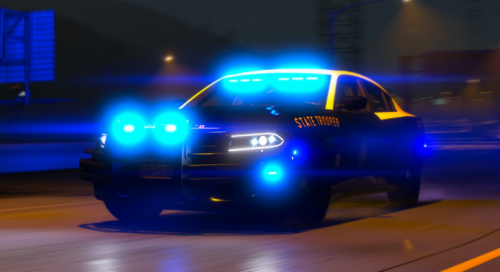
    My first vehicle release here, hope you like it 🙂
     
    Details:
    Detailed Interior Two Versions, All Blue, and Red & Blue Amazing / Detailed Skin Full Environmental lighting (360 Around) Working Spotlights Based off a IRL Vehicle Working Push-bar Collisions Non-ELS Lighting Setup  
    Extra's:
     
    Extra 1: Touchbook Open (driver side)
    Extra 2: Touchbook open (passenger side)
    Extra 3: Radar on dash
    Extra 4: Transport cage
    Extra 5: Gun Rack
    Extra 6: Spotlight Up
    Extra 7: Spotlight Down
     
    Credits:
     
    Model - Matt
    Screenshots - JJ.
    Whelen IONs - BxBugs
    Interior Lighting Package - Bueno
    Interior Lighting Package Re-modeled - BlazingDesigns
    Skin Made by - Floh Designs
    • 3,804 Downloads
    • 9 Comments
    Updated

Account

Navigation

Search

Search

Configure browser push notifications

Chrome (Android)
  1. Tap the lock icon next to the address bar.
  2. Tap Permissions → Notifications.
  3. Adjust your preference.
Chrome (Desktop)
  1. Click the padlock icon in the address bar.
  2. Select Site settings.
  3. Find Notifications and adjust your preference.