TheTacticalPotato
Members
-
Joined
-
Last visited
Everything posted by TheTacticalPotato
-
I’m not sure if this will work but whatever :D Try looking in the .YTD for something along the lines of “tahoe_windows”, and if there is something called that, export it, delete the background in paint.net so it’s just transparent, and replace the original windows file with the one you edited. Then try and change the tint with a trainer to no tint. Keep in mind the windows (if it works) will not be completely transparent and with no tint.
-
First of all, the title isn't strictly correct, I've changed out vehicle handling lines and sounds from there, however when I try to add new vehicle data (for these addon cars that are originally replacements), the game crashes when loading story mode. It's kind of hard to explain what I've done, but I'll try. - Copied patchday15ng to mods folder - Added common\data\dlctext.meta and handling.meta - Added common\data\levels\gta5\vehicles.meta - Added "sheriff3.ytd/yft/_hi.yft" to vehicles.rpf - Modified content.xml to enable handling.meta/vehicles.meta/dlctext.meta - Oh yeah I forgot about the carvariations.meta, I just copied the sheriff2 line and put it in Removing vehicles.meta from the files to enable list makes the game load, but the sheriff3 model can't be found. Re-adding it makes the game crash. I copied the vehicles and handling data from sheriff2/fbi2, then changed out the names and sounds if I remember correctly. Hold on the pastebin stuff is from before I added the carvariations file I’ll fix that soon Here's the crash report: https://pastebin.com/LPsMwSg1 Here's my dlctext.meta: <?xml version="1.0" encoding="UTF-8"?> <CExtraTextMetaFile> <hasGlobalTextFile value="true"/> <hasAdditionalText value="false"/> <isTitleUpdate value="false"/> </CExtraTextMetaFile> Here's my content.xml: https://pastebin.com/Thr1fFfJ Here's my handling.meta: https://pastebin.com/LN6StGDT And here's my vehicles.meta: https://pastebin.com/bueir8vT
-
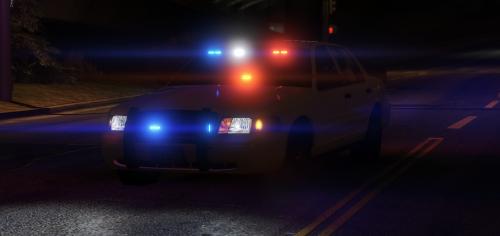 Am I doing something wrong? When I load this in (or any other visual lights modification, e.g. Radiance V/Make Visuals Great Again), it doesn’t make the lights brighter, it just changes red to some idiotic looking bright yellow, and the blue to a really really light blue.
- 35 comments
- 21 reviews
-
-

- 2
-