


SCPDUnit23
Members
-
Joined
-
Last visited
Everything posted by SCPDUnit23
-
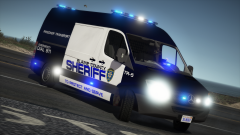
From the album: GTA V WIP
Credits to Not AJ for screenshots -
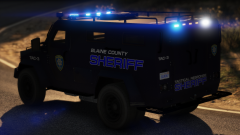
From the album: GTA V WIP
Credits to Not AJ for screenshots -
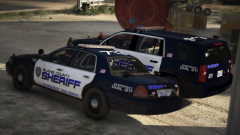
From the album: GTA V WIP
Credits to Not AJ for screenshots -
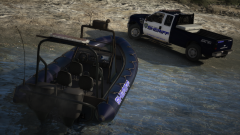
From the album: GTA V WIP
Credits to Not AJ for screenshots -
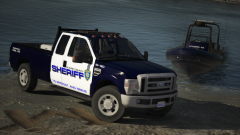
From the album: GTA V WIP
Credits to Not AJ for screenshots -
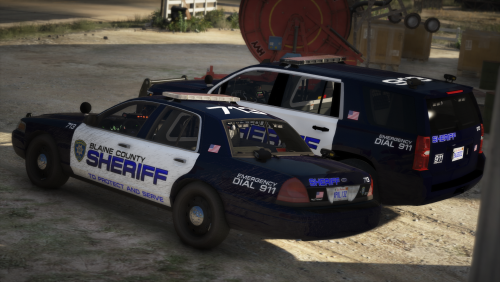 This may require going thru UV mapping all 10-11 vehicles of the lighting modules. And I'm way overdue to release the full pack.
- 39 comments
- 3 reviews
-
-
I would also like to add something to this because this happens way too often Know how to install mods before reviewing: This is kinda important because I get users complaining they don't know how to install mods and yet leave a 1/5 star review just because they can't read the readme file. Unless you followed the readme file or know how to install mods don't whine and say the mod sucks when all you need to do was diffuse the glass tint on the lightbars in vehicles.meta. README EXISTS FOR A REASON! If there is something wrong with the procedure installing the mods I would put it in the comment section outlining the issue. Modders should always document how users install the mods with a README file.
-
Credits updated. Will go through other mods tht uses same plate texture. Thanks for notifying!
- 39 comments
- 3 reviews
-
Try launching without RPH (launch game normally) and see if it crashes. Then spawn the vehicles as instructed. If the game does not crash in neither of those steps, its something else.
- 39 comments
- 3 reviews
-
-
Blaine County Sheriff Office Pack by SCPDUnit23 This pack contains the following divisions with the following vehicles: Patrol Division: The division that oversees regular patrol beats. Ntohing too special. Vehicles include: -2019 Dodge Charger Pursuit -2016 Chevrolet Tahoe PPV -2011 Ford CrownVictora Interceptor -2010 Ford F350 Marine Division: Oversees the waters of the Alameo Sea and the waters of Paleto Bay. Vehicles include: -2010 Ford F350 (towing boat trailer) -Sheriff Dinghy Street Racing Unit Division (SRU Addon): Special task force that specalizes in high speed pursuits. Enforce and combat street races, agressive driving, or other forms of stunt driving. Vehicles includes: -2000 Ford Mustang Cobra R -2002 Nissan Skyline GT-R R34 (RIGHT HAND DRIVE!) -2016 Chevrolet Corvette C7 ZO6 Prisoner Transport Division: Division that manages prisoner transport from crime scenes to sheriff stations to state pens. Vehicle includes -Mecerdes Benz Sprinter Transport Van Tactical Response Unit: Specialized division with expertise of tactical weapons that responds in high risk calls, including high risk warrents, hostage situations, and barracaded suspects. Vehicle includes: -Lenco Bearcat Aerial Support Division: Division that supports ground units in the air. Vehicle includes: -Eurocopter AS350 (texture only!) Template has been provided if you want to create your own liveries except AS350. AS350 template is found in the original download link given below. Disclaimer: Please do not redistribute and reupload this pack to any website or any other sources, including models, screnshots, and liveries without explicit written permission. FiveM and other multiplayer server use is allowed (except GTA Online). Installing SRU Addon pack WARNING: If you are unfamiliar with installing addons, I recommend following these steps to ensure there are no game crashes! Also due to how the vehicles are setup, it is NOT RECOMMENDED to use Albo DLC or any other third party addon modding tools (unless you ABSOLUTELY know how these cars are setup!). 1. Drag and drop the SRU folder (the folder itself) into mods\update\x64\dlcpacks 2. Add the following entry in dlclist.xml located in mods\update\update.rpf\common\data. Mandatory to read the contents in the SRU folder. <Item>dlcpacks:/sru/</Item> 3. Install the VCF ELS files under Grand Theft Auto V\ELS\pack_default You must spawn these vehicles via a vehicle trainer (Simple Native Trainer preferred). The spawn names are c7sru, cobrasru, and skylinesru. Installing AS350 Helicopter (TEXTURE ONLY!): Since no model edits were made on the original AS350, only the texture file was uploaded. 1. Download the original model from SkylineGTRFreak here: https://www.gta5-mods.com/vehicles/as-350-ecureuil 2. Use the included ytd file to use the sheriff livery (rename to polmav.ytd for repalacement or as350.ytd for addon) Installing Patrol/Marine/Transport/Tactical Divisions: 1. Use OpenIV and install the car mods to mods\update\x64\dlcpacks\patchday18ng\dlc.rpf\x64\levels\gta5\vehicles.rpf 2. Install the VCF ELS files under Grand Theft Auto V\ELS\pack_default 3. If the lights does not seem to be flashing, set the diffuse tint value to <diffuseTint value="0x00FFFFFF" /> in whatever car slot you replaced in vehicles.meta file.
- 39 comments
- 3 reviews
-
-

- 15
-
-
From the album: GTA V WIP
In case if your fan of Chargers.... Credits to Not AJ for screenshots! -
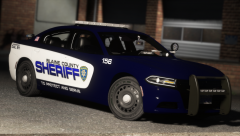
From the album: GTA V WIP
In case if your fan of Chargers.... Credits to Not AJ for screenshots! -
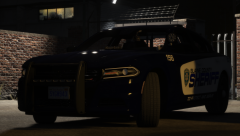
From the album: GTA V WIP
In case if your fan of Chargers.... Credits to Not AJ for screenshots! -

From the album: GTA V WIP
In case if your fan of Chargers.... Credits to Not AJ for screenshots! -

From the album: GTA V WIP
In case if your fan of Chargers.... Credits to Not AJ for screenshots! -

From the album: GTA V WIP
In case if your fan of Chargers.... Credits to Not AJ for screenshots! -

From the album: GTA V WIP
In case if your fan of Chargers.... Credits to Not AJ for screenshots! -
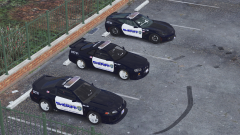
From the album: GTA V WIP
Just try and get away ;) Credits to panoszaf for ss! -
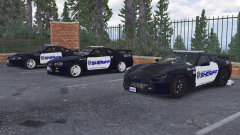
From the album: GTA V WIP
Just try and get away ;) Credits to panoszaf for ss! -
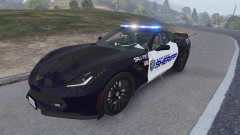
From the album: GTA V WIP
Just try and get away ;) Credits to panoszaf for ss! -
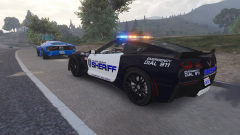
From the album: GTA V WIP
Just try and get away ;) Credits to panoszaf for ss! -
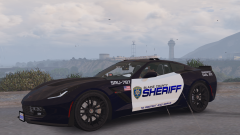
From the album: GTA V WIP
Just try and get away ;) Credits to panoszaf for ss! -
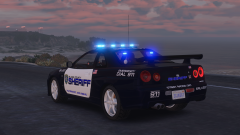
From the album: GTA V WIP
Just try and get away ;) Credits to panoszaf for ss!


