Skip to content
View in the app

A better way to browse. Learn more.

LCPDFR.com

A full-screen app on your home screen with push notifications, badges and more.

To install this app on iOS and iPadOS
  1. Tap the Share icon in Safari
  2. Scroll the menu and tap Add to Home Screen.
  3. Tap Add in the top-right corner.
To install this app on Android
  1. Tap the 3-dot menu (⋮) in the top-right corner of the browser.
  2. Tap Add to Home screen or Install app.
  3. Confirm by tapping Install.

Dylan Perrine

Members
  • Joined

  • Last visited

Everything posted by Dylan Perrine

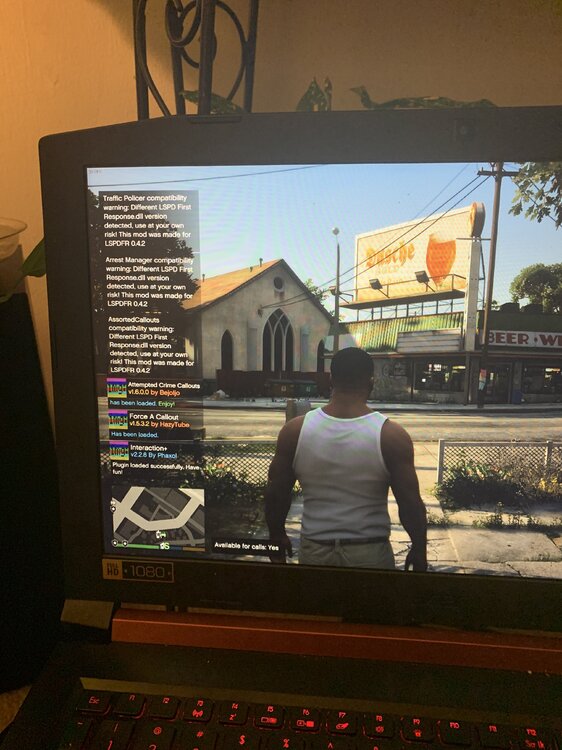
  1. alright ill remove when i have tome maybe tonight or so but in the picture why does it say different lspdfr dll its weird
  2. RagePluginHook.log is that it if not i might have to make another crash log crashreport.txt RagePluginHook.log
  3. you can try this it worked for me it was stuck on launching game while you have rage running load up regular gta v and then it will say hook game instance
  4. whenever i go into the police station and go on duty it says for computer + and lspdfr + different dll when i pull over someone and use computer run name it crashes
Account

Navigation

Search

Search

Configure browser push notifications

Chrome (Android)
  1. Tap the lock icon next to the address bar.
  2. Tap Permissions → Notifications.
  3. Adjust your preference.
Chrome (Desktop)
  1. Click the padlock icon in the address bar.
  2. Select Site settings.
  3. Find Notifications and adjust your preference.