


mapyl
Members
-
Joined
-
Last visited
Everything posted by mapyl
-
 It's never done this before, when I checked the recording it was fine playing at 60FPS. But when I uploaded it via shadowplay it decided to limit it to 30FPS. (There was an option to change the framerate, which I chose 60)
- 9 comments
- 1 review
-
There's one on the Modern siren pack. But sure, I could make one. Just for the fun of it. I'll start on it tomorrow. (Currently 1:38AM EST)
- 9 comments
- 1 review
-
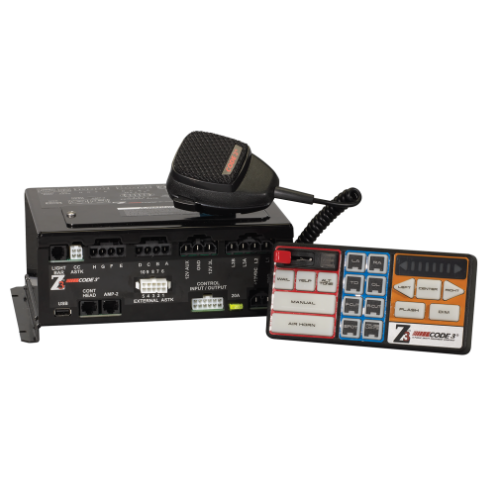
Was finally motivated and dedicated enough to actually stick to making a siren for once. Didn't see any good Z3 Sirens for LSPDFR, decided to make my own! One of my first sirens made, so cut me some slack. Audio files taken from the official CODE 3 Website Audio files were then edited in audacity, then moved into FL Studio 20 for looping and such. Installation instructions are in the RAR file. Have any questions for me? Feel free to PM me on Discord, as listed on my profile. THIS WAS ALL MADE BY ME, NOTHING WAS STOLEN FROM ANYONE ELSE. Siren in game: (The siren is louder and sounds way better in game than the video. The video is also limited to 30FPS, thanks shadowplay.) Changelog: V1.1: • Changed format to .zip for universal access. V1.0: • File uploaded to website.
- 9 comments
- 1 review
-
-
 Absolutely love this update! Only problem is that I can't seem to be able to find the button to change the max speed, as it is not stated in the xml file. Other than that, amazing update!
- 330 comments
- 24 reviews
-
Hello, ThinkRusty! LSPDFR Is solely a single-player mod that runs on RPH/RagePluginHook installed in the local game files. There is currently no way to get it on any server on the FiveM platform, client- sided or not. What I would recommend you do is to just to mess around and find a good FiveM RP Server to play on. As most are very similar/better than LSPDFR in certain conditions. Have fun, stay safe! 😄 Please note that I am not an official support user for the website, I just like helping people!
-
-
 Anyone else having problems pulling people over, accepting callouts, etc while on duty as BCSO?
- 264 comments
- 21 reviews
-
-

- 1
-
-
Thank you!
-
Hi there. (I'm pretty sure this is the wrong section, but I can't think of anywhere else to put it.) I've been looking all over the internet for the past 1-2 months looking for what siren either Pasco County Sheriff's Office and/or Pinellas County Sheriff's Office use. If anyone could find out what siren one of them use that would be great, Thank you! Here's some example videos if you need some.
-
Try using this guide, worked for me greatly on other mods and stuff. If it doesn't work, I don't know then. Sorry. https://forums.gta5-mods.com/topic/19337/fix-for-game-memory-error-may-2018-by-police18651
-
Tried that too, same thing.
-
Tried both windowed and fullscreen, still crashes. I'll try and trace back via the rph or something to see if I can fix it
-
Just tried that, still crashing. Put it at 100000, also still crashing. Thanks for the help though.
-
Thanks for all the hard work on this! (Probably not the right place to post this but only problem is that whenever the game loads, the LSPDFR 0.4 plugin crashes. This is on a clean game install also. The error is the same every time. "LSPDFR.InitializeBackground()") I tried both manual installation, and automatic installation. Same outcome.
-


