




Kreemerz
Members
-
Joined
-
Last visited
Everything posted by Kreemerz
-
Ah, got it.
-
Just so that I am clear... the meta file is the VCF file?
-
Yeah, I would like it to spawn installed. So I will take a look. thanks Kallus!
-
I've downloaded several vehicles I like. I noticed in the description, it shows the vehicles with pushbars. Do I have to go into the garage and add them every single time I start the game?
-
Turned out I was placing the VCF file into the wrong folder. I was erroneously placing it into the ELS folder instead of placing it inside the 'pack_default' folder. Resolved.
-
I am having trouble with the ELS light vehicles. I keep installing them and when I place my officer in the car, he starts the engine and the lights come on. They stay on steady burning. No flashing or anything. And none of my controls to turn them off seem to work. I have reinstalled the Scripthook, ASI Loader, etc. Placed the files in different patchday folders. No change. Not sure what I'm doing wrong. No problems with brightness. The only problem is that they all turn on when the engine is started. And I can't control them to do anything else. I have Radiance V and ELS installed. Tested one vehicle (Los Santos Police Pack _Inglewood Based_)
-
Downloaded new vehicles seemed to fix the problem. Not sure why but it seemed to work.
-
I just reinstalled the game & Mod after a Windows reinstall. I also installed a couple of ELS police vehicles. And for some reason, when I go into the game to check the vehicles, their emergency lights come on automatically as soon as the driver starts the engine. But only a couple of the lights come on and stay on. I can't turn them off, nor can I turn on any. They're bright, so apparently Radiance V is working. I used OpenIV to install the new vehicles in their correct path. I also covered their config XML files in the ELS folder. But same issue remains. Not sure what is going on....
-
-
Include the link?
-
Aw... was really rooting for this. Hate that "wrap'em up in a ball" thing.
-
Is this ready?
-
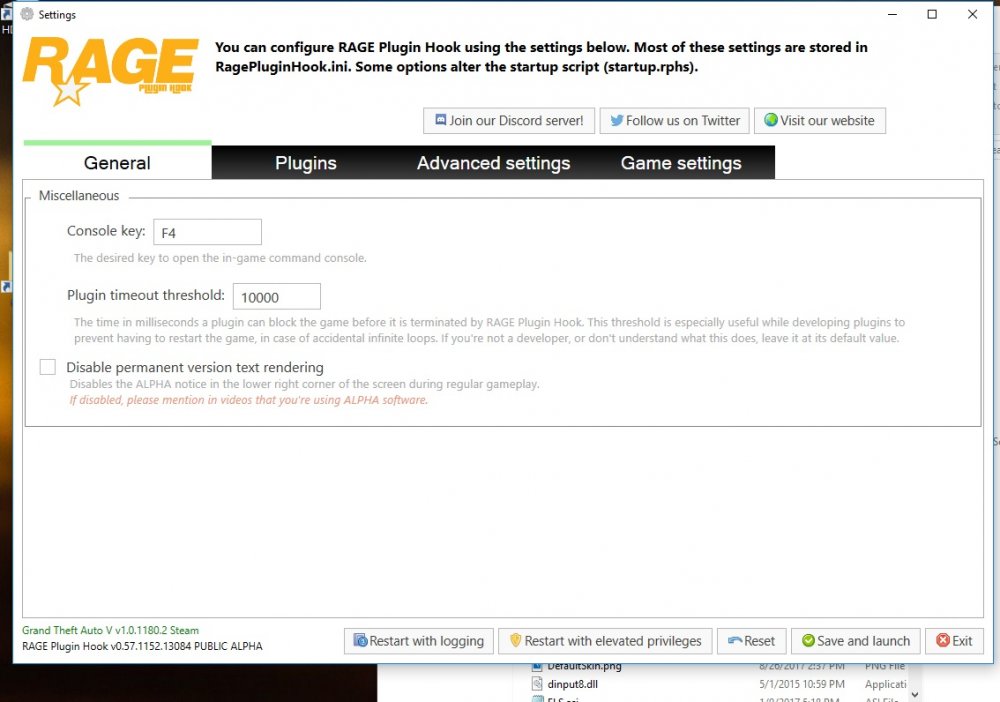
Yeah, it's a bug unless they intended for it to be this way. I changed it multiple times. I used F3 for the console and F4 for the Enhanced Trainer. But now, it is still bound to F4 no matter what I do. Even the config ini file will reflect my change to F3 but the game won't reflect the change. so it's a bug until I see otherwise that it was intended.
-
But I was able to change it before. Did the Rage update change this? I don't use the Native Trainer. I use the Enhanced Trainer.
-
I was able to before. I use a Trainer that is assigned to F4 already. I'm gonna remove the Enhanced Trainer and see what it does.
-
It keeps going back to F4.... after I click 'SAVE and LAUNCH'...
-
I'm confused. Is Radiance required for the lights to work or not. (because no one has ever referenced it in relation to ELS. ) Not sure why it just isn't included.
-
Just did a clean install... but I keep going into the config and trying to assign F3 to the Console. But for some reason, it doesn't want to save. I checked the RageHook ini file and it shows F3 as the assigned key. But when I start the game, it keeps going back to F4. So frustrating...
-
Kallus, I'm doing a clean install for GTAV. Do I need to redownload the entire GTAV game? or does it have an updater? (steam version)
-
50,000? Wow.. why does not just have this setting as default? Seems like lots of people complain about this.
-
Lol. Okay. Thanks. I'm done with questions. Greatly appreciate your patience.
-
Lol... Okay. But what if it has one of those meta files? Those meta files confuse me.
-
Ooooh I see. I can't just drag and drop because the Explorer model files are named police3 and I don't want this to overwrite the already existing police3 file (My CHP crownvic). So I need to rename the three model files and VCF file to Sheriff2. And as for the meta file, I need to open the file and change all references from 'police3' to 'sheriff2'?
-
Hmm... I'm not really trying to get rid of the police3 slot. I just want to change the Sheriff2 slot to the Ford Explorer I found. Police3 is already changed to a crown vic I found.
-
Nevermind. Saw that u already answered the question.


