


Takashi.pc
Members
-
Joined
-
Last visited
Everything posted by Takashi.pc
-
 Don't worry 🙂 Thanks I like it a lot
 -
I thought the current gameconfig does not support .1
-
btw, there is a lspd19 slot 😄
-
 I made a custom file for 3 ultimate backup xml. If you would like to download just check my profile. Thanks and have a nice day.
- 276 comments
- 45 reviews
-
Amazing🙂
-
How to make backup spawn with EUP? (Ultimate Backup). Thanks
-
That was a slicktop. There should be any lights on top. What's the cause of that?
-
 nope
nope -
Do you have a link to that tweet? I dont see any download link
-
It's private? Can I ask him too?
-
Is it ザドルノフ?
-
 Thank you
 -
Did you make that car skin yourself? It's realistic
-
yea you cant find it because this is GTA IV and you are looking for GTA V
-
Got it! Thanks! At this moment, i am waiting Script Hook V to be updated so I can have that tested with the ELS. It would be great if someone could test that out for me. 😄
-
-
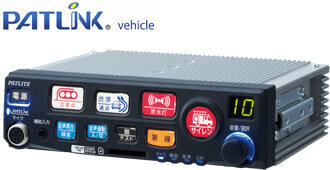
Download Links: ELS: Siren Mastery: OpenIV: https://openiv.com/ Installation Guide: 1. Download OpenIV 2. Create a 'mods' folder in Grand Theft Auto V main directory 3. Copy 'x64' from the main directory to the 'mods' folder 4. Navigate to [] using OpenIV GTAV>mods>x64>audio>sfx>resident.rpf 5. Press edit mode 6. Replace the "vehicles.awc" 7. Press 'tools' then 'ASI Manager'. 8. Install ASI Loader and OpenIV.asi 9. Enjoy! Sound: Patlite SAP500BKPV Patlite SAP520PBK Osaka Siren MK-11 Patlite SAP500RBVZ Real Life Use: Police Primary (4-sec loop) Police Secondary (Stop siren button) Police Tertiary (PD Intersection warning) FireTruckHorn (FD Intersection warning) FireTruckPrimary (Normal wail) FireTruckSecondary = FireTruckHorn AmbulancePrimary (Normal wail) AmbulanceSecondary = Police Tertiary ********-MUST DO-******** Because of size limitation, I have removed the policeb siren, fbi siren, and granger siren. You must edit the .xml file in ELS for it to work. -DO NOT REUPLOAD- -Only Available on lcpdfr.com and gta5-mods.com- Video:
-
-
Useful! Thanks
-
What is the extra police2 meta?
-
Since the last error, I've fixed the mic. But now it takes nearly 2 minutes to detect an input, if I say "Shots fired", it took 3 minutes for backup to arrive. Usually it cant detect my input. It wasnt like this ages ago... Anyone has idea what happened to it? Cheers!
-
Problem fixed. I got something wrong with my settings with mic input wasn't enabled in GTA V.
-
-
 Don't download, buggy plugin... I installed your plugin today, only yours, and it crashes frequently.
- 1,007 comments
- 63 reviews
-
I like those callouts, but your plugin is too buggy. Updaing my review to 4 stars (From 2), for the past few months, I've been playing with this callout and I like the ideas.
- 1,007 comments
- 63 reviews
-
-

- 1
-



