
YTSkillarN
Members
-
Joined
-
Last visited
Everything posted by YTSkillarN
-
Upload a pic on your EUP, both Menu and L&O installed and your dlclist.xml in your /mods/update/update.rpf archive
-
What does the message say?
-
And the EUP Menu mod says you haven't installed it?
-
Do you notice any changes in the Rage Console?
-
No, but it don't add the EUP line to dlclist.xml, have you done that? Copy any line and change the dlc name to eup. Save
-
Thank you very much! It worked now!
-
Okay, I don't remember I have edited that though. But I'll test. Did you use the .oiv package or the manual installer?
-
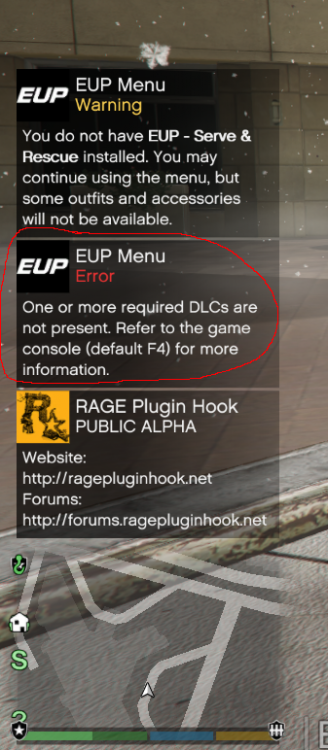
Nice! I have the Modding DLC pack (not x64e and patchday14ng etc) installed. It didn't work even if I did like you said:
-
Okay, I'll do that, btw, can I have add-on cars to my game? I thought this can be the "trigger" for the issue to happen. Thanks anyway!
-
Yes, yes it is
-
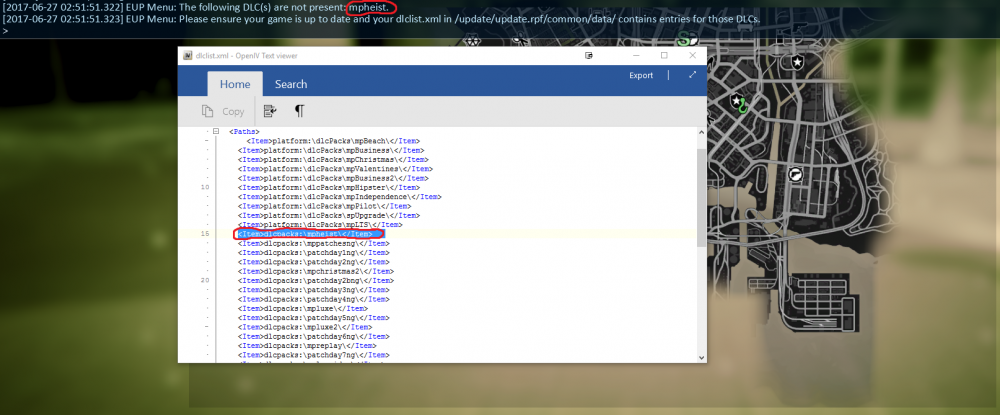
Hello! I've been trying to get EUP working but it says I dont have the mpheist dlc entry in the dlclist.xml in the right directory. Can someone please help me? Can't get this to work! If you don't believe me, look at the picture below.
-
Hello! I've been trying to get EUP working but it says I dont have the mpheist dlc entry in the dlclist.xml in the right directory. Can someone please help me? Can't get this to work! If you don't believe me, look at the picture below.