


Showme10 8
Members
-
Joined
-
Last visited
-
ugh wish I could fast forward to when this will come out I cant wait
-
new tahoes are ugly the older models were better Will we ever see a caprice from GUMP the great?
-
-
-
-
-
 are we gonna be waiting years for v5? and also are you gonna do sheriffs ped?
- 273 comments
- 61 reviews
-
-

- 2
-
-
-
-
-
-
-
-
-
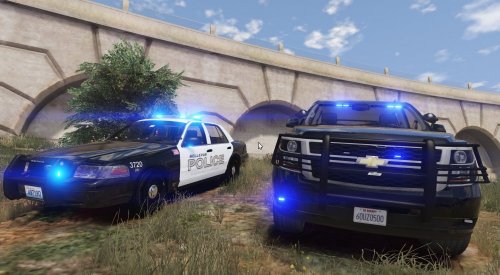 I should be giving this 3 stars but I'm hoping you will make some updates, crossing my fingers. But here is one thing that needs to be addressed 1. all the license plate numbers are the same and its kind of stupid/ridicules in my opinion to see all your back up and all the police that are patrolling with the same exact license plates. I would consider using this pack and I'm sure many others will if you make it so all the license plates are different.
- 21 comments
- 9 reviews
-
-
- 1
-

