BlueGhost
Members
-
Joined
-
Last visited
Files posted by BlueGhost
-
I HAVE RETURNED!
It's been almost five years since my last upload, and roughly four years since I touched Zmodeler.
In January 2026, I began my reintegration into the mod scene. I've been playing FiveM religiously because it was a lot of fun, but the cars I've seen in servers were bothering me, because I knew that I could provide better vehicles for free.
So, I started learning Non-ELS, and the goal was clear. In classic fashion, this pack is hefty. There are almost 20 cars per pack, and they're made to be used either in GTA SP, or you can convert them for FiveM usage.
There are no real-world logos, which makes the entire pack TOS compliant for FiveM usage.
EMS vehicles have red & white lighting. Police vehicles have red & blue lighting.
Features:
All vehicles have toggleable lighting! You can choose your lighting in any number of combinations!
Full hybrid lighting! Non-ELS lighting controlled with ELS.
Strong extras, which means that the pushbars are effective, and can be toggled! Repair your car to see the changes.
All vehicles have enhanced ramming force, which makes for effective PIT maneuvers.
FiveM TOS compliant
Installation:
1. Navigate to your dlpacks folder, located at
mods\update\x64\dlcpacks
2. Enable Edit Mode
3. Drag and drop the "lfpolice" AND/OR "lfems" folder(s) inside the dlcpacks folder
4. Navigate to your data folder, located at
mods\update\update.rpf\common\data
5. Locate your dlclist.xml, then right click and click "Edit"
6. Directly after the latest entry in the XML, you must put the following line(s):
<Item>dlcpacks:/lfpolice/</Item>
<Item>dlcpacks:/lfems/</Item>
7. Click Save
8. Drag and drop the VCF.XML files to pack_default folder located at:
Grand Theft Auto V\ELS\pack_default
9. Start GTA V.
!! SINGLEPLAYER INSTALLATION ALSO REQUIRES ELS !!
SIRENS WILL NOT WORK WITHOUT ELS VCF FILES
Siren IDs: 5555 for Police, 5550 for EMS
Terms of Use:
Don't use this pack in part or whole as a reward for donation to a server, or a direct purchase with real currency or virtual currency (i.e. FiveM Tebex stores)
Don't pass off any of my work as your own.
Do not rip, modify, or alter the contents of this archive.- 1,742 Downloads
- 6 Comments
Updated -
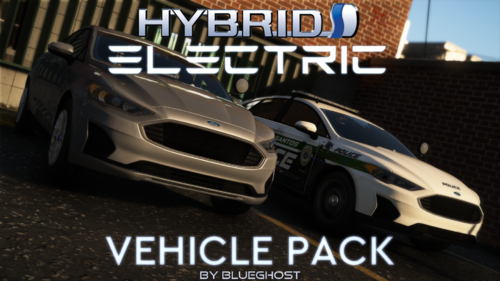
This pack is my return to making practical, realistic marked units. It features the first ever Ford Police Responder Hybrid Sedan, as accurate as I could make it.
IT IS NOT A FUSION.
There are currently six vehicles in this pack, which is a stark contrast to what my previous projects have had. There will be one more update to include a few more modern HEVs. like the Toyota Prius, Ford F150 PowerBoost hybrid, and Ford Police Interceptor Utility hybrid.
I was pressed for time and money to acquire the others that I wanted, like the Ford Mustang Mach E and the Toyota RAV4 Prime, so those will not be included in the update.
Planned Vehicles:
2019 Toyota Prius
2021 Ford F-150 PowerBoost Hybrid
2020 Ford Police Interceptor Utility Hybrid
THIS PACK IS COMPATIBLE WITH ALEXGUIRRE'S SPOTLIGHT PLUGIN
Spotlight - Script Modifications & Plugins - LCPDFR.com
Liveries by @EchoWolf!
Installation instructions and spawn names are included in the archive.
Bugs:
One report of brake calipers swinging wide with wheel turning. I do not have this bug, nor did any of my testers. This is an isolated issue.
If you enjoy my work, join my Discord!
https://discord.gg/3np9Me3
- 11,526 Downloads
- 47 Comments
Updated -
Vertex count: 198k
7mb/9mb high/low YFT, respectively
Works best with POLICE3 handling
LOD'd to L2 (L2 is just a hollow bodyshell, chassis and blacked out windows/glass, around 40k, give or take)
49 materials
FEATURES:
Assigned Light IDs
Interior buttons and sidemarkers illuminate with the headlights
Hands on/near steering wheel
Breakable glass
Templated license plate frame with template in Textures folder (DDS format)
Functional dummies (Plate light, dash glow, exhausts, overheat, etc.)
Paint3 material with [PAINT:1] tag to allow liveries and changeable body colors via trainer or LS Customs
Templated and dirt mapped
Note: If you make an add-on with this vehicle, set your camera height to 0.600
By downloading and using the models provided to you, you agree to the following stipulations and terms;
Any modifications made to base models from all tiers must be LOCKED if they are uploaded in any projects you publish! For example, police, fire, or EMS vehicles.
FORBIDDEN ACTIONS:
- You may NOT sell any content in it's original state which you acquired it from, meaning that you are NOT permitted to sell any unlocked base models.
- Base model edits are NOT allowed to be sold. Only freely distributed. In this case, do NOT claim sole credit. That's a shitty thing to do.
PERMITTED ACTIONS:
- Usage in private sales and public uploads in a LOCKED FORMAT is ALLOWED.
- Usage in private sales does NOT require a license or equity. You may sell to your hearts content. Just make sure that I am credited.
- Uploading liveries is allowed, however, you may only upload the texture itself in that case. For any questions, concerns or clarification, please message me directly.
- 2,514 Downloads
- 23 Comments
Submitted -
This pack contains a myriad of unmarked vehicles for your enjoyment. Ranging from a run-of-the-mill Crown Victoria to an unassuming Subaru WRX STI, there are no shortages of vehicles for you to get to know.
Features:
Uniform lighting packages
Single and Three stage lighting, dependent upon vehicle type
Enhanced engine audio
Unique selection of vehicles, from pickup trucks, sedans, coupes, SUVs
Templates for you to use in livery creation
Optional OIV Installer
Best of all, it's an Add-On archive! No need to replace your existing vehicles!
Join my Patreon to get early access to public base models, and access to exclusive private base models!
https://www.patreon.com/blueghostmods
In order to ensure that your game can handle a pack of this size, you must install the following items!
REQUIRED FILES:
https://www.gta5-mods.com/tools/packfile-limit-adjuster
https://www.gta5-mods.com/misc/gta-5-gameconfig-300-cars
https://www.gta5-mods.com/tools/heap-limit-adjuster-600-mb-of-heap
-----FAQ-----
Q: FiveM version?
A: No, but you may use this on your server, with credits to me, and the authors that created the resources that I've used.
Q: Non-ELS?
A: No, I will not make a Non-ELS version.
Q: Replacement?
A: No, I will not make a replacement version.
Q: Can you change the lighting? It's so boring.
A: No, what's done is done. I like uniformity in my designs.
There are 48 unmarked vehicles in this pack.
-----UPGRADING-----
If you're updating to a new version of this pack, all you need to do is replace the dlc.rpf and VCFs (If you installed manually)
If you're installing this pack for the first time, you must follow the steps below.
-----Manual Installation-----
1. Navigate to your dlpacks folder, located at
mods\update\x64\dlcpacks
2. Enable Edit Mode
3. Drag and drop the "blueghostpack" folder inside the dlcpacks folder
4. Navigate to your data folder, located at
mods\update\update.rpf\common\data
5. Locate your dlclist.xml, then right click and click "Edit"
6. Directly after the latest entry in the XML, you must put the following line:
<Item>dlcpacks:/blueghostpack/</Item>
7. Click Save
8. Drag and drop the VCF.XML files to pack_default folder located at
Grand Theft Auto V\ELS\pack_default
9. Start GTA V.
-----OIV Installation-----
1. Click on the Package Installer button, below the "Favorites" drop-down menu
2. Locate the OIV archive, double click it to select it
3. Click "Install"
4. Click "Mods Folder" to install the archive into your mods folder
5. Confirm the installation, and wait for the process to complete.
6. Start GTA V.
Terms of Use:
You may use this pack in FiveM, with credit in place.
You may not reverse engineer, rip, extract, alter, or otherwise modify the models in this pack.
You may upload liveries using the provided templates.
Do not reupload this pack ANYWHERE for ANY REASON.
Do not sell this pack for ANY REASON.
Discord:
https://discord.gg/3np9Me3
- 304,897 Downloads
- 482 Comments
Updated -
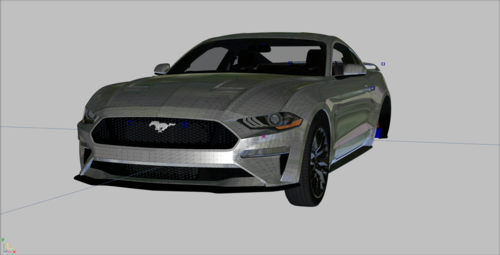
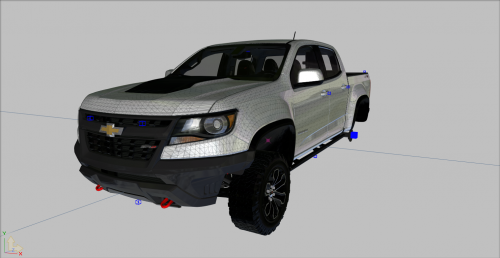
242263 polygons
Templated
Dirt mapped
3D engine
LOD'd to L2
Light IDs
If you cannot open the Z3D, import the provided YFT files.
Terms of Use:
This model is being provided to you, the user, in a usable and ready format, free of charge.
You are expected to have adequate knowledge in creating vehicle modifications when using this model.
Do not ask general questions regarding the creation of modifications with this model.
You may make edits as you see fit.
You may use this model in public uploads and private applications.
You may not sell this model in the format that it has been provided to you.
You may not re-upload lightly edited versions.
You may not re-upload this model in the format that it has been provided to you.
Join my Patreon to get early access to base models, and access to exclusive private base models!
https://www.patreon.com/blueghostmods
Here's the template:
- 3,081 Downloads
- 4 Comments
Updated -
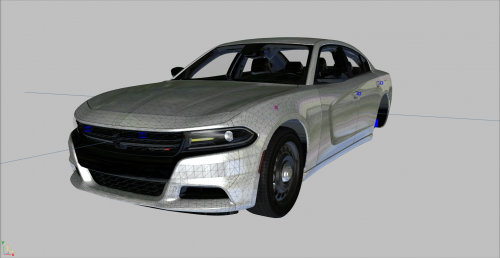
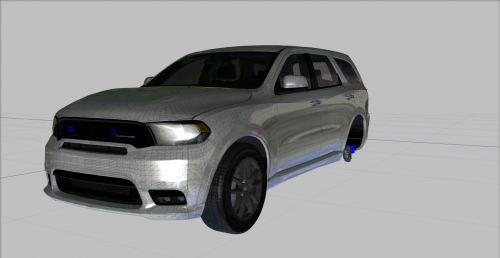
246948 polygons
Templated
Dirt mapped
LOD'd to L2
Light IDs
If you cannot open the Z3D, import the provided YFT files.
Join my Patreon to get early access to public base models, and access to exclusive private base models!
https://www.patreon.com/blueghostmods
Terms of Use:
This model is being provided to you, the user, in a usable and ready format, free of charge.
You are expected to have adequate knowledge in creating vehicle modifications when using this model.
Do not ask general questions regarding the creation of modifications with this model.
You may make edits as you see fit.
You may use this model in public uploads and private applications.
You may not sell this model in the format that it has been provided to you (as a Z3D file).
You may not re-upload lightly edited versions.
You may not re-upload this model in the format that it has been provided to you (as a Z3D file).
- 1,934 Downloads
- 4 Comments
Submitted -
223503 polygons
Templated
Dirt mapped
LOD'd to L2
Light IDs
If you cannot open the Z3D, import the provided YFT files.
Terms of Use:
This model is being provided to you, the user, in a usable and ready format, free of charge.
You are expected to have adequate knowledge in creating vehicle modifications when using this model.
Do not ask general questions regarding the creation of modifications with this model.
You may make edits as you see fit.
You may use this model in public uploads and private applications.
You may not sell this model in the format that it has been provided to you.
You may not re-upload lightly edited versions.
You may not re-upload this model in the format that it has been provided to you.
Join my Patreon to get early access to public base models, and access to exclusive private base models!
https://www.patreon.com/blueghostmods
Uploaded with permission from HP Deskjet
- 6,802 Downloads
- 27 Comments
Submitted -
I know this pack isn't as extravagant as my past releases, but I don't want to overwork myself as I have in the past to meet a deadline. I have other ideas on my plate, so I'll try to divvy up my developmental schedule to bring these ideas to fruition. Templates and dirt mapping will be added. My free time is strenuously spent between development, home life, personal time, and a myriad of other avenues. Please be patient with me!
Join my Patreon to get early access to public base models, and access to exclusive private base models!
https://www.patreon.com/blueghostmods
-----FAQ-----
Q: FiveM version?
A: No, but you may use this on your server, with credits to me, and the authors that created the resources that I've used.
Q: Non-ELS?
A: No, I will not make a Non-ELS version.
Q: Replacement?
A: No, I will not make a replacement version.
Q: License plate holder?
A: You may replace the texture, but I will not remove it. It's a symbol for Autism Awareness.
Q: Can you change the lighting?
A: No, what's done is done.
Q: Game crash / texture loss?
A: Install these
https://www.gta5-mods.com/tools/packfile-limit-adjuster
https://www.gta5-mods.com/misc/gta-5-gameconfig-300-cars
https://www.gta5-mods.com/tools/heap-limit-adjuster-600-mb-of-heap
-----UPGRADING-----
If you're UPGRADING to a new version of this pack, all you need to do is replace the dlc.rpf and ELS VCF XML files.
If you're installing this pack for the FIRST time, you must follow the steps below.
-----Installation-----
1. Navigate to your dlpacks folder, located at
mods\update\x64\dlcpacks
2. Enable Edit Mode
3. Drag and drop the "bgeupack" folder inside the dlcpacks folder
4. Navigate to your data folder, located at
mods\update\update.rpf\common\data
5. Locate your dlclist.xml, then right click and click "Edit"
6. Directly after the latest entry in the XML, you must put the following line:
<Item>dlcpacks:/bgeupack/</Item>
7. Click Save
8. Drag and drop the VCF.XML files to pack_default folder located at
Grand Theft Auto V\ELS\pack_default
9. Start GTA V.
DO NOT CREATE REPLACEMENTS OUT OF ANY OF THESE VEHICLES. THEY WON'T FUNCTION PROPERLY.
BUGS:
A few cars have first person camera clipping, use first person at your own discretion.
Terms of Use:
You may use this pack in FiveM, with credit in place.
You may not reverse engineer, rip, extract, alter, or otherwise modify the models in this pack.
Do not reupload this pack ANYWHERE for ANY REASON.
Do not sell this pack for ANY REASON.
Discord:
https://discord.gg/3np9Me3
STOP USING MY SCREENSHOTS FOR YOUR YOUTUBE VIDEOS. MAKE YOUR OWN.
- 11,227 Downloads
- 21 Comments
Submitted -
Limited:
159772 polygons
Templated
Dirt mapped
LOD'd to L1
Light IDs
TRD Pro:
182338 polygons
Templated
Dirt mapped
LOD'd to L1
Light IDs
If you cannot open the Z3D, import the provided YFT files.
Terms of Use:
This model is being provided to you, the user, in a usable and ready format, free of charge.
You are expected to have adequate knowledge in creating vehicle modifications when using this model.
Do not ask general questions regarding the creation of modifications with this model.
You may make edits as you see fit.
You may use this model in public uploads and private applications.
You may not sell this model in the format that it has been provided to you.
You may not re-upload lightly edited versions.
You may not re-upload this model in the format that it has been provided to you.
Join my Patreon to get early access to public base models, and access to exclusive private base models!
https://www.patreon.com/blueghostmods
- 2,203 Downloads
- 8 Comments
Updated -
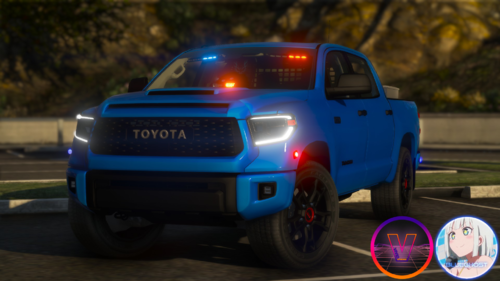
The Tundra is a full size pickup truck developed and sold for the North American market by Toyota.
The first model was rather small and struggled in sales. Because of this, Toyota expanded both the body size and engine displacement for the 2nd generation model that debuted in 2007. This led to greatly improved sales and made the Tundra a very popular model.
From 2014, it underwent minor changes that give it powerful looks, and in 2015 the 'TRD Pro' version was introduced. This TRD Pro was tuned by Toyota's motorsport department, TRD. In order to improve its driving performance on rough roads, this model utilises TRD coils and Bilstein dampers in order to improve the stroke characteristics of the suspension.
The TRD Pro was dropped from the lineup for some time afterwards, but returned as a catalogue model again in 2019. Based on the Crewmax 4x4 with a 5.7L V8, the suspension was further tuned with Fox dampers, and its sporting character is further raised with equipment such as the new hood scoop and BBS wheels.
Included in this archive are two variants of the Tundra:
TRD Pro and Limited
Installation:
1. Navigate to your dlpacks folder, located at
mods\update\x64\dlcpacks
2. Enable Edit Mode
3. Drag and drop the "tundra" folder inside the dlcpacks folder
4. Navigate to your data folder, located at
mods\update\update.rpf\common\data
5. Locate your dlclist.xml, then right click and click "Edit"
6. Directly after the latest entry in the XML, you must put the following line:
<Item>dlcpacks:/tundra/</Item>
7. Click Save
8. Drag and drop the VCF.XML files to pack_default folder located at
Grand Theft Auto V\ELS\pack_default
9. Start GTA V. Spawn name is "tundrap" and "tundrap2".
Non-ELS version coming soon.
Known bugs:
Takedowns are backwards. Will fix with Non-ELS update.
Discord:
https://discord.gg/3np9Me3
- 6,945 Downloads
- 16 Comments
Updated -
184522 polygons
Templated
Dirt mapped
LOD'd to L2
Light IDs
If you cannot open the Z3D, import the provided YFT files.
Terms of Use:
This model is being provided to you, the user, in a usable and ready format, free of charge.
You are expected to have adequate knowledge in creating vehicle modifications when using this model.
Do not ask general questions regarding the creation of modifications with this model.
You may make edits as you see fit.
You may use this model in public uploads and private applications.
You may not sell this model in the format that it has been provided to you.
You may not re-upload lightly edited versions.
You may not re-upload this model in the format that it has been provided to you.
Join my Patreon to get early access to public base models, and access to exclusive private base models!
https://www.patreon.com/blueghostmods
- 1,549 Downloads
- 2 Comments
Updated -
177863 polygons
Templated
Dirt mapped
LOD'd to L2
Light IDs
If you cannot open the Z3D, import the provided YFT files.
Join my Patreon to get early access to public base models, and access to exclusive private base models!
https://www.patreon.com/blueghostmods
- 1,137 Downloads
- 2 Comments
Updated -
219848 polygons
Templated
Dirt mapped
LOD'd to L2
Light IDs
If you cannot open the Z3D, import the provided YFT files.
Terms of Use:
This model is being provided to you, the user, in a usable and ready format, free of charge.
You are expected to have adequate knowledge in creating vehicle modifications when using this model.
Do not ask general questions regarding the creation of modifications with this model.
You may make edits as you see fit.
You may use this model in public uploads and private applications.
You may not sell this model in the format that it has been provided to you.
You may not re-upload lightly edited versions.
You may not re-upload this model in the format that it has been provided to you.
Join my Patreon to get early access to public base models, and access to exclusive private base models!
https://www.patreon.com/blueghostmods
- 2,259 Downloads
Updated -
153902 polygons
Templated
Dirt mapped
LOD'd to L2
Light IDs
If you cannot open the Z3D, import the provided YFT files.
Terms of Use:
This model is being provided to you, the user, in a usable and ready format, free of charge.
You are expected to have adequate knowledge in creating vehicle modifications when using this model.
Do not ask general questions regarding the creation of modifications with this model.
You may make edits as you see fit.
You may use this model in public uploads and private applications.
You may not sell this model in the format that it has been provided to you.
You may not re-upload lightly edited versions.
You may not re-upload this model in the format that it has been provided to you.
Join my Patreon to get early access to public base models, and access to exclusive private base models!
https://www.patreon.com/blueghostmods
- 4,545 Downloads
- 6 Comments
Updated -
166366 polygons
Templated
Dirt mapped
LOD'd to L2
Light IDs
If you cannot open the Z3D file, import the provided YFT files.
Terms of Use:
This model is being provided to you, the user, in a usable and ready format, free of charge.
You are expected to have adequate knowledge in creating vehicle modifications when using this model.
Do not ask general questions regarding the creation of modifications with this model.
You may make edits as you see fit.
You may use this model in public uploads and private applications.
You may not sell this model in the format that it has been provided to you.
You may not re-upload lightly edited versions.
You may not re-upload this model in the format that it has been provided to you.
Join my Patreon to get early access to public base models, and access to exclusive private base models!
https://www.patreon.com/blueghostmods
- 1,234 Downloads
- 2 Comments
Updated -
212867 polygons
Templated
Dirt mapped
3D engine
Light IDs
LOD'd to L2
If you cannot open the Z3D, import the provided YFT files.
Terms of Use:
This model is being provided to you, the user, in a usable and ready format, free of charge.
You are expected to have adequate knowledge in creating vehicle modifications when using this model.
Do not ask general questions regarding the creation of modifications with this model.
You may make edits as you see fit.
You may use this model in public uploads and private applications.
You may not sell this model in the format that it has been provided to you.
You may not re-upload lightly edited versions.
You may not re-upload this model in the format that it has been provided to you.
Join my Patreon to get early access to public base models, and access to exclusive private base models!
https://www.patreon.com/blueghostmods
- 1,183 Downloads
- 1 Comments
Updated -
138840 polygons
Templated
Dirt mapped
Light IDs
LOD'd to L2
Functional sliding door (when vehicle layout is set to a van style layout)
If you can't open the Z3D, import the provided YFT files.
Terms of Use:
This model is being provided to you, the user, in a usable and ready format, free of charge.
You are expected to have adequate knowledge in creating vehicle modifications when using this model.
Do not ask general questions regarding the creation of modifications with this model.
You may make edits as you see fit.
You may use this model in public uploads and private applications.
You may not sell this model in the format that it has been provided to you.
You may not re-upload lightly edited versions.
You may not re-upload this model in the format that it has been provided to you.
Join my Patreon to get early access to public base models, and access to exclusive private base models!
https://www.patreon.com/blueghostmods
- 3,946 Downloads
- 1 Comments
Updated -
225107 polygons
Templated
Dirt mapped
Light IDs
3D engine
LOD'd to L2
If you cannot open the Z3D, import the provided YFT files.
Terms of Use:
This model is being provided to you, the user, in a usable and ready format, free of charge.
You are expected to have adequate knowledge in creating vehicle modifications when using this model.
Do not ask general questions regarding the creation of modifications with this model.
You may make edits as you see fit.
You may use this model in public uploads and private applications.
You may not sell this model in the format that it has been provided to you.
You may not re-upload lightly edited versions.
You may not re-upload this model in the format that it has been provided to you.
Join my Patreon to get early access to public base models, and access to exclusive private base models!
https://www.patreon.com/blueghostmods
- 2,468 Downloads
- 8 Comments
Updated -
EasyParkingLights (EPL) is a simple and lightweight plugin made to allow users to toggle their amber parking lights on an EPL-compatible vehicle.
The idea for this plugin comes from seeing many law enforcement officers using their parking lights in the evening while their vehicles are parked.
I reached out to Rich to help me with the initial idea, which was to use the vehicle indicators as steady burning lights, but they're hard programmed to flash by the game.
Using that knowledge as a foundation, I reached out to Sebo for further assistance. We came up with a script using similar functions to his HoldMyGun plugin.
Thus, EPL was born.
EPL WILL ONLY WORK ON COMPATIBLE VEHICLES.
What vehicles are compatible with EPL?
As it stands, my vehicles are the only vehicles that can be used with EPL, but I'm sure that other creators will jump aboard and use this feature.
GET MY EPL PACK HERE:
How can I use it?
Simple. Spawn your EPL-compatible vehicle, and hit your modifier+keybind to toggle the parking lights (RShiftKey+N by default).
You may only toggle your parking lights while your vehicle is STOPPED/PARKED, because duh.
Beyond that, depending on which version you've installed, the parking lights will toggle off automatically when you start driving, or they will toggle off manually with the modifier+keybind while your vehicle is in motion.
FOR VEHICLE MODELERS:
- 5,091 Downloads
- 12 Comments
Updated -
YOU MUST DOWNLOAD THE PLUGIN IN ORDER TO USE THE PARKING LIGHTS VIA KEYBINDING.
This vehicle pack is just a handful of vehicles from my Unmarked Pack, with a few slight tweaks. The main difference is that these vehicles are COMPATIBLE with my EasyParkingLights (EPL) plugin. Beyond that, the cosmetic extras have been combined to open up the extra_12 slot that is required by EPL. Nothing more has changed with these vehicles.
This is really just a pack to showcase the function of my plugin, so if you download this,
How can I use EPL?
Simple. Spawn your EPL-compatible vehicle, and hit your modifier+keybind to toggle the parking lights (RShiftKey+N by default).
You may only toggle your parking lights while your vehicle is STOPPED/PARKED, because duh.
Beyond that, depending on which version you've installed, the parking lights will toggle off automatically when you start driving, or they will toggle off manually with the modifier+keybind while your vehicle is in motion.
FOR VEHICLE MODELERS:
Make sure you install these files to prevent game crashes:
https://www.gta5-mods.com/tools/packfile-limit-adjuster
https://www.gta5-mods.com/misc/gta-5-gameconfig-300-cars
https://www.gta5-mods.com/tools/heap-limit-adjuster-600-mb-of-heap
- 2,506 Downloads
- 6 Comments
Updated -
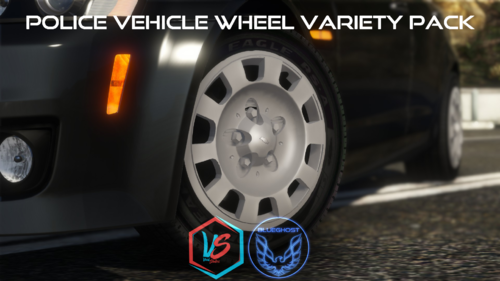
This pack is a collection of wheel types for various police vehicles.
The purpose is to allow players to further customize their rides to fit their taste.
SO HELP ME GOD, IF I SEE ANY ONE OF YOU HEATHENS USING A WHEEL THAT DOESN'T FIT THE VEHICLE YOU PUT IT ON,
I'LL SLAP YOU ON THE TIT.
After much consideration, I’ve had a change of heart.
FiveM usage is allowed FOR THIS WHEEL PACK ONLY.
-----Installation-----
1. Navigate to your dlpacks folder, located at
mods\update\x64\dlcpacks
2. Enable Edit Mode
3. Drag and drop the "wheelvarietypack" folder inside the dlcpacks folder
4. Navigate to your data folder, located at
mods\update\update.rpf\common\data
5. Locate your dlclist.xml, then right click and click "Edit"
6. Directly after the latest entry in the XML, you must put the following line:
<Item>dlcpacks:/wheelvarietypack/</Item>
7. Click Save
8. Start GTA V.
-----Expansion-----
Nah lol
-----Contents-----
There are 18 wheel choices that will fit most common police vehicles in modern model years.
Ford CVPI: 3
Ford Police Interceptor: 2
Dodge Charger: 7
Chevrolet Caprice: 1
Chevrolet Tahoe: 4
Chevrolet Impala: 1
USE THE CORRECT WHEEL FOR THE CORRECT VEHICLE AND TRIM LEVEL
NO ALL-WHEEL-DRIVE WHEELS ON A REAR-WHEEL-DRIVE CHARGER, GOD DAMN IT.
-----Applying your wheels-----
Simply open your trainer menu, and navigate to the wheel customization section. You will find them under the "Sport" category
Enjoy!
- 25,058 Downloads
- 88 Comments
Updated -
GET THE UNMARKED PACK HERE:
Although Ford have discontinued production of the Taurus after the 2019 model year, the Police Interceptor variant still sees extensive use in the fleets of most law enforcement agencies around the world. This variant is a Taurus, the standard CIVILIAN version, with the Limited trim level. You'll have no issues blending in with the flow of traffic, because this Taurus features the body colored grille, upscale interior, LED tail lights, and LED daytime running lights. All of these features make the Taurus a perfect candidate for undercover police work.
The lighting package includes a flowing traffic advisor, front/side/rear lighting, single or three stage activation, and three primary LED & warning strobe patterns in the scan pool. Comsetic extras are MPH900 ALPR as extra ten, and an antenna cluster as extra 12.
The siren controller has been resized, contrary to the screenshots. The video shows the up-to-date version.
THIS VEHICLE IS ONLY AVAILABLE AS AN ADD-ON. DO NOT ASK ME TO MAKE A REPLACEMENT VERSION. DO NOT ATTEMPT TO USE THE TAURUS AS A REPLACEMENT. IT IS NOT DESIGNED TO FUNCTION AS A REPLACEMENT. THE TAURUS IS DESIGNED TO UTILIZE THE PROVIDED LIGHTING PACKAGE. DO NOT MODIFY THE VCF.
LINK TO THIS FILE IF YOU USE IT IN A YOUTUBE VIDEO. YOU KNOW WHO YOU ARE.
Installation:
1. Navigate to your dlpacks folder, located at
mods\update\x64\dlcpacks
2. Enable Edit Mode
3. Drag and drop the "taupol" folder inside the dlcpacks folder
4. Navigate to your data folder, located at
mods\update\update.rpf\common\data
5. Locate your dlclist.xml, then right click and click "Edit"
6. Directly after the latest entry in the XML, you must put the following line:
<Item>dlcpacks:/taupol/</Item>
7. Click Save
8. Drag and drop the desired VCF.XML file to the pack_default folder located at
Grand Theft Auto V\ELS\pack_default
9. Start GTA V. Spawn name is "taupol".
- 7,624 Downloads
- 39 Comments
Updated -
You don’t need to have a bushy moustache and a catchy CB handle to appreciate the 1977 Pontiac Firebird Trans Am, but it certainly doesn’t hurt. The legendary black-and-gold Trans Am is famous for being the ride of choice of a certain “Bandit” seeking to fool the local “Smokies” from East Texas to Georgia. From its T-tops down to the affectionately nicknamed “screaming chicken” emblazoned on the hood, no car epitomizes the era quite like the Trans Am. The period-correct experience continues under the shaker hood, where the 6.6-liter V8 provides enough torque to provide that all-important shove into the seatback, despite emissions restrictions beginning to take their toll on horsepower numbers. If that’s not enough grunt to play cat-and-mouse with the Kojaks, there are plenty of options for souping up the Trans Am at the tuner shop.
There are two variants for you to choose from, in case you're not a fan of the other variant. Both variants include targa tops as extra_12. Decal color options are also included.
THIS VEHICLE IS ONLY AVAILABLE AS AN ADD-ON. DO NOT ASK ME TO MAKE A REPLACEMENT VERSION. DO NOT ATTEMPT TO USE THE FIREBIRD AS A REPLACEMENT. IT IS NOT DESIGNED TO FUNCTION AS A REPLACEMENT. THE FIREBIRD IS DESIGNED TO UTILIZE SINGLE STAGE LIGHTING. DO NOT MODIFY THE VCF.
FAQ:
No, you may NOT use this on your FiveM server.
No, I will NOT make a Non-ELS version.
No, I will NOT make a replacement version.
Installation:
1. Navigate to your dlpacks folder, located at
mods\update\x64\dlcpacks
2. Enable Edit Mode
3. Drag and drop the "firebirdpol" folder inside the dlcpacks folder
4. Navigate to your data folder, located at
mods\update\update.rpf\common\data
5. Locate your dlclist.xml, then right click and click "Edit"
6. Directly after the latest entry in the XML, you must put the following line:
<Item>dlcpacks:/firebirdpol/</Item>
7. Click Save
8. Drag and drop the VCF.XML files to pack_default folder located at
Grand Theft Auto V\ELS\pack_default
9. Start GTA V. Spawn names are "firebird" & "firebird2".
- 1,181 Downloads
- 10 Comments
Updated -
GET THE UNMARKED PACK HERE:
The M5 has always been the standard bearer among the BMW line, with the larger 7-series being more pure luxury and the 3-series a bit more on the playful side. To be an M5, it must do everything right. Comfort that makes you never want to leave the seat, power that ensures you own the road, and handling that is part super saloon and part ultimate sports car. The newest M5 ticks all those boxes and more, including all-wheel drive, an M5 first. Compare it against previous generations and you’ll see the results of years of evolution of the ultimate driving machine.
Equipped with a 599hp 4.4L twin-turbo V8, you'll launch from 0-60 in 3.2 seconds. In the real world, the M5 can alternate between all-wheel-drive and rear-wheel-drive, which can be attributed to the mad scientists at BMW. This vehicle is RWD.
THIS VEHICLE IS ONLY AVAILABLE AS AN ADD-ON. DO NOT ASK ME TO MAKE A REPLACEMENT VERSION. DO NOT ATTEMPT TO USE THE M5 AS A REPLACEMENT. IT IS NOT DESIGNED TO FUNCTION AS A REPLACEMENT. THE M5 IS DESIGNED TO UTILIZE SINGLE STAGE LIGHTING. DO NOT MODIFY THE VCF.
FAQ:
No, you may NOT use this on your FiveM server.
No, I will NOT make a Non-ELS version.
No, I will NOT make a replacement version.
Installation:
1. Navigate to your dlpacks folder, located at
mods\update\x64\dlcpacks
2. Enable Edit Mode
3. Drag and drop the "m5police" folder inside the dlcpacks folder
4. Navigate to your data folder, located at
mods\update\update.rpf\common\data
5. Locate your dlclist.xml, then right click and click "Edit"
6. Directly after the latest entry in the XML, you must put the following line:
<Item>dlcpacks:/m5police/</Item>
7. Click Save
8. Drag and drop the VCF.XML files to pack_default folder located at
Grand Theft Auto V\ELS\pack_default
9. Start GTA V. Spawn name is "m5police".
- 24,386 Downloads
- 36 Comments
Updated -
GET THE UNMARKED PACK HERE:
You know we are deep into the age of the SUV when the folks at Jeep decide to stuff a Hellcat motor into the Grand Cherokee SRT model. I don’t have to tell you it’s a beast; undoubtedly I had you at “Hellcat motor.” This is a 707 horsepower, two-and-a-half-ton all-wheel-drive SUV. Even if it looks relatively tame, one punch of the gas pedal will tell you that this TrackHawk is much more than “family friendly”. Boasting a 707hp 6.2L HEMI V8, capped with a 2.4L IHI Supercharger, this monstrosity will launch you from 0-60 in three and a half seconds. Don't forget to breathe.
Albeit the real world handling is not reflected in this model, I highly recommend upgrading all of your performance parts to get the most out of the TrackHawk. Change the engine audio to the WINDSOR for maximum immersion.
The Whelen Cencom siren controller has been resized, contrary to the screenshots
BEFORE YOU INSTALL THIS VEHICLE, MAKE SURE YOU'RE USING A MODS FOLDER.
YOU MUST USE A TRAINER TO CHANGE THE WINDOW TINT UPON SPAWNING THE JEEP.
Installation:
Run OpenIV
Enable Edit Mode
Navigate to the latest PatchDay folder in your DLCPacks folder, then drag and drop the vehicle files inside the archive
\mods\update\x64\dlcpacks\patchday##ng\dlc.rpf\x64\levels\gta5\vehicles.rpf\
Navigate to the pack_default folder in your root GTA directory, then drag and drop your preferred VCF (Single or Three Stage) inside the folder
Grand Theft Auto V\ELS\pack_default
Disclaimers:
Hands are NOT aligned with the steering wheel
No functional dials
FAQ:
No, you may NOT use this on your server.
No, this vehicle will never be Non-ELS
- 18,667 Downloads
- 19 Comments
Updated