sheepdog6024
Members
-
Joined
-
Last visited
Everything posted by sheepdog6024
-
 All the vehicles work awesome except the FPIS, the lightbar turns on but doesn't rotate like the rest of them. The FPIU and Chargers lightbars work fine which make me think it may be a bug with the vehicle itself. Anyone else have or fix this problem?
- 46 comments
- 29 reviews
-
-
-
-
 Yea literally right after I posted my comment I noticed the ones above, Ive tried deleting it but cant seem to. My bad bro.
- 66 comments
- 26 reviews
-
-

- 1
-
-
@HuskyBaud the pack is awesome man; only problem I’m having is the slicktop Impala lights don’t actually flash correctly, they emit off the ground and walls but don’t flash from the lights themselves. Yes I installed the files correctly and yes I removed the tint using a trainer.
- 66 comments
- 26 reviews
-
what does that mean?
-
What callout packs have locations both in the city and the county? Im tired of getting dispatched to the county when im patrolling in the city.
-
UPDATE: Put in my latest back up.....again after what happened above and it worked fine, installed 1 car from a pack that I already had in the game (to be safe) and worked fine, everything seems to be back to normal *knock on wood* so im starting to think it may be Jedidiahs BCSO pack, nothing against him he makes amazing cars but those vehicles may just have some files in them that aren't compatible with some stuff I added in my game.
-
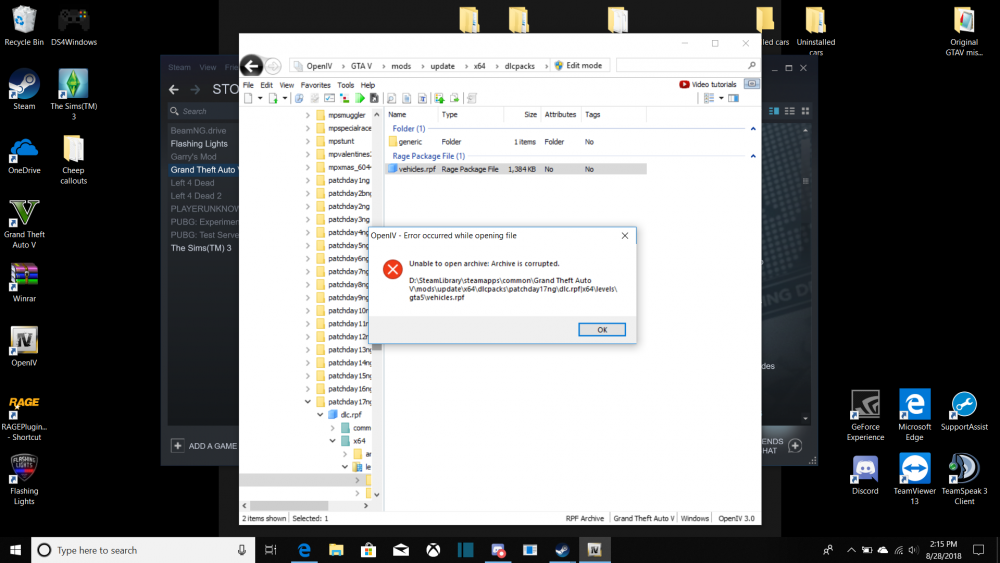
So put in my most recent back up, was able to access my vehicle.rpf in openIV, started the game everything was fine. Went back to open IV installed 3 bcso units and a sasp charger, started the game, spawned the charger and this happened and now cant access the vehicle.rpf
.thumb.png.bcd72613a37d37edd4967d52bed983c0.png)
.thumb.png.fb92b0c708157ea025c1c5d18aca7129.png)
-
Thank you very much I will try it when I get home and update.
-
Could you show me the navigation to it? It’s been a while
-
And how would I get the new folder back there to put my vehicles in? My latest back up wasn’t corrupted because I made it right before I changed vehicles then this happened.
-
So yesterday I decided to change my vehicles up, I installed straightglitchez unmarked 2014 charger and 3 of jedidiahs new BCSO vehicles in. When I started the game it was all black and white so I quit immediately and to fix the problem removed the unmarked 2014 charger and put in one I used before. The game was fine but now trying to access the "vehicle.rpf" file in openIV to put in more cars says it cant be opened because the archive is corrupted. Anyone have any idea on how to fix this? Also put in a back up of the directory I made right before I changed the vehicles, put that in and still getting the error.
-
 Makes sense, more locations need to be added for these callouts, way too many people are driving their cars into the mirror park lake lol
- 136 comments
- 42 reviews
-
why is it when I'm patrolling in sandy shores I get dispatched from LSPD to a call down in the city?
- 136 comments
- 42 reviews
-
I agree with Khalid02 I did the same thing he did and it worked just had to adjust my visual settings and reinstall EUP law and order.
-
So my latest patchday I have is 17, I don't have 18 or 19.
-
Lol well let me know what you find out, I’m going to move them all to 19 to see if it helps, I’ll update when I do.
-
Sorry yes I have all my vehicles in 18, so move them all to 19?
-
I have all of my vehicles in patchday17, I’m assuming I have to move them to the newest one?
-
I updated my GTA, Rageplug in hook and ScripthookV and when I launch Rage its just an infinite loading screen and the game doesn't load. Any help on that?
-
-
-
I realized my battery was set on "best performance" not on "best battery life". Something must have changed it. Appreciate the answers.

.png.852b4a83d745ed7a4695dd1603e4915f.png)
.png.39424970a1e2e11b39a082e5f18dd344.png)