


Gilbo
Members
-
Joined
-
Last visited
Everything posted by Gilbo
-
@HappyJoker So instead of saying that you probably installed it wrong since it worked for me, I should lie and say you installed it right? Clearly you not knowing how to drop drag and drop a file is a fact considering you cant get a mod to work that works for everyone including myself. If it's something that needs to be updated just like @Chillbill561 mentioned you can go ahead and blame me for saying you installed it wrong but until then i will keep my word for it. Also: If you're going to be offended over that then I suggest you leave the internet because you're probably going to end up killing yourself because someone calls you an ''idiot''.
-
@Chillbill561 @HappyJoker If RadianceV don't work for neither of you then you installed it wrong. I just downloaded RadianceV and retried installing it and it worked like a charm. So giving him another mod that replaces the same files as RadianceV (Visualsettings.dat) won't really do anything. However you can try, but make sure you use the ''mods'' folder in OpenIV to install them. When I installed RadianceV for the first time I replaced the files without using the mods folder and it changed nothing but then when I replaced the files using the mods folder it worked. If the lights are still dim then try installing another vehicle.
-
-
@Bxbugs123 is working on a new 2006 tahoe. It's coming along nicely. http://www.lcpdfr.com/forums/topic/75992-bxbugs123s-release-wip-showroom/?tab=comments#comment-499476
-
Try putting the cars in Patchday11ng instead of Patchday15ng.
-
FUCK YEAAAAAAAAAAAAAAAAAAAAAA!!!!!!
-
I still have EUP 7.4, I can PM you it if you want?
-
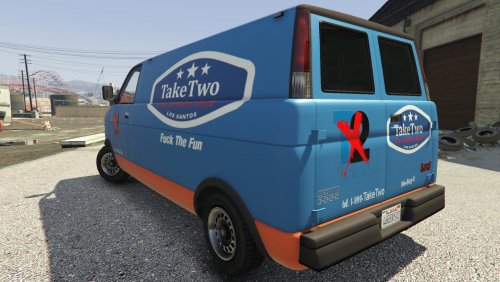 I know. If you already know then why did you ask why this file is in vehicle category and not texture category? Clearly this file has vehicle files and not texture files in it. Although it just replaces the texture I felt like it was a bit missleading putting it in texture category considering it replaces whatever modded burrito2 vehicle you have. And thanks for letting me know!
- 16 comments
- 13 reviews
-
Look under ''File Information'' and you will see what is inside the file, there is burrito2 yft, ytd and hi.yft files. The reason I gave vehicle files and not just the texture was because when I installed the texture in x64e it didn't replace in-game. So I added the burrito2 vehicle files with the texture already changed in the ytd file to patchday11ng and it worked.
- 16 comments
- 13 reviews
-
@LanceGood Well that explains it :p
-
All he wanted was a new mercedes...
-
-
-
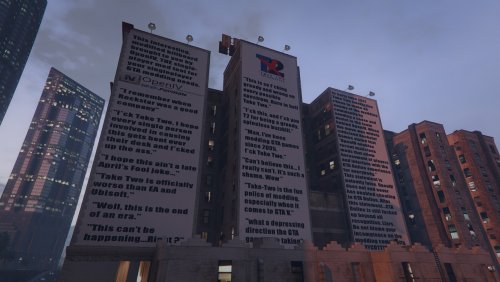 GAWD DAMNIT I WAS PLANNING ON MAKING THIS MYSELF. Fucking love it though! 5/5 from me.
 -
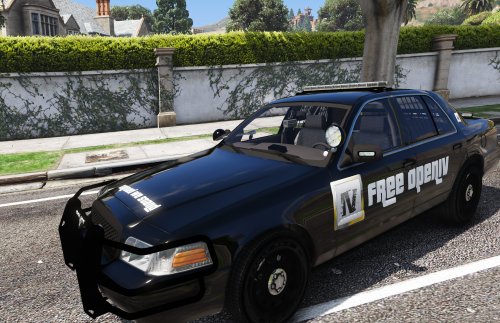 Awesome skin!! Would love a 16K resolution one. (just joking) but anyways you did an amazing job.
- 3 comments
- 5 reviews
-
-

- 1
-
-
-
-
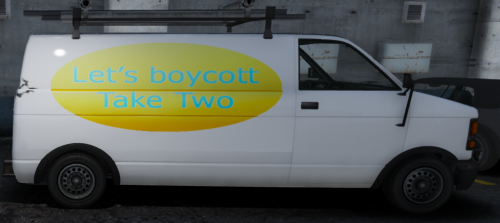 How many sharkcards do I need to buy so I can afford this? PM me if you want brotha I got some good ideas for a mod we can do together ;)
- 1 comment
- 5 reviews
-
-
- 1
-
-
@ThisIsntMyName Not sure if I should take that as a complement or not haha. I really appreciate you commenting though! ♥ Together we all stand as an army singing ♬FuUuUck TakeEeE TwoO♫ @Hullian111 The body template for this van is fucked, it's something I could have fixed but it looks dank flipped tbh. Hopefully you still find enjoyment in this mod ♥
- 16 comments
- 13 reviews
-
I know not many people will be interested in this but this is my own opinion about this, just putting it out there.
-
 @Alex_Ashfold Why is this so hard to install? Even the oiv package installer is fucked up. When I try to extract the files it says they are corrupt, and when I try the manual installation my game crashes every single time. I've literally been sitting here now for almost 5 hours straight trying every single thing but nothing ends up working. Can you please help me? I want to use this mod so bad right now, it looks so dope from the screenshots!
- 2,353 comments
- 239 reviews
-
-
- 1
-
-
Ok so I downloaded the auto installer but I can't drag and drop the ''EUP - LEO 7.5.oiv'' from the downloaded winrar file to my desktop. It said there was not enough storage on the C drive so i have removed over 15gb of games/programs and a bunch of other stuff however it still don't work. So i decided to try the manual version and I did excatly what the readme said and now my game crashes so I'm currently reinstalling gta 5, please help! (Btw now it says the 'EUP - LEO 7.5.oiv' is corrupted when I try drag and drop from winrar file to desktop) You can either PM me or help me out in the comments, any help is appreciated.
- 2,353 comments
- 239 reviews
-
 Fantastic, very good quality and it's a must have for anyone who likes to roleplay as not only police but a bunch of other services. 5/5 from me!
- 80 comments
- 28 reviews
-
This update is fucking fantastic! Love the new ''belt'' layout so to speak. 5/5 from me.
- 2,353 comments
- 239 reviews
-
@That1JdmReefer This is actually my first ever mod, i appreciate the positive support my guy! c:
- 16 comments
- 13 reviews


